2. Open the display and remove the hinge cover. See Hinge Cover.
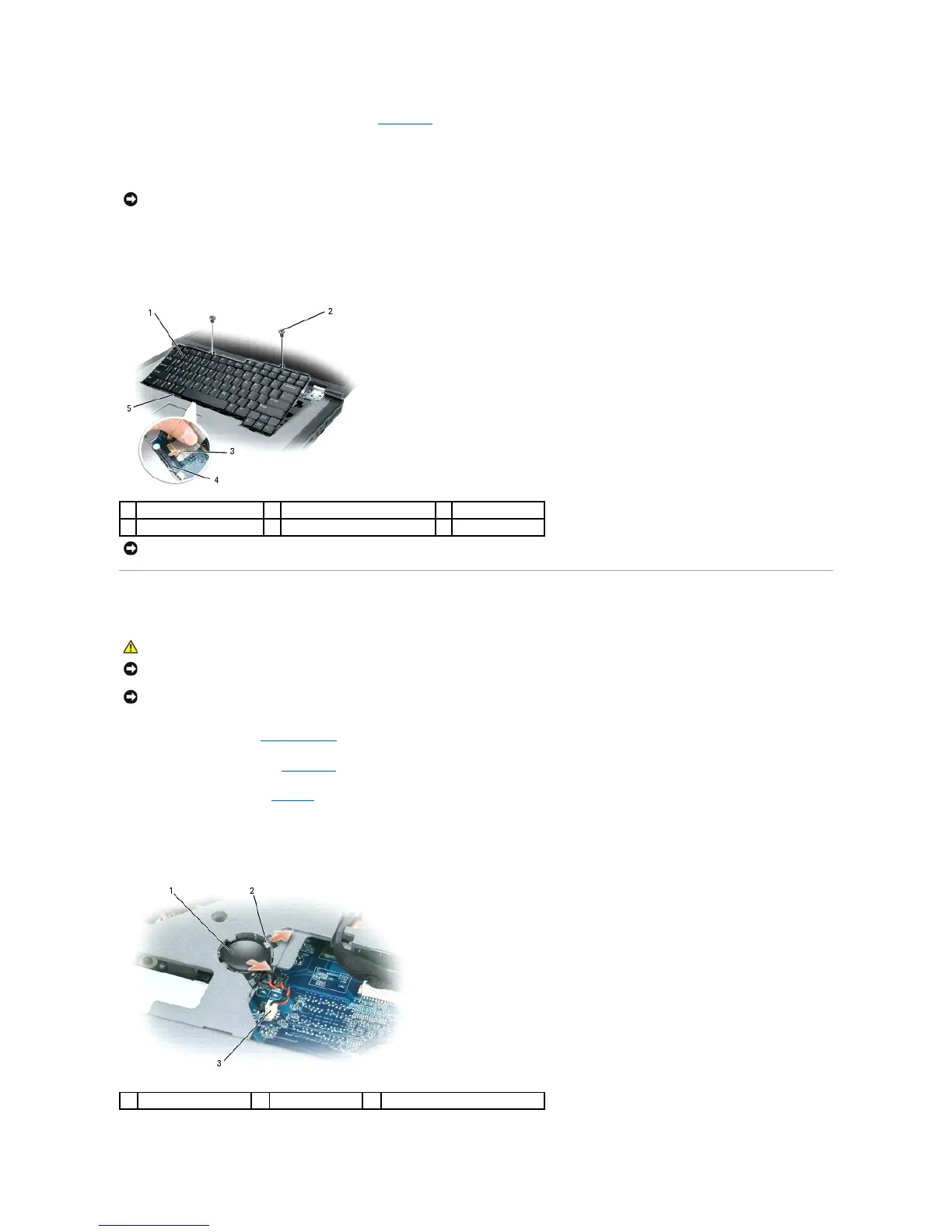
3. Remove the keyboard:
a. Remove the two screws at the top of the keyboard.
b. Lift the keyboard and hold it up and slightly forward to access to the keyboard connector.
c. To disconnect the keyboard cable from the keyboard connector on the system board, rotate the keyboard connector latch toward the front of the
computer.
d. Slide the keyboard cable out of the keyboard connector on the system board.
Coin-Cell Battery
1. Follow the procedures in Before You Begin.
2. Remove the hinge cover. See Hinge Cover.
3. Remove the keyboard. See Keyboard.
4. Remove the existing coin-cell battery:
a. Pull up on the connector to disconnect the battery cable from the system board.
b. Press the release latch on the side of the coin-cell battery compartment, and lift the battery.
NOTICE: The key caps on the keyboard are fragile, easily dislodged, and time-consuming to replace. Be careful when removing and handling the
keyboard.
NOTICE: To avoid scratching the palm rest when replacing the keyboard, hook the five tabs along the front edge of the keyboard into the palm rest,
and then secure the keyboard in place.
NOTICE: To avoid electrostatic discharge, ground yourself by using a wrist grounding strap or by periodically touching an unpainted metal surface (such
as a connector on the back of the computer).














 To Next Page