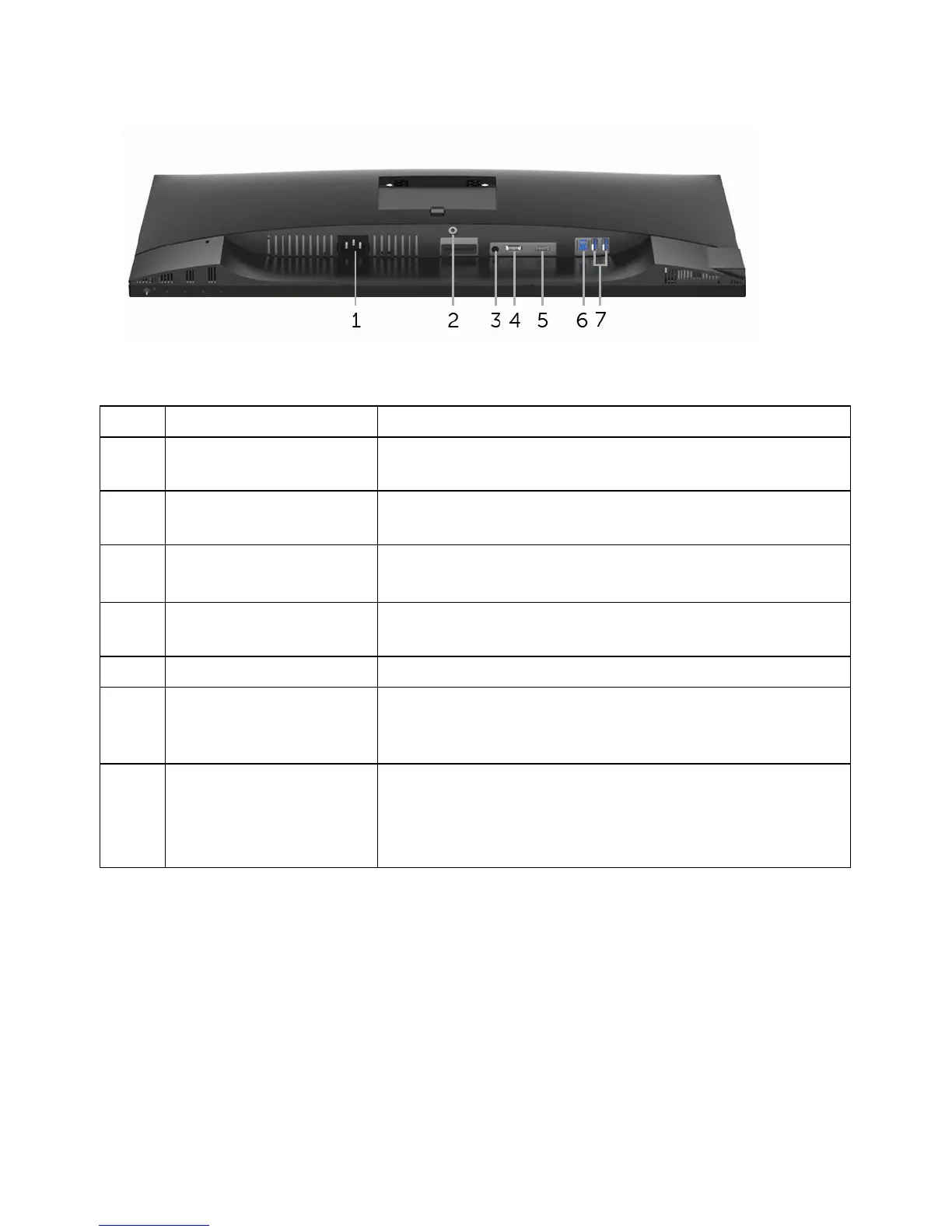
Bottom view without monitor stand
Description Use
1 Power cable
conn
ector
Connect the power cable (shipped with your
monitor).
2 Stand lock feature To lock the stand to the monitor using a M3 x 6 mm
s
crew (screw not included).
3 Line-out port Connect your speakers.
NOTE: This
port does not support headphones.
4 DisplayPort Connect your computer with DP cable (shipped with
your monitor).
5 HDMI port Connect your computer with HDMI cable.
6 USB upstream port Connect the USB cable (shipped with your monitor)
to
this port and your computer to enable the USB
ports on your monitor.
7 USB downstream port Connect USB device.
NOTE: T
o use this port, you must connect the USB
cable (shipped with your monitor) to the USB-
upstream port on the monitor and to your computer.
10 | About Your Monitor
Bottom View
Label



 To Next Page