Display
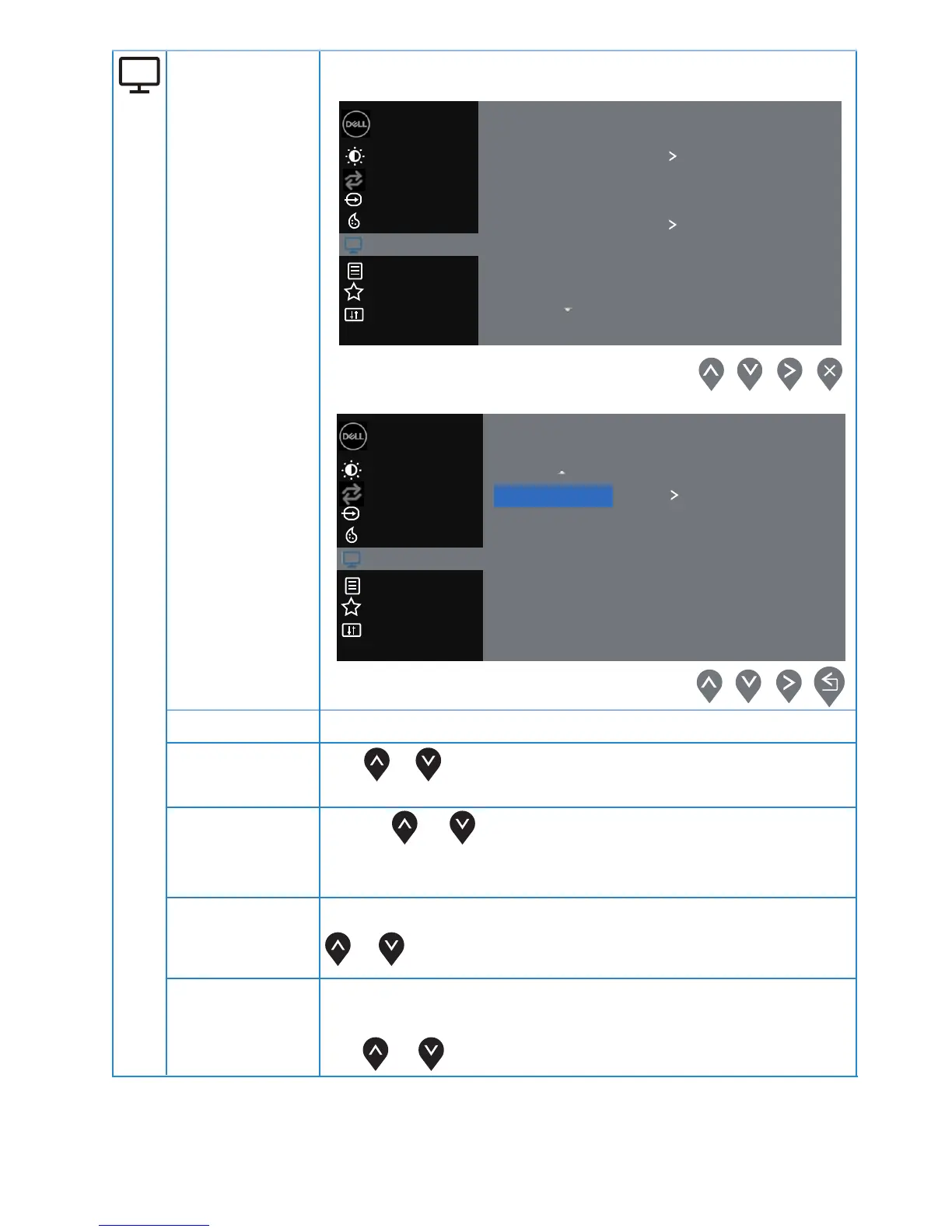
Use the display to adjust image.
Aspect Ratio
Adjust the image ratio to Wide 16:9, 4:3 or 5:4.
Horizontal
Position
(VGA input only)
Use or to move image left and right.
Minimum is '0' (-). Maximum is '100' (+).
Vertical
Position
(VGA input only)
Use the or to move image up and down.
Minimum is '0' (-). Maximum is '100' (+).
Sharpness
(VGA input only)
This feature can make the image look sharper or softer. Use
Pixel Clock
The Pixel Clock feature enables you to adjust
image quality on your monitor to your preference.
Use or buttons to adjust for best image quality.
or to adjust the sharpness from 0 to 100.
Brightness / Contrast
Dell 22 Monitor
Input Source
Color
Display
Others
Personalize
Menu
Aspect Ratio
Horizontal Position
Vertical Position
Wide 16:9
Sharpness
50
Auto Adjust
Pixel Clock
Phase
Dymanic Contrast
Brightness / Contrast
Dell 22 Monitor
Input Source
Color
Display
Others
Personalize
Menu
Reset Display
Normal
Auto Adjust
Response Time
30
|
Operating your monitor



 To Next Page