- 15 -
5.2 Assembly SOP
Preparation before assemble
1. Clean the room for work
2. Identify the area for material
3. Prepare the implement, equipment, material as bellow:
1) Working table
2) Philips-head screwdriver
3) Glove
4) Cleaning cloth
5) ESD protection
1
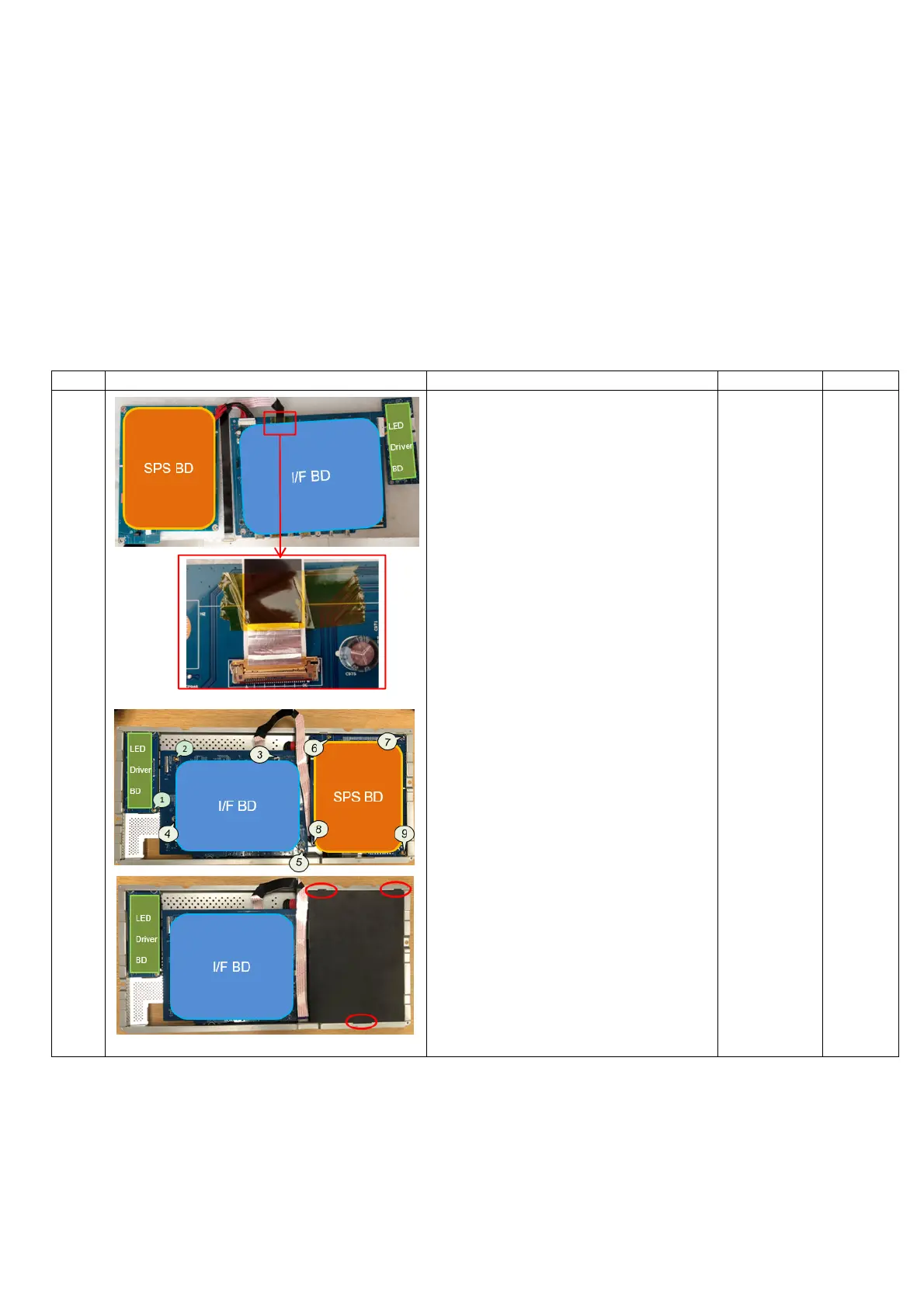
1. Insert SPS BD wire to SPS BD
2. Insert AC wire to SPS BD
3. Assemble SPS BD to Main SHD
4. Insert LVDS cable to I/F BD and
paste 1 yellow tape to fix it
5. Insert LED Driver BD wire to I/F
BD
6. Insert SPS BD wire to I/F BD
7. Assemble I/F BD to Main SHD
8. Insert LED Driver BD wire to LED
Driver BD
9. Assemble LED Driver BD to Main
SHD
10. Lock 9 PCBA screws to fix PCBA
on Main SHD
11. Assemble Mylar on SPS BD
Philips-
head
screwdriver
Torsion of
PCBA
screw:
8.5±0.5Kg
Torsion of
Grounding
screw:
6.5±0.5Kg


 To Next Page