About Your Monitor | 13
8
Audio line-out
port
Connect speakers to playback audio through HDMI or
DisplayPort audio channels. Only two-channel audio is
supported.
NOTE: The audio line-out port does not support
headphones.
11
USB-C
downstream port
Port with icon supports 5 V/ 3 A.
Connect your USB device. You can use this port only after
you have connected the USB cable (A to C or C to C) from
the computer to the monitor.
12 Stand lock Lock the stand to the monitor using a M3 x 8 mm screw
(screw not included).
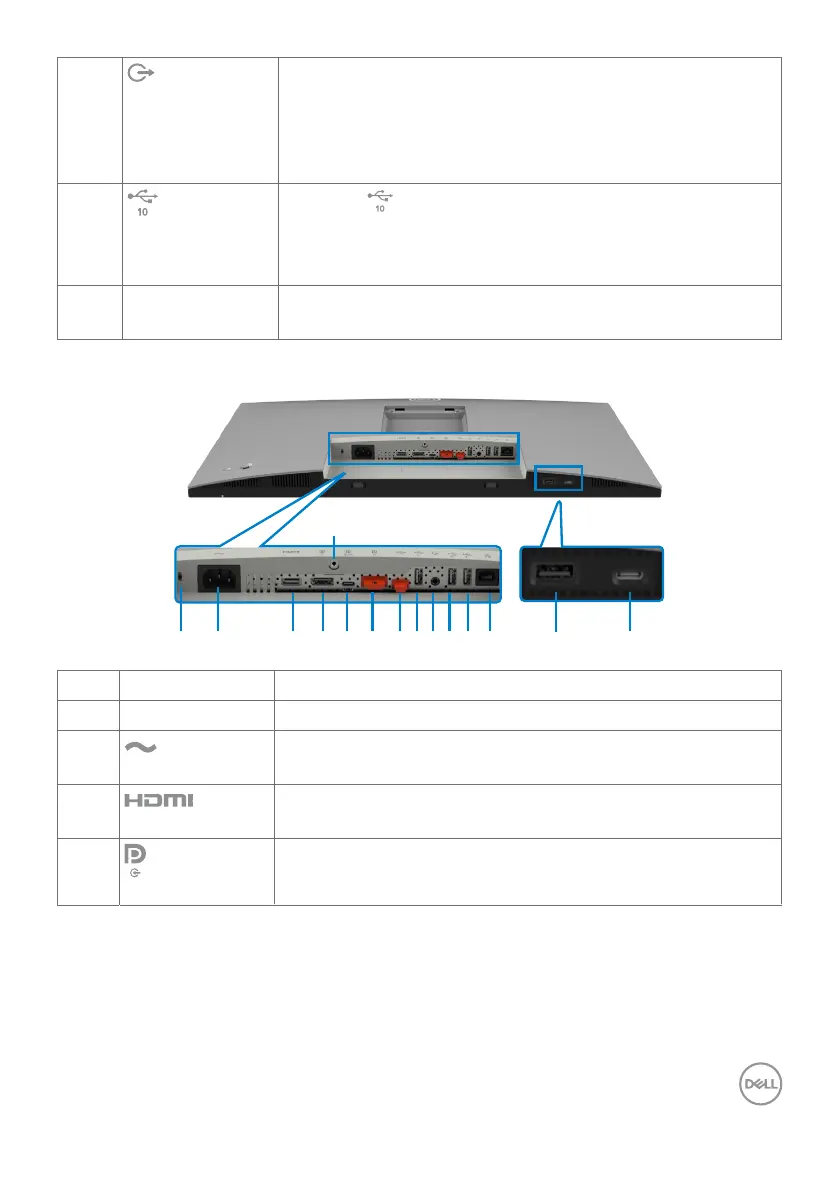
U2722DE
1 4 5 6 7 832 14910 1211 13
15
Label Description Use
1 Security lock slot Secures monitor with security cable lock (sold separately).
2
Power connector
Connect the power cable.
3
HDMI port
Connect your computer with the HDMI cable.
4
DisplayPort in
Connect your computer with the DisplayPort cable.












 To Next Page