Communicating With People Using Your Dell™ Venue Pro 41
To read e-mails
1 Touch the e-mail tile for example on the Start screen.
2 Touch the e-mail thread to read the content.
To quickly find an e-mail
Other than flicking the list of e-mails, touch search and type the
name of the sender in the text box, keyword of the e-mail subject, or
the content you are looking for. The screen displays the matching e-
mail and highlights the text that matches the text you have entered in
the text box.
4
Touch to select multiple e-mails to delete or move to another
folder.
5
Touch to select another e-mail folder and view the e-mails inside.
6
Touch to sync your e-mail account and download new e-mail to
your phone.
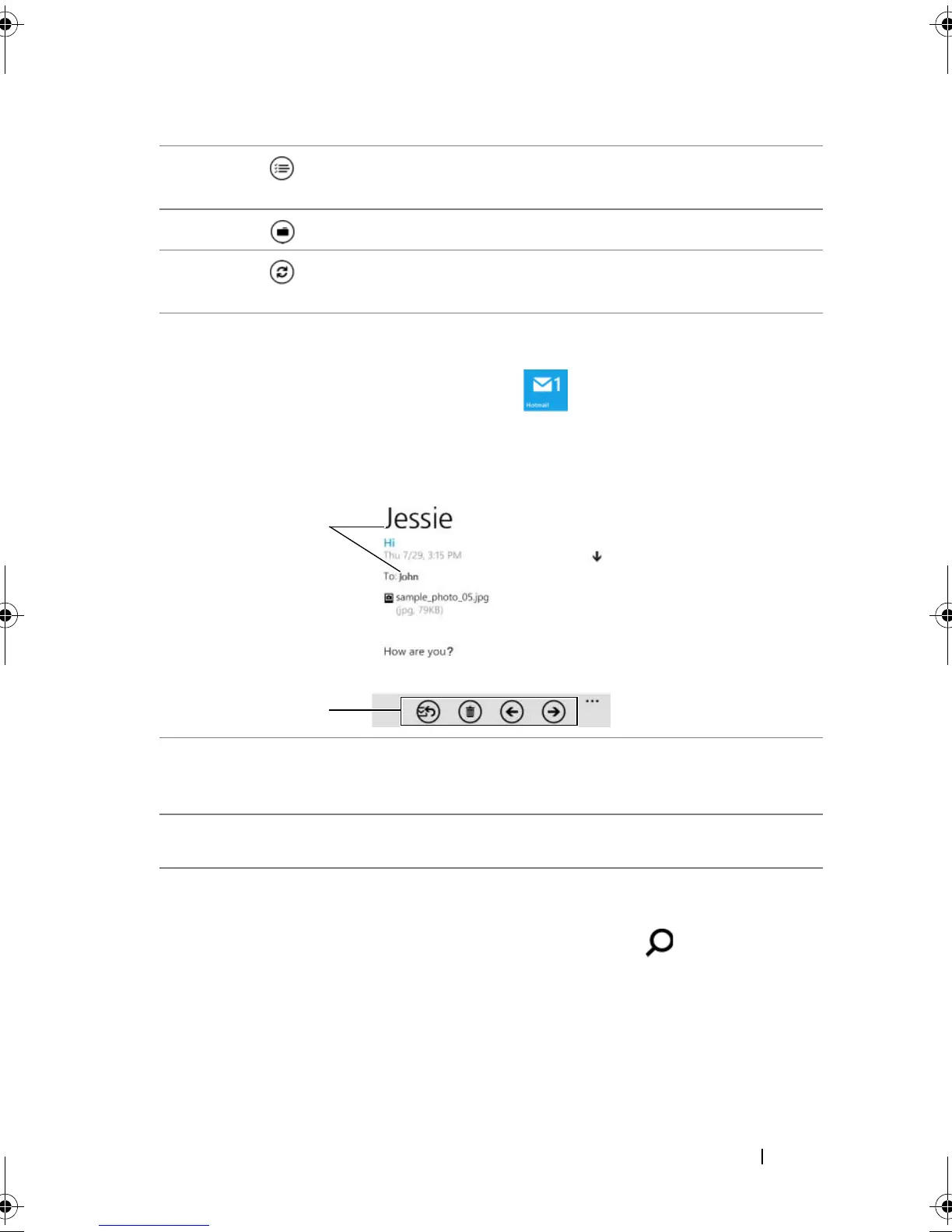
1 Touch the contact name to open the profile of the contact who has
been saved on your phone. You can touch send email and select an e-
mail account you want to use to e-mail the contact.
2 Touch the buttons from left to right to: Reply to or forward the e-mail;
delete the e-mail; read the newer e-mail; read the older e-mail.
bk0.book Page 41 Monday, November 8, 2010 4:26 PM


 To Next Page