Dell Venue Smartphone Features 41
FILE LOCATION: E:\Mobile\Toucan\UM\Generic\fm\Features.fm
DELL CONFIDENTIAL – PRELIMINARY 12/13/10 - FOR PROOF ONLY
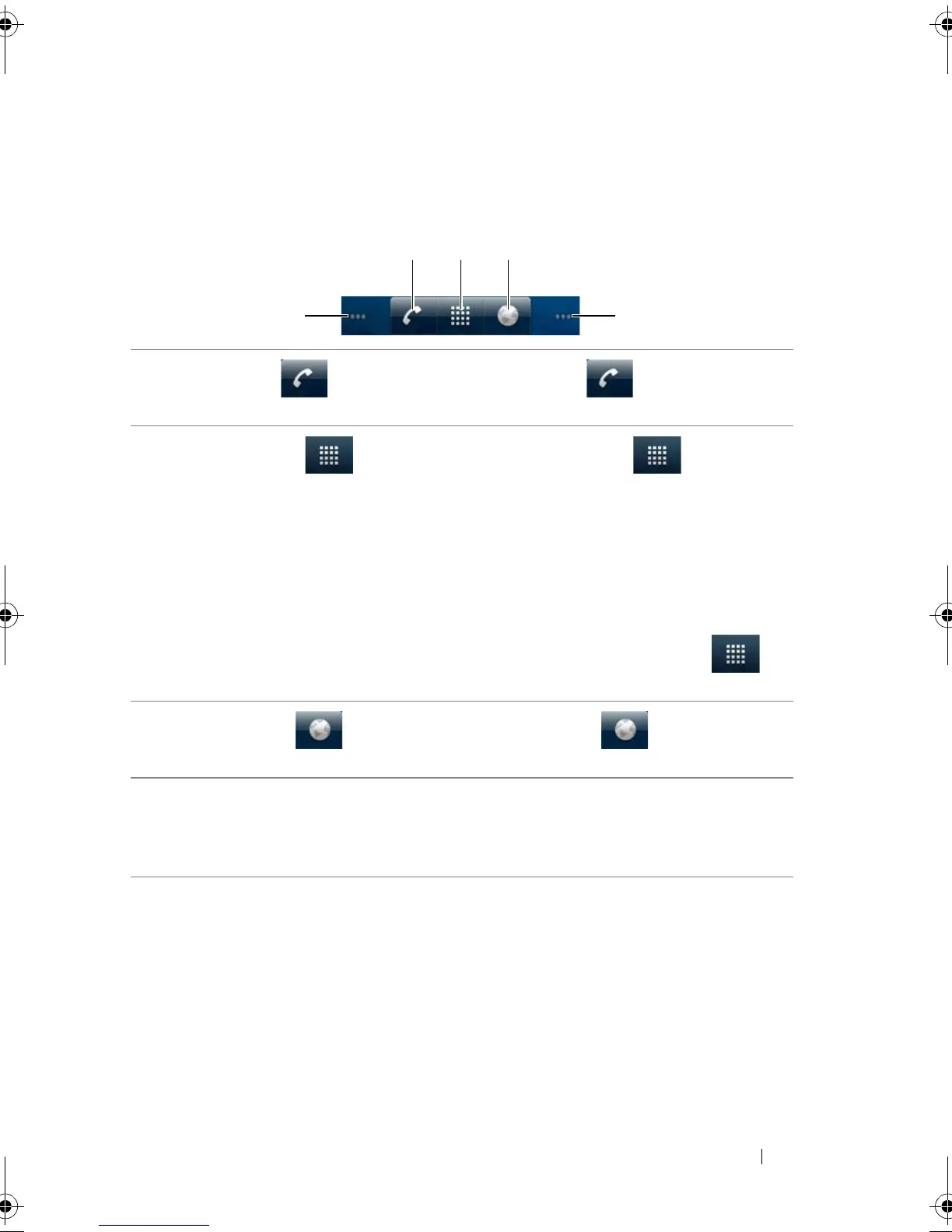
Quick Buttons
The quick buttons at the bottom of the Home screen allow you to
access the application menu and some main functions quickly.
1 Phone button Touch the Phone button to open the
Phone application to make calls.
2 Launcher button • Touch the Launcher button to display
the applications menu:
–The applications menu contains all of the
applications on your smartphone, including
those you have downloaded from the
Android Market.
–Touch an application to launch it.
• Touch and hold the Launcher button to
display thumbnails of the Home screens.
3 Browser button Touch the Browser button to open the
Browser application.
4 Dots The panoramic Home screen is made up of
seven individual screens. Small dots at the lower
left and right of the screen indicate which Home
screen you are viewing.
Thunder_UM.book Page 41 Monday, December 13, 2010 6:53 PM














 To Next Page