Diagnostic power LED codes
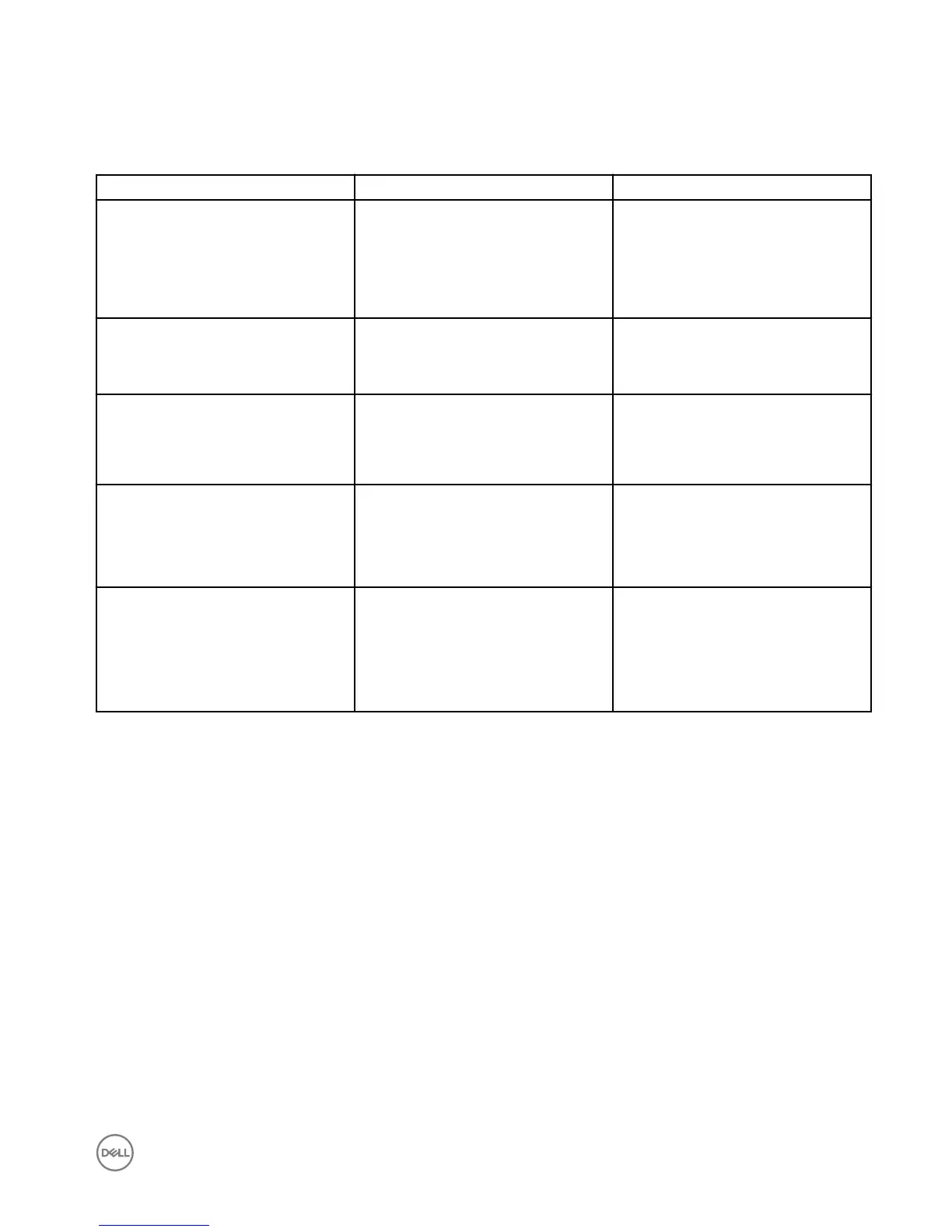
Table 18. Diagnostic power LED codes
Power LED light status Possible cause Troubleshooting steps
At rst power apply: No LED light up
briey
Both power LED and activity LED come
up briey and then turn o.
• Check AC power, call your utility
company.
• Check that AC power cord is plugged-
in.
• Check that DC plug is plugged into
the unit.
At rst power apply: Both LEDs stay ON Both power LED and activity LED come
up briey and then turn o.
• Logic board defect
• BIOS malfunctioning
• Abnormal power source
Push power button the LED does not turn
• Power LED should come up in steady
Blue.
• Activity LED should turn on in steady
Amber.
• Logic board defect
• Power button defect
• Mechanical assembly misaligned;
causes miss actuation.
LED comes up normally but no display BIOS screen is displayed after few
seconds.
• Incompatible monitor
• Defect logic board
• Malfunction dongle (if used)
• Defect cable or connector
Distorted display Should have normal viewable display.
• Incompatible monitor
• Incompatible dongle (if used)
• Not supported display mode
• Bad connection on display output
• Logic board defect
49


 To Next Page