Conguring the General settings
To congure the general network settings:
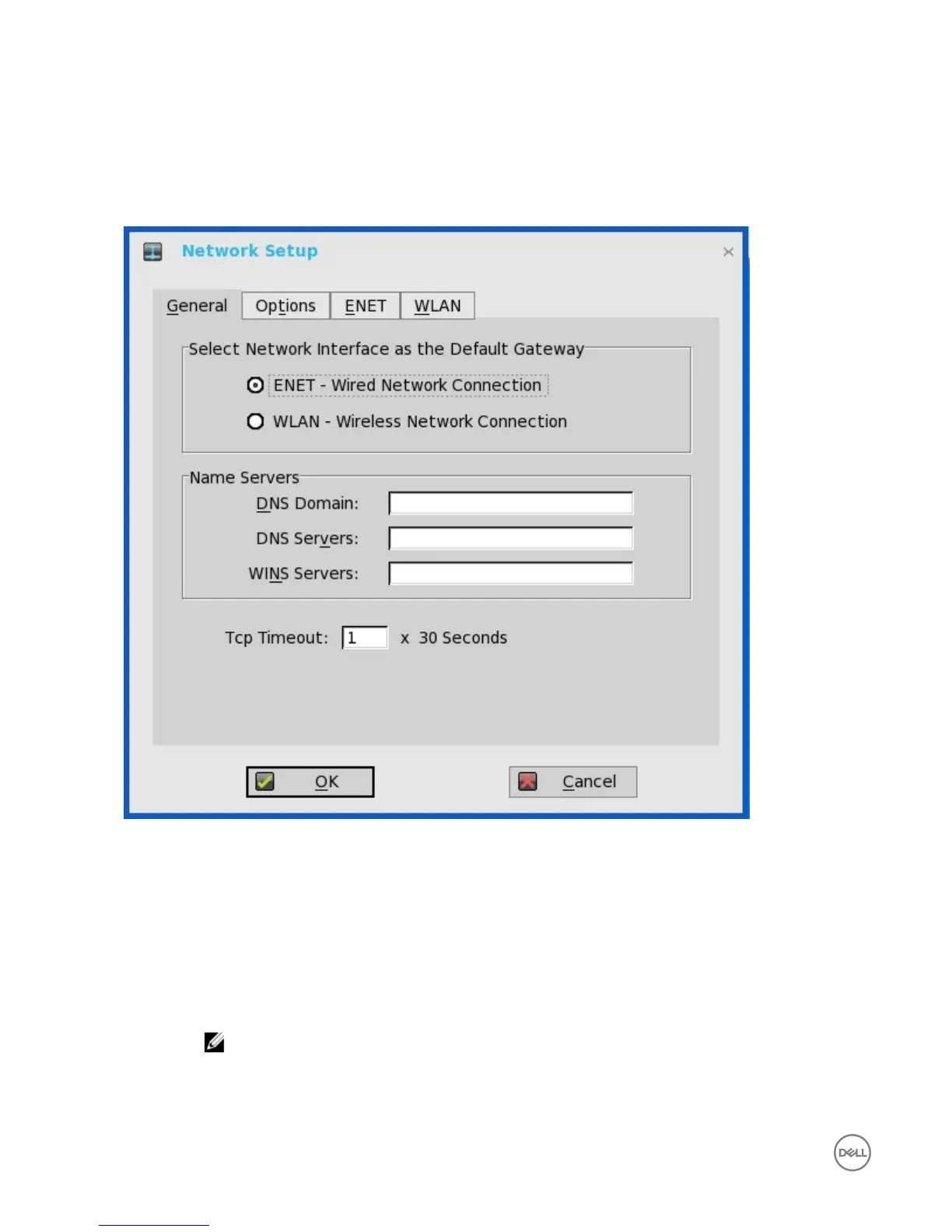
1. From the desktop menu, click System Setup, and then click Network Setup.
The Network Setup dialog box is displayed.
2. Click the General tab, and use the following guidelines:
a. To set the default gateway, select the type of network interface from the available options.
1. Single Network support — Either wireless or wired network is connected.
• ENET — Click this option, if you want set up the Ethernet Wired Network Connection.
• WLAN — Click this option, if you want to set up the Wireless Network Connection.
• If you use wireless network after selecting ENET connection or wired network after selecting WLAN connection,
then the system log "WLAN: set default gate way xxx.xxx.xxx.xxx" for rst case and "ENET: set default gate way
xxx.xxx.xxx.xxx" for second case are printed to ensure that the UI setting reects the actual usage.
NOTE: The User Interface (UI) will not be changed automatically.
2. Dual Network support — Both wireless and wired networks are connected. The default gateway is determined by the
UI settings.
b. Enter the URL address of the DNS domain in the DNS Domain box.
8


 To Next Page