13
Chapter 2 - Using the control and setting the modes
2.4 - BROILING FUNCTION
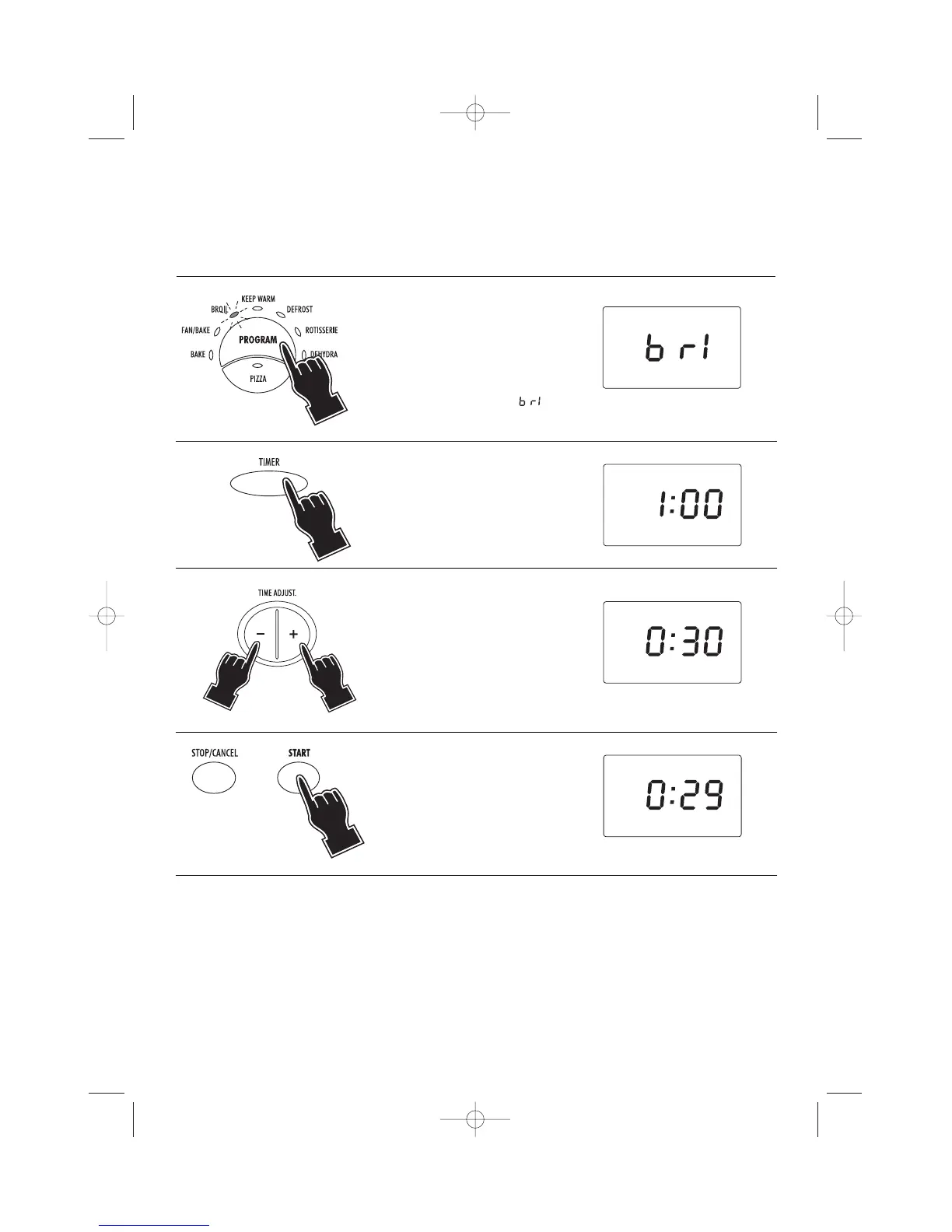
1 Select the BROILING function
by pressing the PROGRAM
button (7) until the BROIL
indicator light (4) will be illu-
minated. The display will
show the message .
2 Press the TIMER button (9).
The display will show
1:00.
4 Press the START button (17).
As you press START, time
selected is reduced of 1
minute.The oven will start the
countdown. At the end of the
set time the control will emit 4
beeps and the display will
return to stand-by (showing
the time of the day, if previ-
ously set).
• If the cooking time is not set, (skipping points 2 and 3) the display will show the countdown starting from
the default duration of
1:00 (1 hour).
• The set time can be modified during cooking by simply repeating points 2 and 3. The countdown will
automatically restart 3 seconds after the last setting.
• If the START button (17) is not pressed within 3 minutes from the previous setting, the control will return
to stand-by.
3 Set the time (max 2 hours) by
pressing the “-” (12) and “+”
(18) buttons. Keep the button
pressed for more than 2 sec-
onds to quickly scroll the time
up or down. For each press of
the button the time will
increase or decrease by one 1
minute.


 To Next Page