13
22 FAVORITE PROGRAM
The Favorite program allows you to create and store up to 5 of
your own programs.
To Create/Modify Own Program
1 Plug in and switch on.
2 Press the FAVORITE button to select the program you wish to
change from P1 to P5.
3 Press the PROGRAM button (s) to start modifying the pro-
gram.
4 Use the DELAY TIMER buttons (-) & (+) to change the time re-
quired for each stage.
5 Press the CONFIRM button to save the change and move to the
next stage of the program.
6 Repeat stage 3 to 5 until all stages have been programmed as
required. The program status indicator shows what stage of
the program you have reached.
7 When the CONFIRM button is pressed for the last time after
the keep warm stage a beep will sound and the program will
be automatically saved.
8 If you want to move back to the previous stage press the CAN-
CEL button to change the time.
To use the favorite program
1 Plug in and switch on.
2 Press the FAVORITE button to choose the required program P1
to P5.
3 Press the START/STOP button or select the delay timer func-
tion.
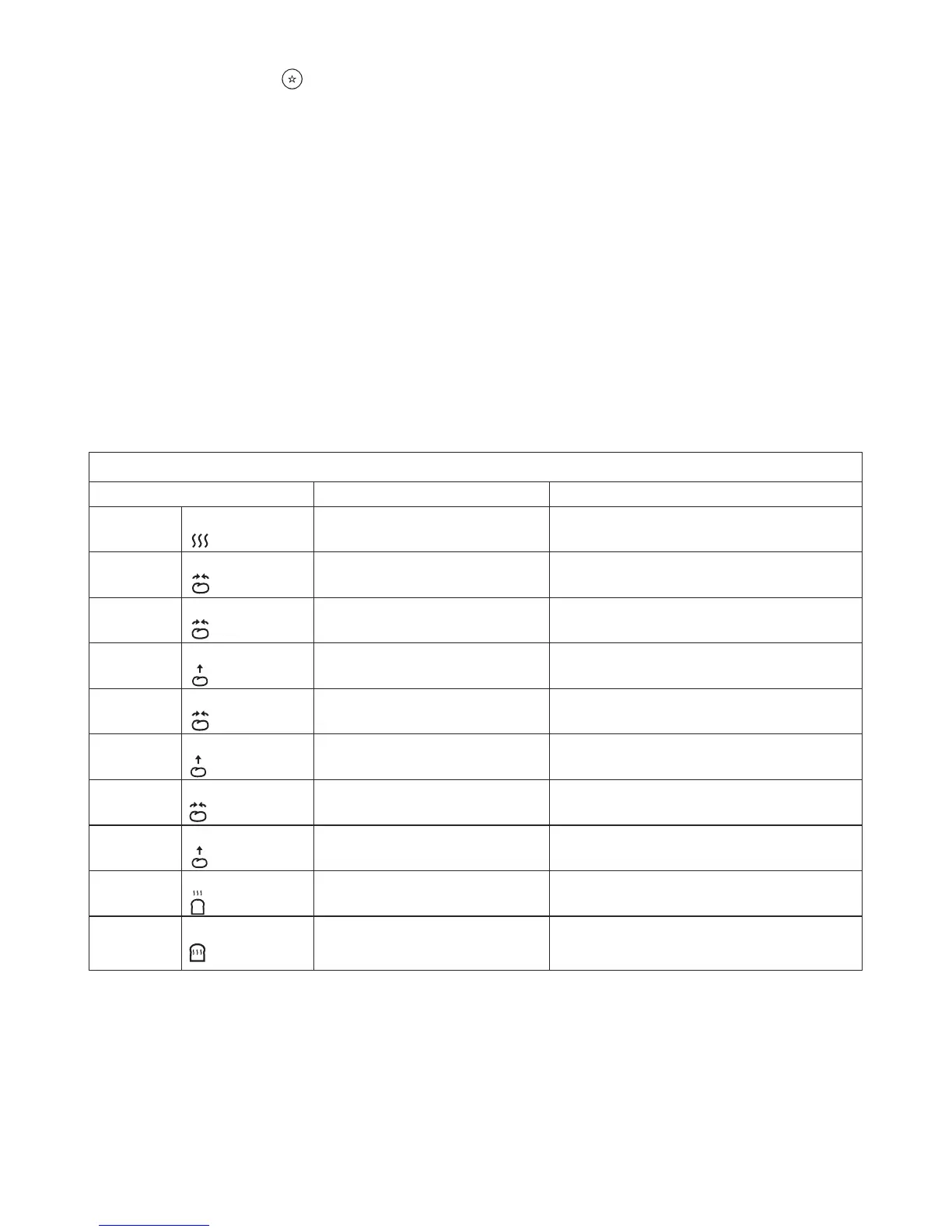
P1 – P5 Favorite Pad Program Stages
Stage Default Setting Min and Max Time Change Available
1 Pre-Heat
0mins 0 – 60mins
2 Knead 1
3mins 0 – 10mins
3 Knead 2
22mins 0 – 30mins
4 Rise 1
20mins 20 – 60mins
5 Knead 3 15secs Non changeable
Kneader will not operate if Rise 2 set to 0
6 Rise 2
30mins 0 – 2hrs
7 Knead 4 15secs Non changeable
Kneader will not operate if Rise 3 set to 0
8 Rise 3
50mins 0 – 2hrs
9 Baking
60mins 0 – 1hr 30mins
10 Keep Warm
60mins 0 – 60mins


 To Next Page