Instructions for use
programmingmenu,pressbutton again.
Setting the temperature
Tomodifythetemperature(low,medium,high)ofthewater
usedtomakethecoee,proceedasfollows:
1. Accesstheprogrammingmenu;
2. Keepbutton presseduntilthelightsrelativetothe
wantedtemperatureturn-on(seechartbelow).
3. Whenthelightsrelativetothewantedtemperatureturn-
on,releasethebutton.
4. Press toturntheapplianceo(stand-by).
Adjust Stand-by
Themachineispre-settoswitchtostand-byafter75minutes
of non-use.This time interval can be modied so that the
appliance switches o after 15 minutes or after 3 hours.
Proceedasfollows:
1. Accesstheprogrammingmenu;
2. Keepthe buttonpresseduntilthelightsrelativeto
thedesiredstand-byintervalturn-on(seechartbelow).
3. Whenthelightsrelativetothewantedstand-byinterval
turn-on,releasethebutton.
4. Press toturntheapplianceo(stand-by).
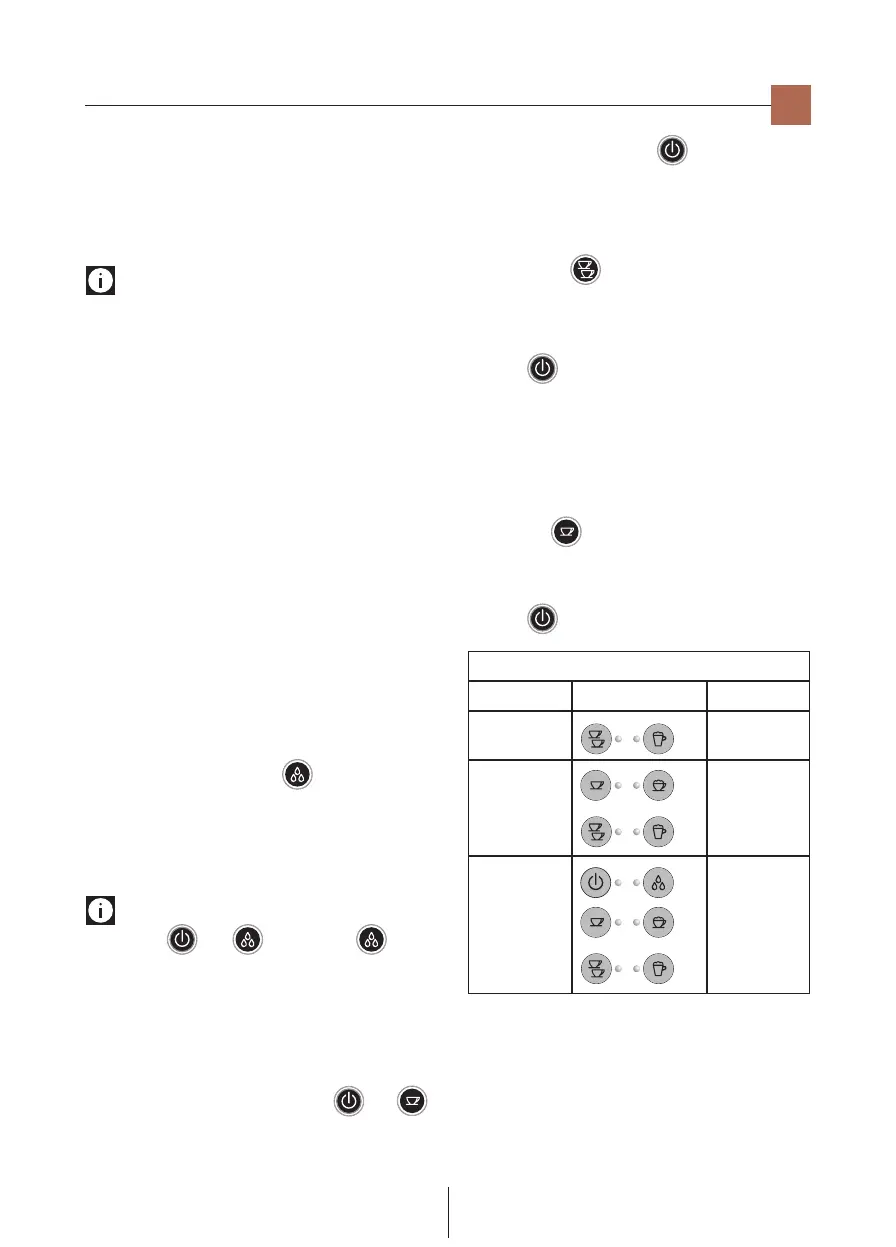
“Setting temperature” and “Adjust Stand-by” chart
Temperature Correspondinglights Stand-byafter
Low 15minutes
Medium
75minutes
High 3hours
Set the water hardness
Thelightssignalingtheneed to descaletheappliance,after
a pre-set period of operation depends on the hardness of the
water.Itispossibletoprogramthemachineaccordingtothe
actualwaterhardnessinuseinthearea,thusmakingdescaling
lessfrequent.Proceedasfollows:
1. Remove the provided reactive strip “TOTAL HARDNESS
TEST”fromitspackaging.
en
Activation of the water lter and lling of the water
tank
• Removethe lterfromthepackaging andrinse it with
about17OZ/0.5Lofrunningwater(g.2).
• Turn the calendar disc (seeg.3) until thefollowing2
monthsofusearedisplayed.
Please note
thelter has a twomonthdurationif the appliance isused
normally, whereas if the machine remains unused with the
lterinstalled,ithasamaximum3monthduration.
• Removethewatertankandllitwithfreshwater(donot
exceedtheMAXline)(g.4).
• Completelydipthelterinthewater,tiltingittoenable
airbubblestocomeout(g.5).
• Insertthelterintheappropriateseat(g.6),pressdown
andclosethetankwiththelid.
• Placethetankbackintothemachine(Ensurethewater
levelisnotovertheMAXline)(g.7).
Thelterisnowactivatedandthemachinecanbeused.
Appliance rst use
• Turn the appliance on bypressing the I/O main switch
A3 atrear in pos. I: the appliance performs a self-test,
signalledbythesequentialashingofthelights.
•
Oncetheself-testiscompleted,the“hotwaterspout”light
B8asheswhiletheothersturn-o:theappliancesignals
itisnecessarytoinsertthehotwaterspout(g.8).
• Placeacontainerunderneaththe spout withminimum
capacityof100ml(g.9).
• Pressthe“hotwater”button :deliverystartsand
interruptsautomatically.
• The coee and water spout lights ash to indicate the
applianceisreachingtemperature:whenthelightsstop
ashing and remain permanently on, the appliance is
readyforuse.
Please note: upon rst use
• Iflights and ash, press the button
again.
• Upon rst use, it is necessary to make 4-5 coees or
4-5 cappuccinos before the machine gives a satisfying
results.
Settings of the programming menu
To access the programming menu, ensure the appliance is
in stand-by, simultaneously press buttons and
until the ON/Stand-by (B2) lightashes: the appliance is in
programmingmode.Setthemachineaswanted;toexitthe


 To Next Page
 Loading...