10
1
4
2
5
3
6
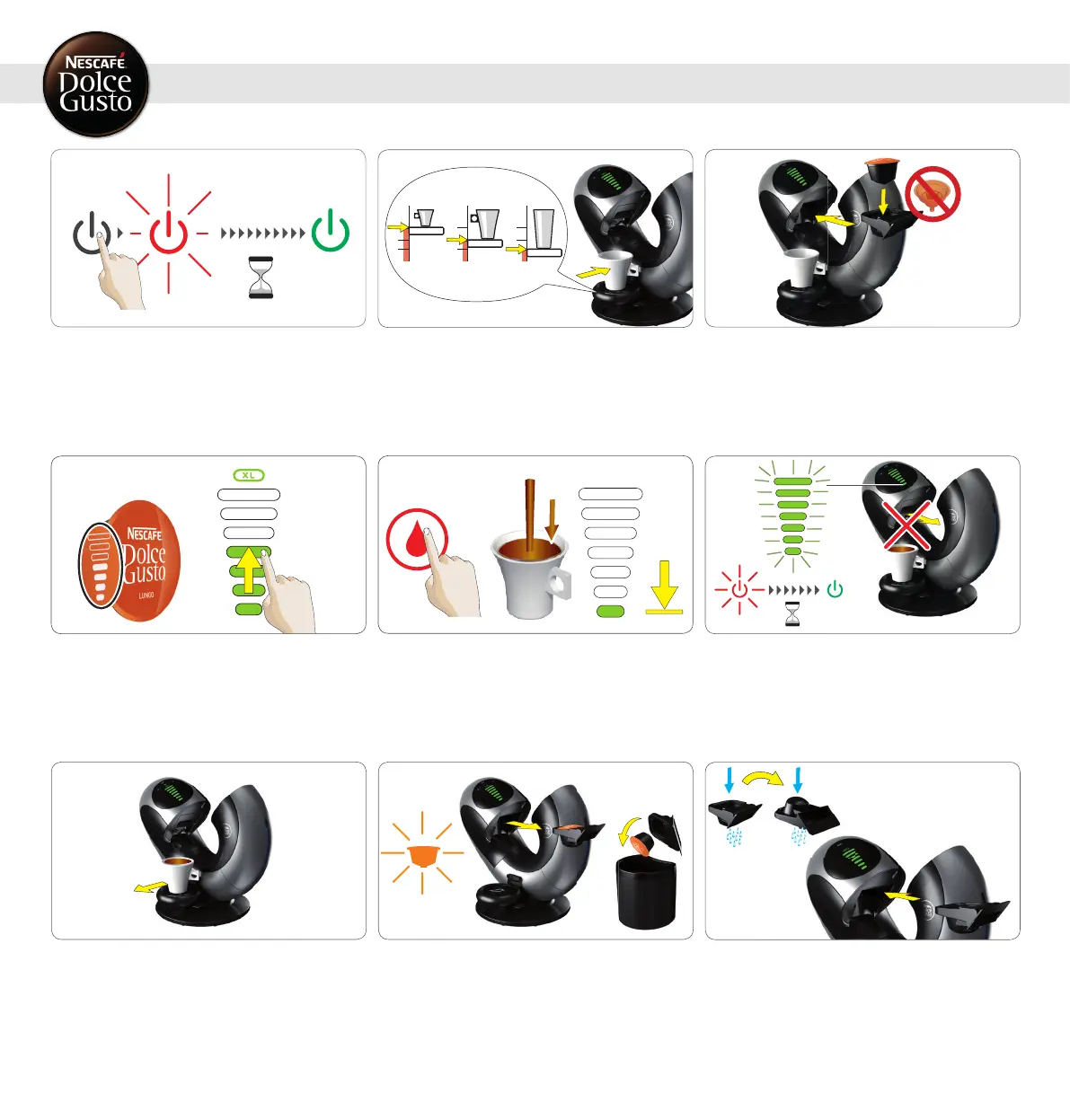
6.1 ONE CAPSULE (E.G. LUNGO)
6. PREPARING A BEVERAGE
Afternishingpreparation,bardisplayashes
and ON / OFF icon blinks red for about 5
seconds.
During that time do not try to pull out the
capsule holder!
Touch hot (or cold water icon–depending on
beverage). Beverage preparation starts. Stay
beside the machine throughout the prepara-
tion! Bar display lights vanish progressively.
Machine stops preparation automatically.
Check if water tank contains enough fresh
drinking water. Switch machine on. While
machine is heating up, ON / OFF icon starts
blinking red. After approx. 30 seconds, ON /
OFF icon lights steady green and machine is
ready.
Pull out capsule holder. Make sure rinsing tool
is not inside. Insert capsule in capsule holder
and insert capsule holder back into machine.
Use touch volume selector to illuminate the
bars in accordance with the number of bars
shown on capsule, or set bar display to your
own taste. Choose XL beverage for an extra
big cup. Wait around 1.5 min if you want to
prepare a second extra big cup.
Adjustdriptrayposition.Placecupwithcorrect
cupsizeondriptray.See“3.BEVERAGE
EXAMPLES“ on page 7 or package.
8 9
Used capsule icon blinks orange until capsule
is removed. Pull out capsule holder. Remove
used capsule. Put used capsule in capsule bin.
7
Afterbeveragepreparationisnishedremove
cup from drip tray.
Rinse capsule holder with fresh drinking water
frombothsides.Drycapsuleholder.Insertit
intomachine.Enjoyyourbeverage!




 To Next Page