1x
26
14
Seing the coee volume
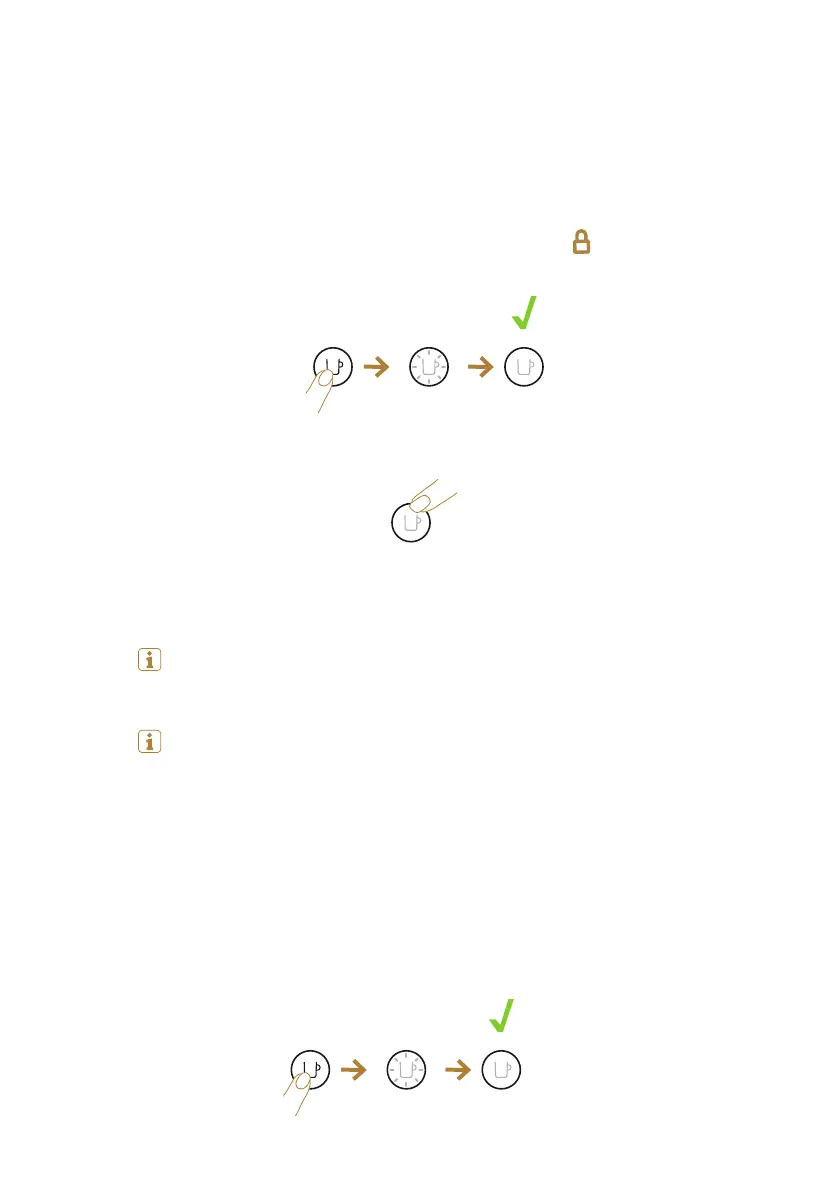
1. The programmation of the coee volume is specific to each capsule type:
Espresso, Double Espresso, Gran Lungo, Mug or Carafe.
2. Open the machine, insert the capsule you want to program; close the ma-
chine; turn the lever towards the lock position . Light will blink while
the machine is heating up. Steady light indicates the machine is ready.
3. Then press and hold the buon until desired volume is reached.
4. New coee volume is now stored for the capsule type used during the
seing.
Note: once a customer-specific volume is programmed by the user, every
time that capsule type is inserted in the machine, the preparation will
stop at the user-programmed cup size.
Note: if you wish to come back to the default parameters see the para-
graph “Reset to factory seings”.
15
Reset to factory seings
1. Plug the power cord.
2. Make sure that no accessory ( milk carafe or descaling pipe ) is connected
to the milk carafe connector door. Turn on your machine.
1x


 To Next Page