EasyManua.ls Logo

Delta DIGIVOX-2 - User Manual

Delta DIGIVOX-2
3 pages
Print Icon
To Next Page IconTo Next Page
Loading...
DIGIVOX-2 INTERFACE FOR DIGITAL BROADCASTING
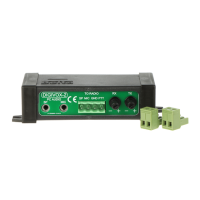
DIGIVOX-2 is a passive, power-independent system that connects a computer to a radio.
It is designed for digital modes that use the sound card as a modem.
Interface features:
allows you to connectany VHF/UHF or KF radio with a PC
works very well with handheld radios, e.g. Baofeng
provides full and complete galvanic separation between radio and computer (600V)
does not require external power supply
you don't need a serial or USB port. Connection to the computer is only through the audio I/O of the sound
card
works with most computer programs designed to broadcast digital Packet,PSK31, RTTY, SSTV, FAX, etc.
works very well with the Winlink Ekspress program (e-mail using radio waves), which allows you to send
messages in the absence of internet using a gateway (e.g. Poznan SR3WLK) or directly (peer -to-peer)
Schematic diagram:
When a sound signal of appropriate amplitude appears on the audio output of the sound card (SP),
the Q1 transistor is opened, causing the DIGIVOX-2 PTT output to short to ground.
Illustrative connection diagram:
Connection:
"PC AUDIO" slots:
"SP" – connect to the headphone/speaker output of the sound card
"MIC" - we connect to the microphone input of the sound card
Question and Answer IconNeed help?

Do you have a question about the Delta DIGIVOX-2 and is the answer not in the manual?

Summary

DIGIVOX-2 Interface for Digital Broadcasting

Interface Features

Lists connectivity, performance, and power requirements for the DIGIVOX-2 interface.

Schematic Diagram

Visual representation of the DIGIVOX-2 internal circuit connections.

Illustrative Connection Diagram

Shows a practical setup of DIGIVOX-2 with a computer and radio.

Connection Details

Explains the purpose of "PC AUDIO" and "TO RADIO" connection slots.

Recommendations and Safety

Audio Signal Level Recommendation

Advises setting computer speaker volume to 100% for optimal audio signal.

External Sound Card Recommendation

Suggests using external USB sound cards for better system performance.

Radio Manual Pre-Connection Check

Emphasizes reading the radio manual before connecting to avoid issues.

Custom Cable Requirement

Notes that specific cables are needed and must be self-made for the interface.

Baofeng UV-5 R Connection Guide

Directs users to the last page for specific Baofeng UV-5R connection instructions.

Technical Specifications Overview

Details key technical parameters like work mode, connectors, timings, and dimensions.

Waste Disposal Information

Informs about proper disposal of electronic waste according to WEEE Directive.

Baofeng UV-5 R Connection and Settings

Recommended Radio Settings

Lists optimal menu settings for the Baofeng UV-5R for digital transmissions.

Sample Connection Diagram

Illustrates how to connect the Baofeng UV-5R using the DIGIVOX-2 modem.

Summary

DIGIVOX-2 Interface for Digital Broadcasting

Interface Features

Lists connectivity, performance, and power requirements for the DIGIVOX-2 interface.

Schematic Diagram

Visual representation of the DIGIVOX-2 internal circuit connections.

Illustrative Connection Diagram

Shows a practical setup of DIGIVOX-2 with a computer and radio.

Connection Details

Explains the purpose of "PC AUDIO" and "TO RADIO" connection slots.

Recommendations and Safety

Audio Signal Level Recommendation

Advises setting computer speaker volume to 100% for optimal audio signal.

External Sound Card Recommendation

Suggests using external USB sound cards for better system performance.

Radio Manual Pre-Connection Check

Emphasizes reading the radio manual before connecting to avoid issues.

Custom Cable Requirement

Notes that specific cables are needed and must be self-made for the interface.

Baofeng UV-5 R Connection Guide

Directs users to the last page for specific Baofeng UV-5R connection instructions.

Technical Specifications Overview

Details key technical parameters like work mode, connectors, timings, and dimensions.

Waste Disposal Information

Informs about proper disposal of electronic waste according to WEEE Directive.

Baofeng UV-5 R Connection and Settings

Recommended Radio Settings

Lists optimal menu settings for the Baofeng UV-5R for digital transmissions.

Sample Connection Diagram

Illustrates how to connect the Baofeng UV-5R using the DIGIVOX-2 modem.

Delta DIGIVOX-2 Specifications

General IconGeneral
BrandDelta
ModelDIGIVOX-2
CategoryRecording Equipment
LanguageEnglish

Related product manuals