3
A N O R D I C B R A N D
ENG – User Manual
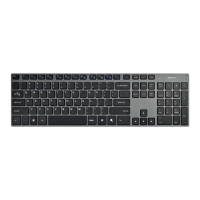
FN + F1 = Open media player
FN + F2 = Reduce volume
FN + F3 = Increase volume
FN + F4 = Turn sound on or off (mute)
FN + F5 = Previous song
FN + F6 = Next song
FN + F7 = Play / pause
FN + F8 = Stop
FN + F9 = Open browser
FN + F10 = Open email
FN + F11 = Open “this computer” window
FN + F12 = Open my favorites
LED status
Num lock LED is ashing = BT1 channel activated.
Caps lock LED is ashing = BT2 channel activated.
Battery symbol is ashing = indicates low battery.
Connect
You can connect to 2 devices, and switch between them.
Connect the keyboard via Bluetooth, from your device. Activate
pairing mode on the keyboard by pressing and holding Ctrl + 1 or
Ctrl + 2 for 5 seconds.
Switch between the connected devices by pressing (quick press)
Ctrl + 1 or Ctrl + 2.
Sleep modes
The keyboard enters sleep mode after 10 minutes of inactivity,
and after 30 minutes it enters a deeper sleep mode.
The operating current is less than or equal to 10 mA, sleep mode
is 25 µA.
Safety instructions
1. Keep the product away from water and other liquids.
Cleaning and maintenance
Clean the keyboard with a dry cloth. For difcult stains use a mild
detergent.
Support
More product information can be found at www.deltaco.eu.
Contact us by e-mail: help@deltaco.eu.
DAN – Brugervejledning
FN + F1 = Åben medieafspiller
FN + F2 = Reducer lydstyrken
FN + F3 = Forøg lydstyrken
FN + F4 = Slå lyd til eller fra (mute)
FN + F5 = Forrige sang
FN + F6 = Næste sang
FN + F7 = Afspil / pause
FN + F8 = Stop
FN + F9 = Åben browser
FN + F10 = Åben e-mail
FN + F11 = Åben vinduet ”denne computer”
FN + F12 = Åben mine favoritter
LED-status
Num lock LED blinker = BT1 kanal aktiveret.
Caps lock LED blinker = BT2-kanal aktiveret.
Batterisymbolet blinker = angiver lavt batteriniveau.
Forbindelse
Du kan oprette forbindelse til 2 enheder og skifte mellem dem.
Tilslut tastaturet via Bluetooth fra din enhed. Aktivér
parringstilstand på tastaturet ved at trykke og holde Ctrl + 1 eller
Ctrl + 2 nede i 5 sekunder.
Skift mellem de tilsluttede enheder ved at trykke på (hurtigt tryk)
Ctrl + 1 eller Ctrl + 2.
Dvaletilstand
Tastaturet går i dvaletilstand efter 10 minutters inaktivitet, og efter
30 minutter går det i en dybere dvaletilstand.
Deno perating strøm er mindre end eller lig med 10 mA,
dvaletilstand er 25 μA.
Sikkerheds instruktioner
1. Hold produktet væk fra vand og andre væsker.
Rengøring og vedligeholdelse
Rengør tastaturet med en tør klud. For vanskelige pletter brug et
mildt rengøringsmiddel.
Support
Mere produktinformation kan ndes på www.deltaco.eu.
Kontakt os via e-mail: help@deltaco.eu.


 To Next Page
 Loading...