Thank you for choosing DeLUX product, please read the manual carefully before using it.
DESIGNER is a compact single-handed keypad. Born for design workers & photographers.
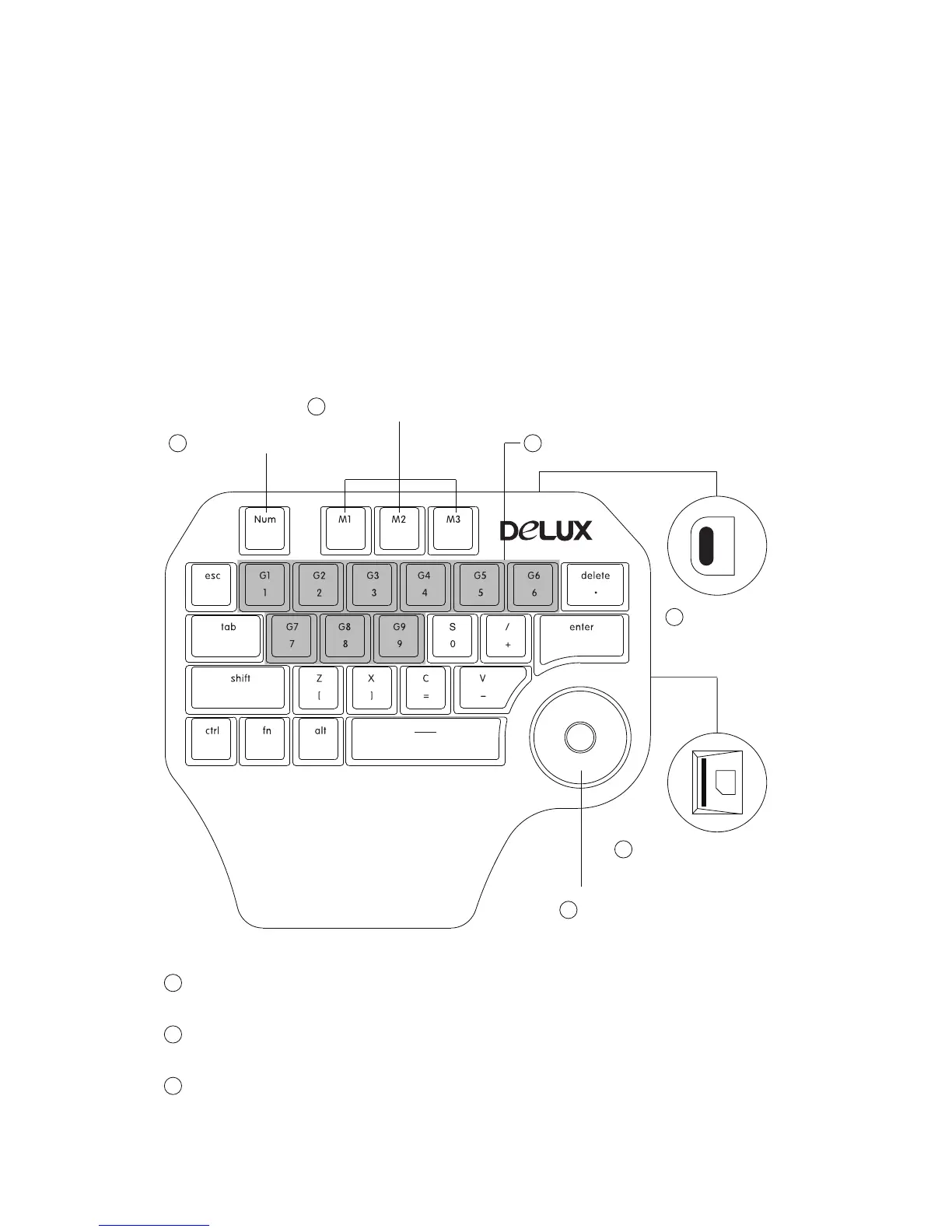
3 customizable shortcut key groups are available (M1, M2, M3), each group has 9 shortcut
keys (G1-G9). After setting, pressing one button can make things happen without having
to type the full instructions. Multi-functional knob has functions like turn up and down,
turn left and right, zoom in, zoom out, page up, page down, volume adjustment, brightness
adjustment, etc.
Number mode: Pressing Num to enter number mode, the backlight of Num will be on,
1-0 number buttons are available.
Shortcut key mode: Pressing M1 to enter M1 mode, the backlight of M1 will be on,
M1, M2, M3 mode can be switched freely.
G1-G9: Pressing one button can make things happen without having to type the full
instructions.
3 Shortcut key groups
Knob
Shortcut keys (G1-G9)Number mode
Introduction
1
1
2
2
3
3
4
6
Type-C
connector
5
Micro SD card slot
(Micro SD card is optional)


 To Next Page