Micro SD slot: Support data reading and storage in Micro SD card
Type-C: One cable with USB and Type-C connector on each end to connect
computer and DESIGNER.
Knob: Long press middle button of knob for 1 second to activate knob setting
operation interface.
Driver
Visit http://www.deluxworld.com to download the driver and set the functions
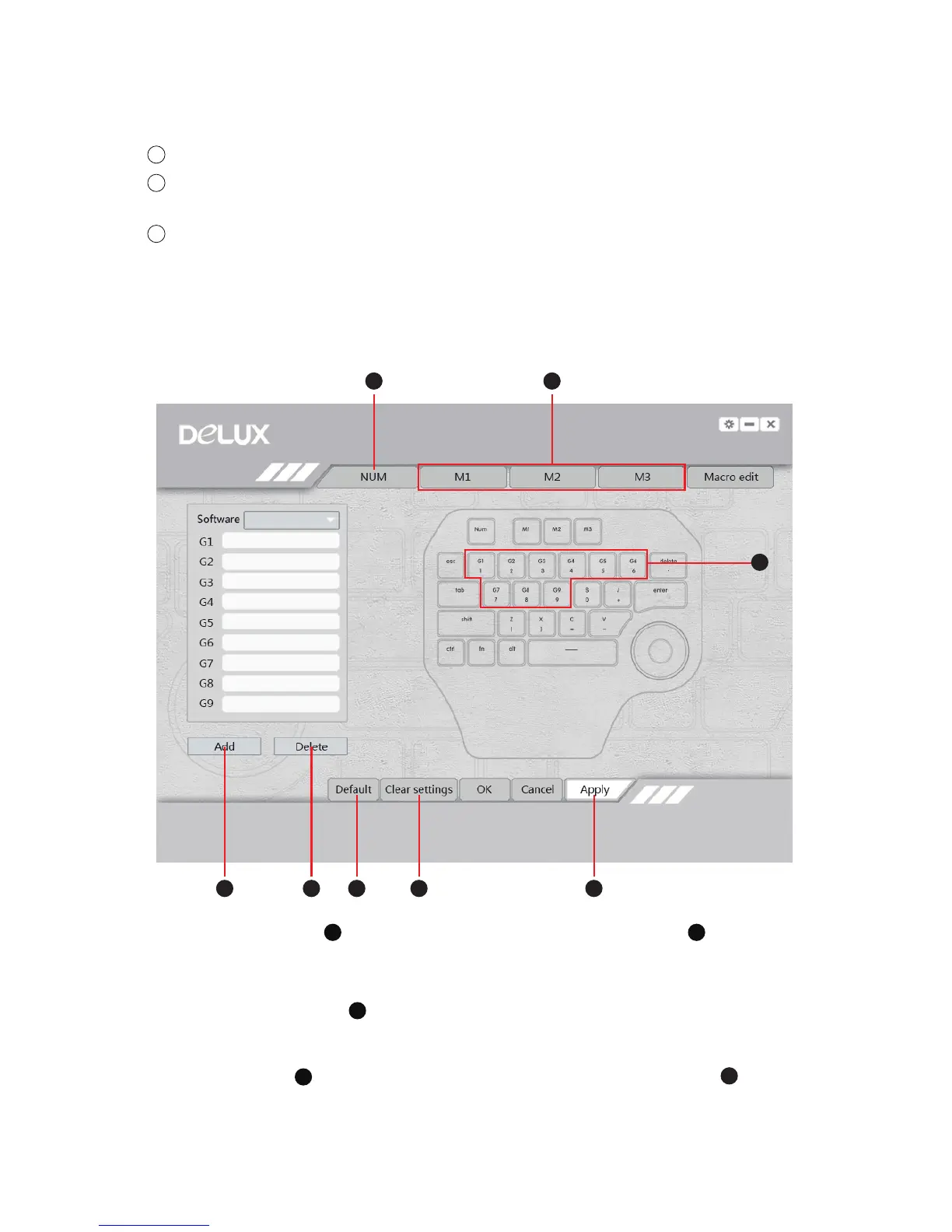
1. Under NUM mode , if there is no customized settings for G1-G9 , default
function please refer to the characters (numbers and symbol) in the second row.
Pressing G1/1 button, 1 comes out, press G2/2 button, 2 comes out, etc.
NUM, M1, M2, M3 mode can be switched freely.
2. There are preset shortcut keys for 13 design software in the driver. You can edit and
delete presetting , also can add new software settings by clicking “Add” .
6
5
4
A
D
D
F G H
E
E
B
B
A
C
C


 To Next Page