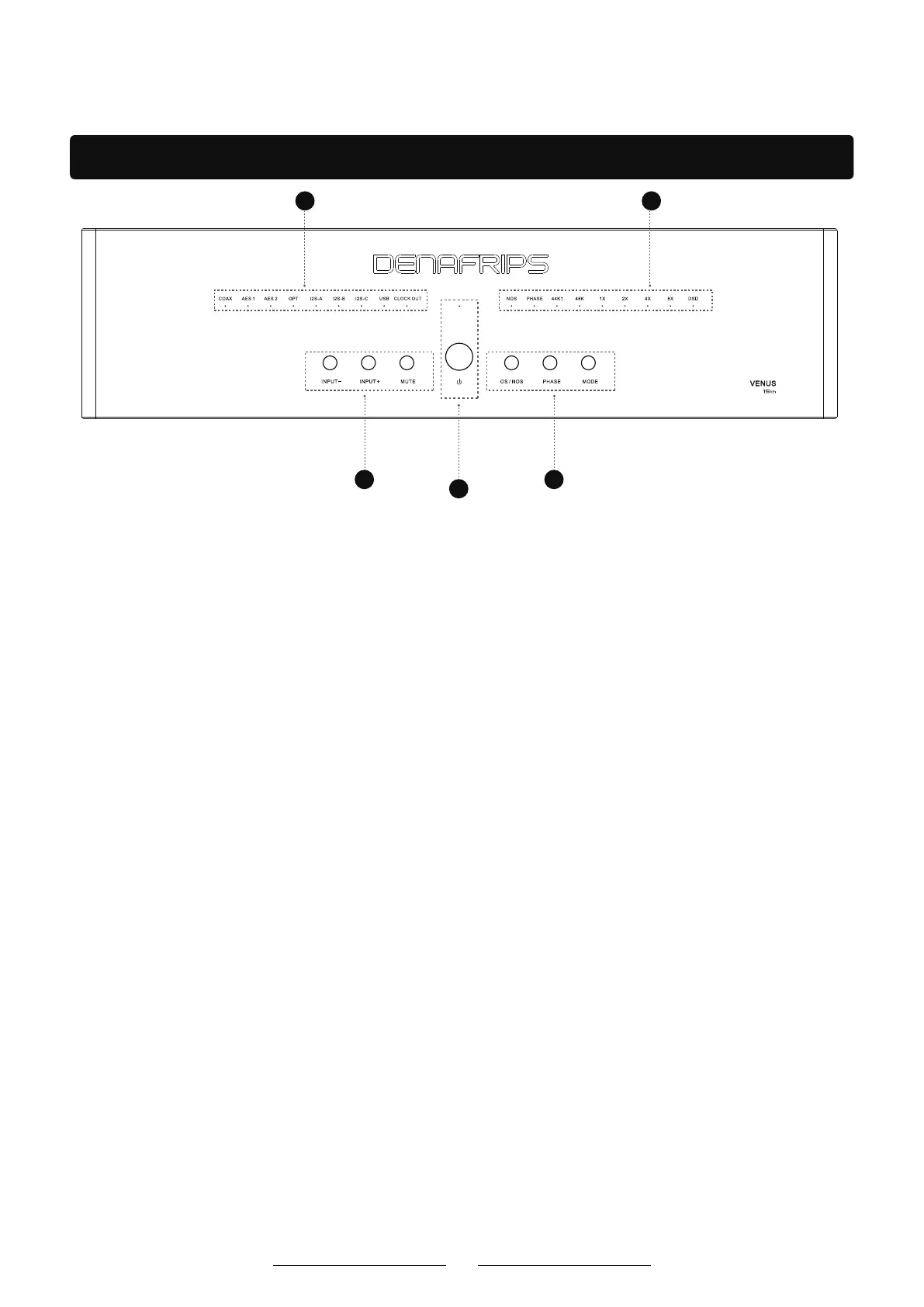
Function panel introduction
33
1
22
2. These LED lights on the DAC panel are used to indicate the current input source, sample rate,
frequency doubling, audio format, and other specific states.
①. Input source indicator: COAX, AES 1, AES 2, OPT, I2S-A, I2S-B, I2S-C, USB.
These LED lights represent different input ports. When an input source is selected and activethe corresponding LED lights up.
②. Sampling rate indicator: 44K1(44.1kHz sampling rate); 48K(48 kHz sampling rate).
These LED lights represent the current sampling rate of the incoming audio signal.
③. Frequency doubling indicator: 1X(original sampling rate); 2X(twice the sampling rate);
4X(4 times the sampling rate); 8X(8 times the sampling rate).
These LED lights represent the frequency multiplier (such as a multiple of the original sampling rate) of the current input audio
signal.
④. Audio Format indicator: DSD, indicating the format of the current input audio signal. DSD is a high resolution audio format
that offers much higherThe sound quality.
⑤. Other status indicators: CLOCK OUT(clock output); NOS(original bit rate); PHASE.
When CLOCK OUT is on, the DAC is output clock signals. These clock signals can be used to synchronize other audio devices
ensuringAll devices use the same clock source, which reduces jitter and other timing
issues and improves the overall performance of the audio system.
When the NOS light is on, it means that the DAC is in raw rate mode, and the DAC directly processes the input digital audio
signal without any oversampling Reason. This mode preserves the original characteristics of the audio signal and avoids
distortion or changes in audio characteristics that may be introduced during
the oversampling process.
When the NOS light is off, the DAC will process the input digital audio signal to improve the sampling rate
when the DAC is in the supersampling rate mode. Oversampling pass Overinterpolation algorithms add more data points
potentially improving audio quality and reducing distortion and noise.
PHASE: The phase is usually used to describe the offset degree of the waveform or the time relationship
between the waveforms. Reversing the phase can help solve some acoustic phases Locate problems or
other audio phenomena.
1.Power button and LED indicator
①. Power LED indicator, used to indicate the power status of the device.
Steady on: The device is working properly and powered on.
Blinking: The device is performing some activity (such as starting, updating, or processing data).
Off: The device is powered off or powered off.
②. Power button
The DAC can be turned on or off by pressing the power button.
4



 To Next Page