"TV"
~
CD
button
[I]
button
CD
button
1 DENON
- -
2 (VDP/TV)
HITACHI A HITACHI B
-
3 (PHONO) MITSUBISHI A MITSUBISHI B MITSUBISHI C
4 (TUNER) PANASONIC
-
-
5
(VCR-l) JVC (VICTOR)
- -
6 (VCR-2)
SONY
- -
7
PIONEER
-
-
8 (CD)
TOSHIBA
- -
9 (MULTI)
SANYO A
SANYO B
-
10 (V.AUX/GAME)
SHARP
- -
11/0
(OAT/TAPE)
NEC A
NEC B
NEC C
12/E
PHILIPS A PHILIPS B PHILIPS C
STEREO RCA A RCA B
-
MODE
GENERAL
GENERAL
-
ELECTRIC A ELECTRIC B
TONEIDIRECT MAGNAVOX A MAGNAVOX B MAGNAVOX C
NOTE:-------------------------.
Preset memory function will not work for some
models or some codes.
In such case, please use the learning function.
(Page 12)
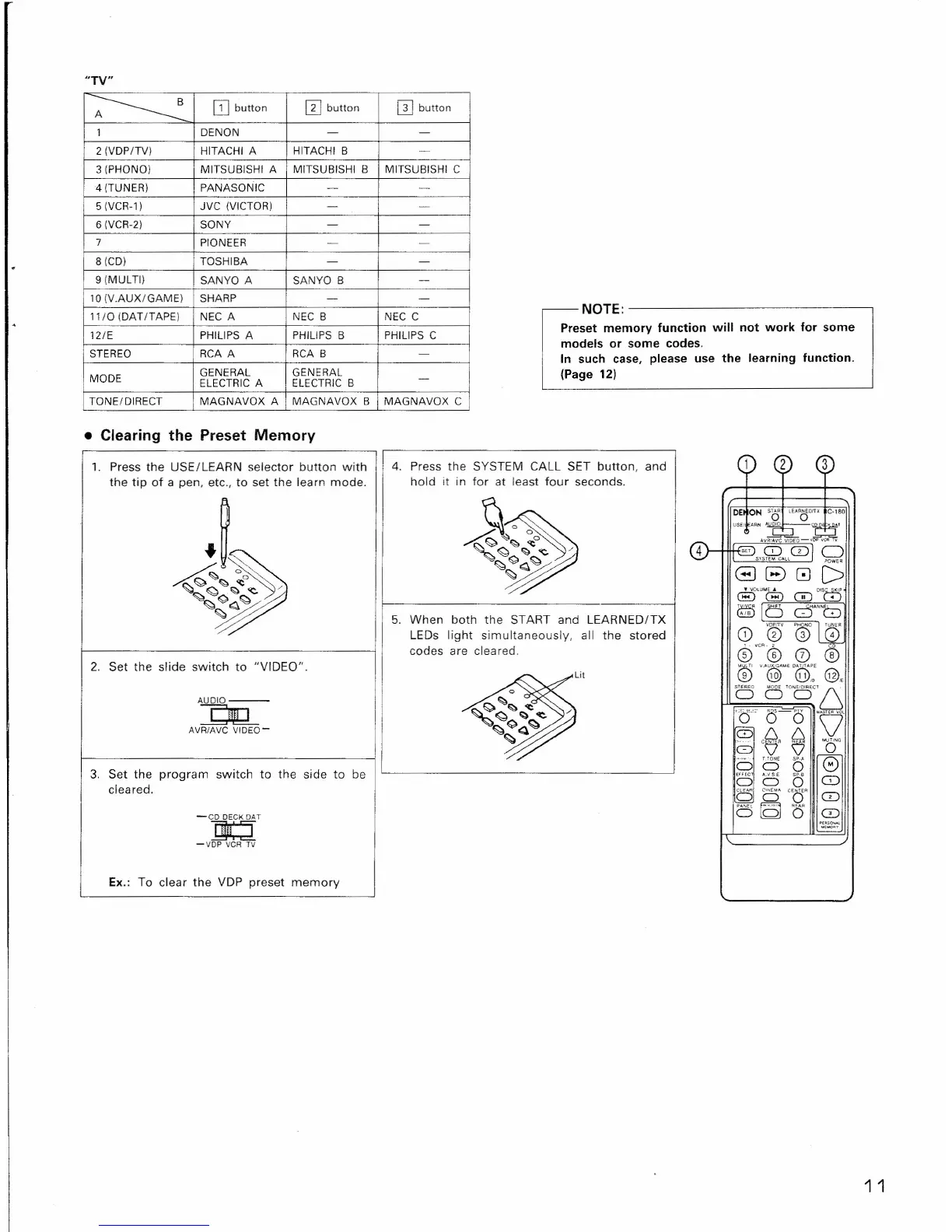
• Clearing the Preset Memory
-CD DECK OAT
~
-VDP VCR TV
1. Press the USE/LEARN selector button with
the tip of a pen, etc., to set the learn mode.
I
4. Press the SYSTEM CALL SET button, and
hold it in for at least four seconds.
5. When both the START and LEARNED/TX
LEDs light simultaneously, all the stored
codes are cIea red.
2. Set the slide switch to "VIDEO".
AUDIO---
~
AVR/AVC VIDEO-
3. Set the program switch to the side to be
cleared.
Ex.: To clear the VDP preset memory
1
2
3
DE ON
So
LE.AoOnX
C-I80
USE:
AAN
",,;;"10 "
~I
,,~~-,~~
4
SET
0
CD
g
~SYSTE~C""LL
G
8
0
D
• "OlU~E'"
GDDI~
G!)
G
(ftf)la
Cr""8
CY,e,CP'
@LC[
co
CD
®
(7)
®
®
".A@~EO@~oE
@.
?
a
W
cr'6
"cr'
0 0
'''''''0'
'8'@'
e
2
o
0
BooB
HHC
A.1I5.E
0
G)
C) C)
C5
0'
eer
CD
~
(Qj
0"
C)
CD
0'(_$000AL
u,_.
1 1


 To Next Page
 Loading...