EasyManua.ls Logo

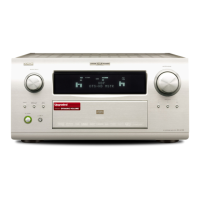
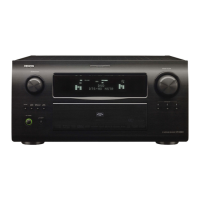
Denon AVR-5308CI - User Manual

Denon AVR-5308CI
241 pages
Print Icon
To Next Page IconTo Next Page
Loading...
Denon Brand Company, D&M Holdings lnc.
e
For purposes of improvement, specifications and
design are subject to change without notice.
Please use this service manual with referring to the
operating instructions without fail.
Some illustrations using in this service manual are
slightly different from the actual set.
注 意
サービスをおこなう前に、このサービスマニュアルを
必ずお読みください。本機は、火災、感電、けがなど
に対する安全性を確保するために、さまざまな配慮を
おこなっており、また法的には「電気用品安全法」に
もとづき、所定の許可を得て製造されております。
従ってサービスをおこなう際は、これらの安全性が維
持されるよう、このサービスマニュアルに記載されて
いる注意事項を必ずお守りください。
本機の仕様は性能改良のため、予告なく変更すること
があります。
補修用性能部品の保有期間は、製造打切後 8 年です。
修理の際は、必ず取扱説明書を参照の上、作業を行っ
てください。
本文中に使用しているイラストは、説明の都合上現物
と多少異なる場合があります。
X0365 V.04 DE/CDM 0805
SERVICE MANUAL
AV SURROUND RECEIVER
AV SURROUND AMPLIFIER
MODEL JP EU EC E2 EK E2A E1C EUT
AVR-5308CI
3
MODEL JP EU EC E2 EK E2A E1C EUT
AVC-A1HD
33
Ver. 4
Please refer to the
MODIFICATION NOTICE.

Table of Contents

Questions and Answers

  • V
    Vanessa LiAug 18, 2025
    Why does my Denon AVR-5308CI power off suddenly and the power indicator flashes red?
    • B
      Brandon PerryAug 18, 2025
      Your Denon Amplifier might be shutting down and flashing red due to a few reasons: the internal temperature is too high, speaker wires are shorting, the speaker impedance is incorrect, or the unit is damaged. To resolve this: * Turn off the power, let the unit cool completely, and then turn it back on. * Ensure the amplifier is in a well-ventilated area. * Check speaker wires for any contact or stray strands; fix by twisting the core wires tightly or terminating the speaker cables, then reconnect. * Verify you are using speakers with the correct impedance. * If the issue persists, the unit might be damaged; in that case, turn off the power.
  • P
    Paul WhiteAug 21, 2025
    Why is no sound coming from my Denon AVR-5308CI Amplifier subwoofer?
    • N
      Neil LeeAug 21, 2025
      If you're not getting any sound from your subwoofer, here are a few things to check: * Make sure the subwoofer is powered on. * Verify that the receiver recognizes the subwoofer by checking the speaker settings and ensuring the subwoofer is set to “Yes”. * Confirm that all connections are secure. * Adjust the subwoofer volume to a suitable level, ensuring it's not set too low or muted.
  • M
    Michael TurnerAug 23, 2025
    What to do if there is no sound from surround speakers on my Denon AVR-5308CI Amplifier?
    • K
      Kevin HinesAug 23, 2025
      If you are not getting any sound from your surround speakers, ensure that your Denon Amplifier is set to a surround playback mode instead of “STEREO”.
  • Z
    Zachary GomezAug 26, 2025
    How to fix no sound from center speaker on Denon Amplifier?
    • J
      Jordan DavisAug 26, 2025
      If you aren't hearing sound from the center speaker, the mode may be set to something other than “STANDARD” (Dolby/DTS Surround) or “HOME THX CINEMA” when playing a monaural source like TV or AM radio.
  • B
    Bradley StaffordAug 28, 2025
    How to fix no sound from front height speaker on Denon AVR-5308CI Amplifier?
    • J
      Jonathan CainAug 28, 2025
      If there's no sound from the front height speakers on your Denon Amplifier, check these settings: * In the “Amp Assign” settings, make sure the settings are configured to use front height speakers. * Ensure the front height speaker setting is not set to “None”. * Confirm that the “Extension Channel” setting is set to “Front Height”.
  • J
    Judy KnightAug 30, 2025
    How to fix no sound from front wide speaker on Denon AVR-5308CI?
    • M
      Margaret DominguezAug 30, 2025
      If you are not getting any sound from your front wide speakers, here are the settings you should check: * In the “Amp Assign” settings, set to use front wide speakers. * Set the front wide speakers to something other than “None”. * Set the “Extension Channel” setting to “Front Wide”.
  • M
    mdavidSep 2, 2025
    Why is no sound coming from surround back speaker on my Denon AVR-5308CI?
    • G
      Gene HardySep 2, 2025
      If there's no sound from the surround back speaker, check the following: * Ensure the surround back speaker setting is not set to “None”. * Select a surround playback mode that supports 6.1- or 7.1-channel playback. * If the surround back speaker’s power amplifier is assigned to a different channel, change the settings.
  • R
    rileynelsonSep 4, 2025
    Why is DTS sound not working on my Denon Amplifier?
    • E
      Erin BakerSep 5, 2025
      If DTS sound isn't working, here are a few potential solutions: * Ensure your DVD player’s audio output setting is set to bitstream. Refer to the DVD player’s operating instructions for details. * Confirm that you are using a DTS-compatible player. * Set the unit’s “Decode Mode” setting to “Auto” or “DTS” mode.
  • B
    Belinda MccannSep 7, 2025
    What to do if HDMI audio signals are not outputting from Denon AVR-5308CI Amplifier speakers?
    • G
      garnerleslieSep 7, 2025
      If HDMI audio signals aren't outputting from the speakers, check that the “Manual Setup” – “HDMI Setup” – “Audio” setting is set to “Amp”.
  • M
    Mariah McneilSep 9, 2025
    What to do if no test tones are produced when TEST button is pressed on Denon AVR-5308CI Amplifier?
    • C
      Charles MasonSep 9, 2025
      If no test tones are produced when you press the TEST button, set the surround mode to “STANDARD” (Dolby/DTS Surround) or “HOME THX CINEMA” mode.

Denon AVR-5308CI Specifications

General IconGeneral
Amplifier TypeAV Receiver
Channels7.1
Total Harmonic Distortion (THD)0.05%
Frequency Response10 Hz - 100 kHz
Input Impedance47 kΩ
Input Sensitivity200 mV
Signal-to-Noise Ratio100 dB
Dimensions (W x H x D)434 x 195 x 482 mm (17.1 x 7.7 x 19 inches)
InputsHDMI
OutputsHDMI
Audio Formats SupportedDolby TrueHD, DTS-HD Master Audio
Video Formats Supported1080p
Network ConnectivityEthernet
Power Output (8 ohms)140W per channel

Related product manuals