EasyManua.ls Logo

Denon DCD-3300 - Page 11

Denon DCD-3300
45 pages
Print Icon
To Next Page IconTo Next Page
To Previous Page IconTo Previous Page
Loading...
e@
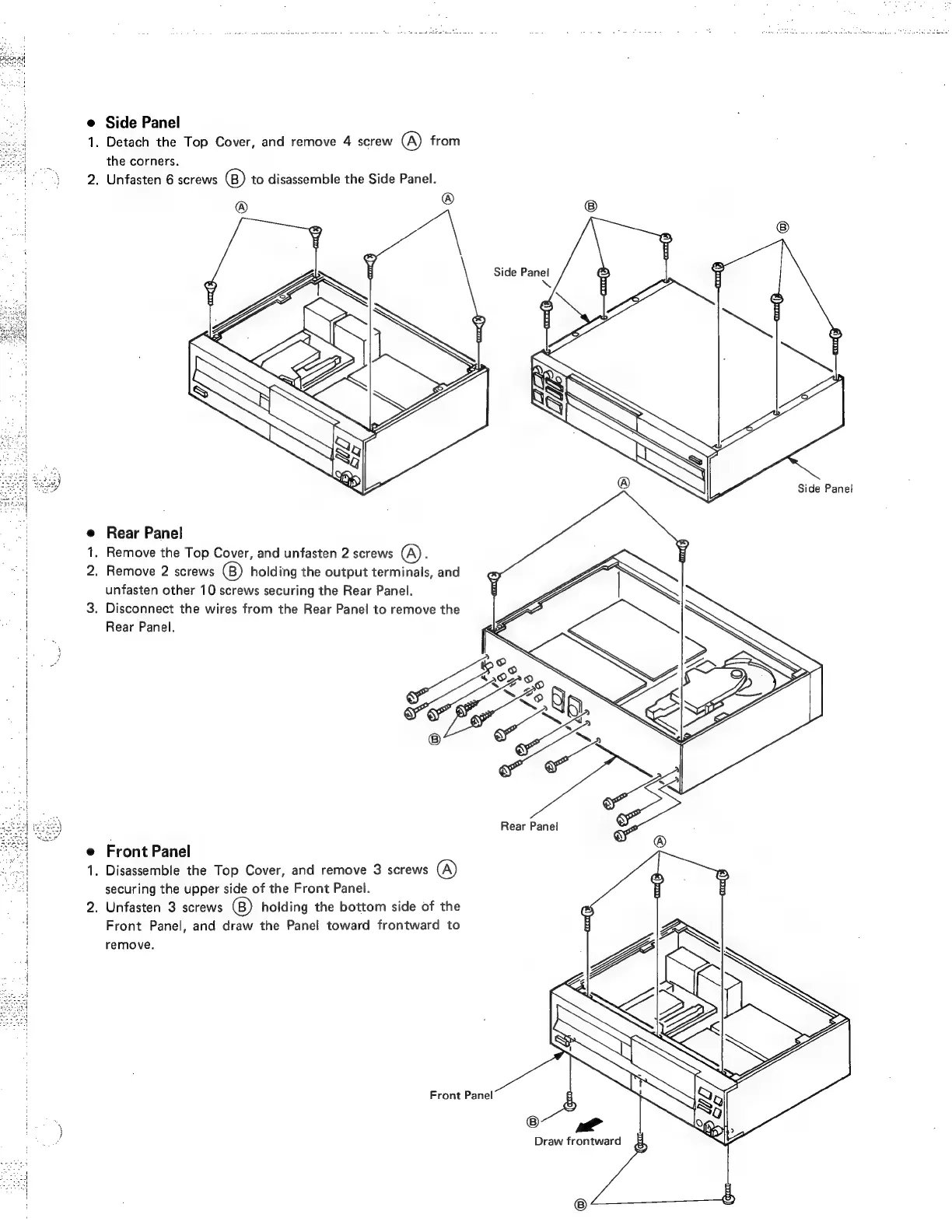
Side
Panel
1.
Detach
the
Top
Cover,
and
remove
4
screw
(A)
from
the
corners.
2.
Unfasten
6
screws
to
disassemble
the
Side
Panel.
®
Side
Panel
e
Rear
Panel
1.
Remove
the
Top
Cover,
and
unfasten
2
screws
(A).
a
2.
Remove
2
screws
holding
the
output
terminals,
and
|
unfasten
other
10
screws
securing
the
Rear
Panel.
3.
Disconnect
the
wires
from
the
Rear
Panel
to
remove
the
a
Rear
Panel.
<a>
Rear
Panel
e
Front
Panel
1.
Disassemble
the
Top
Cover,
and
remove
3
screws
@)
securing
the
upper
side
of
the
Front
Panel.
2.
Unfasten
3
screws
holding
the
bottom
side
of
the
o
Front
Panel,
and
draw
the
Panel
toward
frontward
to
remove.
Front
Panel
Draw
frontward

Related product manuals