DCD-F101
5
!
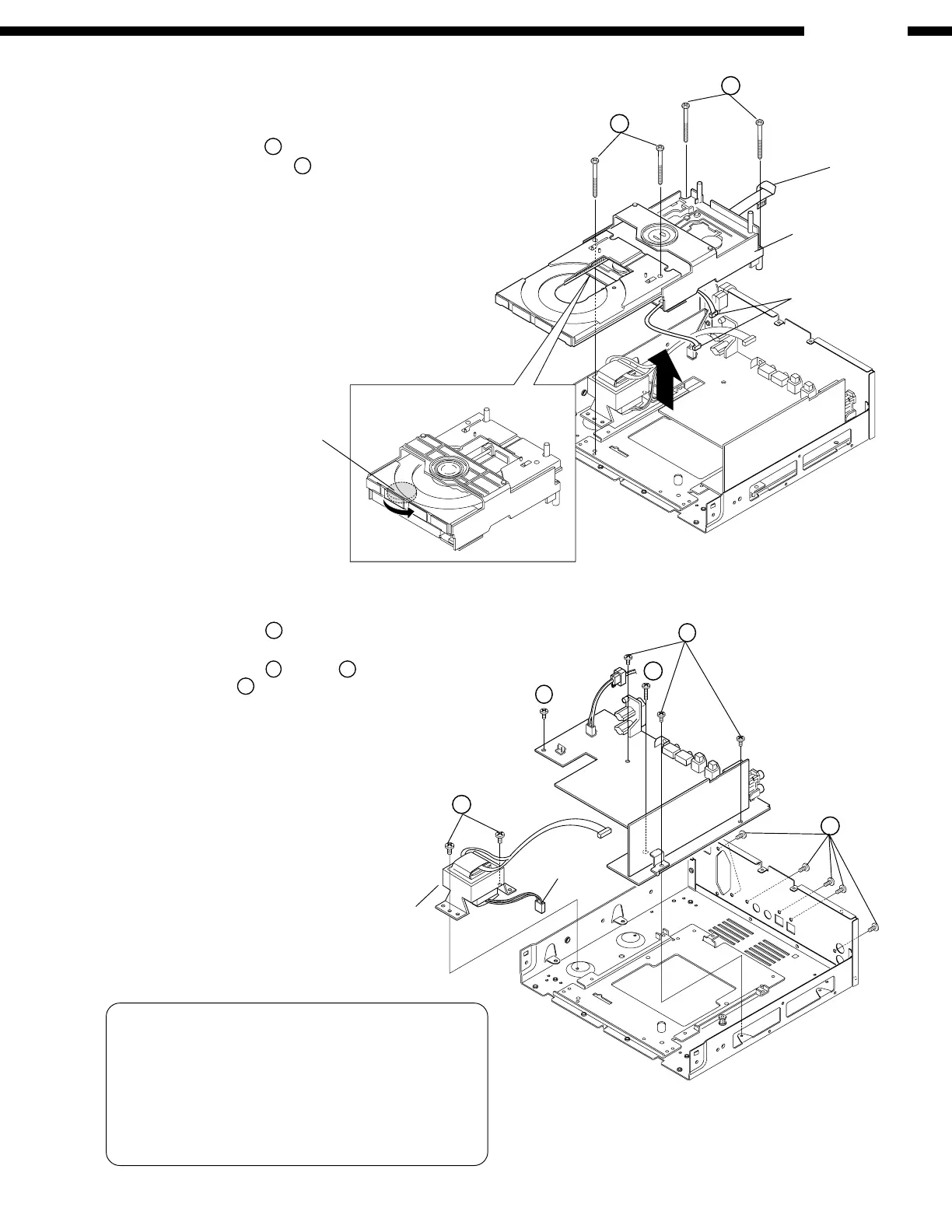
Power Trans
6. Main P.W.B. & Power Trans
1) Remove 2 screws
.
2) Disconnect 1 connector to take off the Power Trans.
3) Remove 4 screws
,1 screw
on the Main P.W.B.,
and 6 screws
!
on the Rear Panel.
4) Detach the Main P.W.B.
• Caution
When inserting the FFC coming out of the CD Mecha.
to the connector base, +B and GND may be short-
circuited if the wires are bent. Connect or disconnect
the wires as straight as possible by holding the FFC
with both hands when connecting or disconnecting the
FFC.
Connector
Connector
Gear
5. CD Mecha. Unit
1) Open the Tray completely by turning the gear under the
Mecha. Unit counterclockwise.
2) Remove 2 screws
8
on the Tray.
3) Remove 2 rear screws
9
fixing the CD Mecha.
4) Detach the CD Mecha. in the arrow direction.
5) Lift the CD Mecha., and disconnect FFC and connectors.
CD Mecha. Unit
8
9
FFC



 To Next Page