q
Information display
Various information is displayed here,
depending on the operation mode.
For a music CD:
•Total number of tracks
•Total playing time
•Track number
• Elapsed time, etc.
For MP3/WMA files:
•Total number of folders
• Number of tracks
• Folder number
• Elapsed time
•Track name
•Artist name
• Album name, etc.
w
Lights when a disc is playing.
e
Lights when the pause mode is set.
r
Lights when the total number of tracks and total
time are displayed at
q
.
t
Lights when in the random play mode.
y
Lights when in the repeat play mode.
The display switches as follows each time the
REPEAT button is pressed.
• In modes other than the folder mode:
•In the folder mode:
q
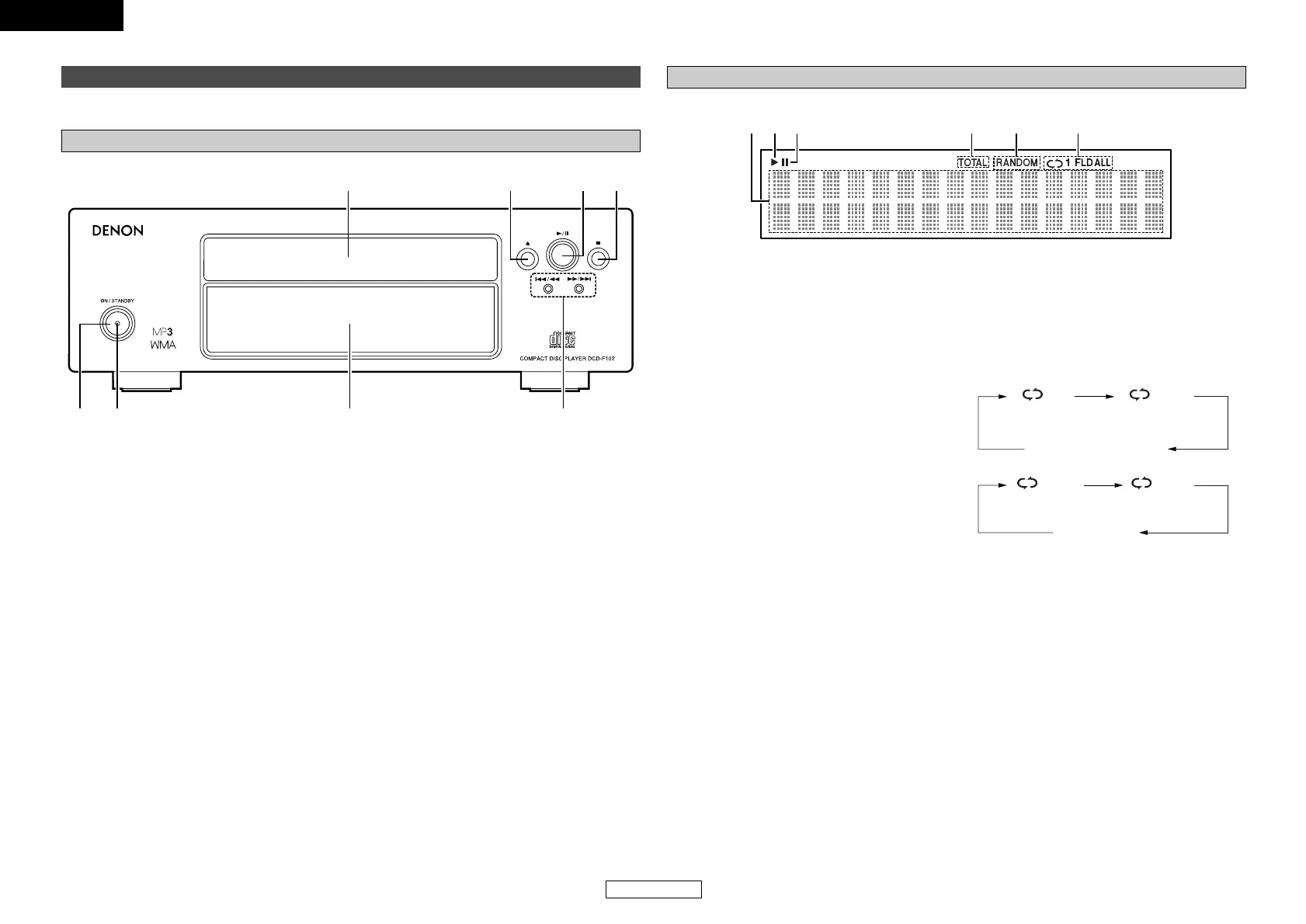
Power operation switch
(ON/STANDBY) ···········································(7)
w
Power indicator···········································(7)
e
Display··························································(4)
r
Skip buttons (8, 9) ·················(8, 9, 11)
Search buttons (6, 7)·························(8)
t
Stop button (2)···········································(7)
y
Play/Pause button (1/3) ········(7 ~ 9, 11, 14)
u
Disc tray open/close button (5)················(7)
i
Disc tray ·······················································(7)
(All-track repeat)(1-track repeat)
Not displayed
(All-track repeat
between folders)
(1-track repeat)


 To Next Page