EasyManua.ls Logo

Denon DN-951FA - Page 4

Denon DN-951FA
92 pages
Print Icon
To Next Page IconTo Next Page
To Previous Page IconTo Previous Page
Loading...
2)
Presettings
e@
Table
of
preset
functions
(Note:
10]
and
[1]
indicate
settings
upon
shipment
from
the
factory.}
e
Setting
procedure
@
DEX
__TIME_ENO
MON
*
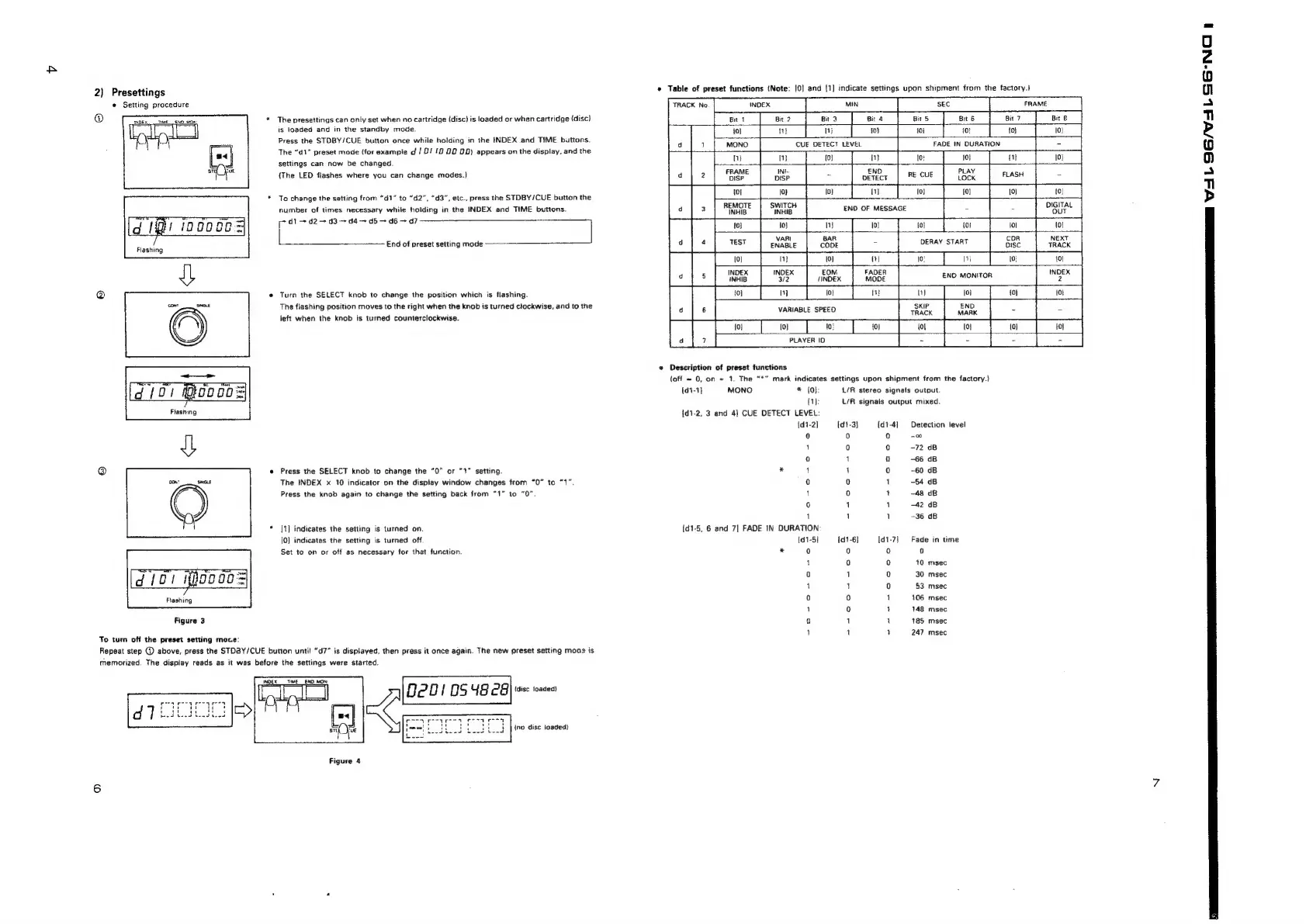
The
presettings
can
only
set
when
no
cartridge
(disc)
is
loaded
or
when
cartridge
(disc)
is
toaded
and
in
the
standby
mode.
Press
the
STDBY/CUE
button
once
while
holding
in
the
INDEX
and
TIME
buttons.
The
“d1”
preset
mode
(for
example
d
/
&/
12
20
DD)
appears
on
the
display,
and
the
settings
can
now
be
changed.
{The
LED
fiashes
where
you
can
change
modes.)
Gene
*
To
change
the
setting
from
“d1”
to
“d2”, “d3",
etc.,
press
the
STDBY/CUE
button
the
number
of
times
necessary
while
holding
in
the
INDEX
and
TIME
buttons.
oe
END
OF
MESSAGE
Hs
ANNAN
di
d2
d3
~~
d4
~
d5
~
d6
d7
(g
Ped
ingobos|
7
F
VARI
Flashing
End
of
preset
setting
mode
ENABLE
10]
ni} [0]
INDEX
INDEX
EON.
INHIB
32
‘INDEX
@
e
Turn
the
SELECT
knob
to
change
the
position
which
is
flashing.
1]
coe
coga
The
flashing
position
moves
to
the
right
when
the
knob
is
turned
clockwise,
and
to
the
VARIABLE
SPEED
left
when
the
knob
is
turned
counterclockwise.
{0} {0}
1:
10)
7
PLAYER
ID
*
Description
of
preset
functions
=
“7
{off
~
0,
on
=
1.
The
“*”
mark
indicates
settings
upon
shipment
from
the
factory.)
d
/
0}
Boo
co
=|
{1-1}
MONO
*
[0]:
L/R
stereo
signals
output
"
0}:
L/R
signals
output
mixed.
Flashing
{d1-2,
3
and
4)
CUE
DETECT
LEVEL:
{d1-2]
[d1-3}
{d1-4]
Detection
level
0
0
o
2
1
0 0
-72
dB
te)
4
0
-66
dB
@
@
Press
the
SELECT
knob
to
change
the
“0”
or
“1”
setting.
*
1 1
0
~60
dB
The
INDEX
x
10
indicator
on
the
dispiay
window
changes
from
“0”
to
“1”.
0
0
1
—54
dB
Press
the
knob
again
to
change
the
setting
back
from
“1”
to
“0”
|
0
1
48
dB
6
1
a
-42
dB
1
1
1
-36
dB
*
|]
indicates
the
setting
is
turned
on.
{d1-5,
6
and
7]
FADE
IN
DURATION
[0]
indicates
the
setting
is
turned
off.
[d1-5]
{d1-6}
[d1-7)
Fade
in
time
Set
to
on
or
off
as
necessary
for
that
function.
*
0
0
0
0
1
0 0
10
msec
TRO
[d
101
ijo09
=
0
1
0
30
msec
4
1
0
53
msec
Flashing
ie)
0
1
106
msec
1
0
1
148
msec
Figure
3
0
1 1
185
msec
1 1
a]
247
msec
To
turn
off
the
preset
setting
moce:
Repeat
step
@
above,
press
the
STD3Y/CUE
button
until
“d7”
is
displayed,
then
press
it
once
again.
The
new
preset
setting
moae
is
memorized.
The
display
reads
as
it
was
before
the
settings
were
started.
TE
_END
MON
Deo!
0S
ug
ca
(disc
loaded}
ino
disc
toaded}
Figure
4
a
NFL
ISL
SG-NCI
h

Related product manuals