EasyManua.ls Logo

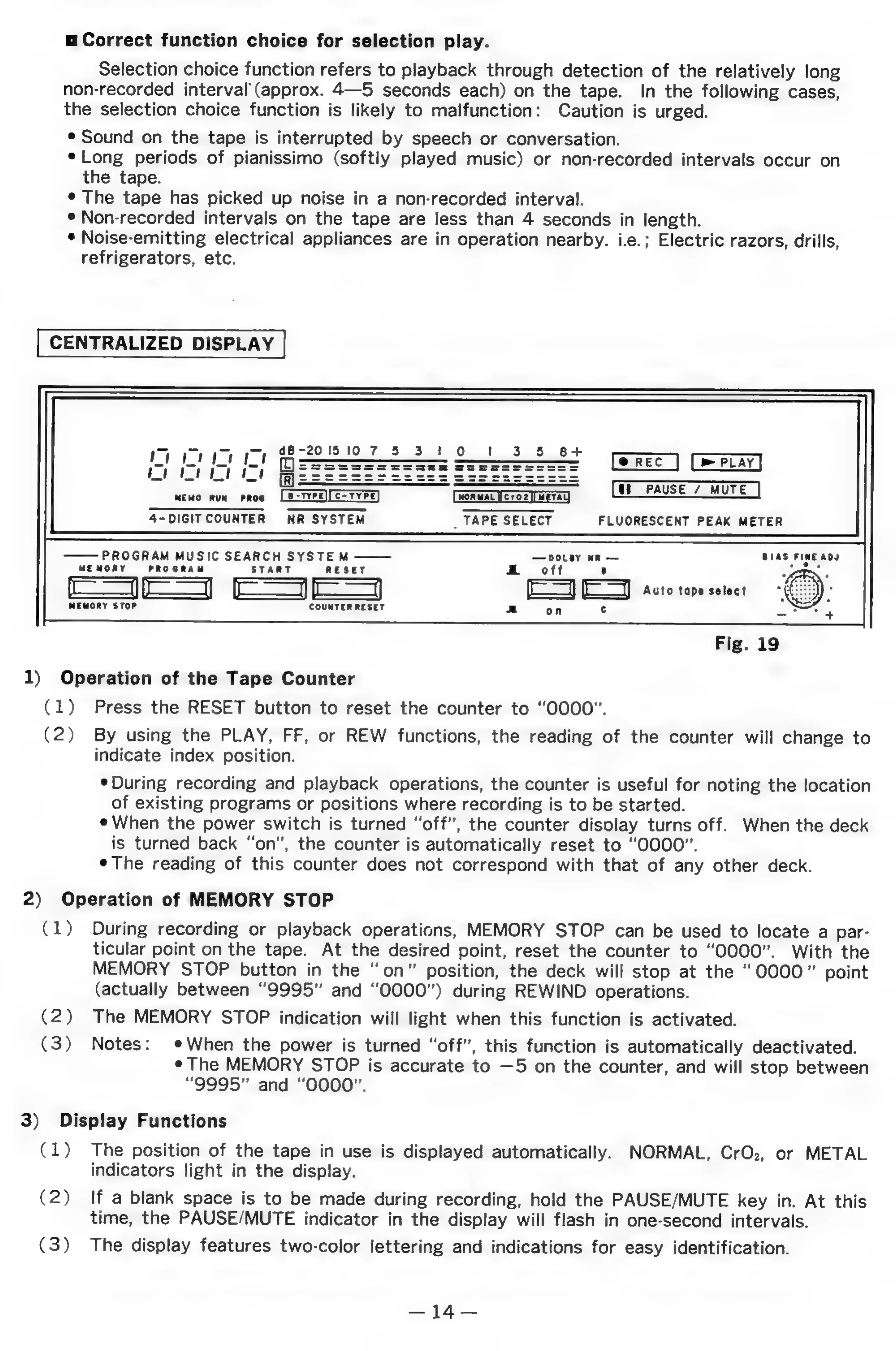
Denon DR-M11 - Centralized Display and Controls; Operation of the Tape Counter; Operation of MEMORY STOP; Display Functions

Denon DR-M11
20 pages
Print Icon
To Next Page IconTo Next Page
To Previous Page IconTo Previous Page
Loading...
m=
Correct
function
choice
for
selection
play.
Selection
choice
function
refers
to
playback
through
detection
of
the
relatively
long
non-recorded
interval’
(approx.
4—5
seconds
each)
on
the
tape.
In
the
following
cases,
the
selection
choice
function
is
likely
to
malfunction:
Caution
is
urged.
®
Sound
on
the
tape
is
interrupted
by
speech
or
conversation.
*Long
periods
of
pianissimo
(softly
played
music)
or
non-recorded
intervals
occur
on
the
tape.
¢
The
tape
has
picked
up
noise
in
a
non-recorded
interval.
°
Non-recorded
intervals
on
the
tape
are
less
than
4
seconds
in
length.
*
Noise-emitting
electrical
appliances
are
in
operation
nearby.
i.e.;
Electric
razors,
drills,
refrigerators,
etc.
CENTRALIZED
DISPLAY
dB-201510
7
5
3
|
0
!
3
5
B+
Pm
PLAY
me
a
MEWO
RUN
PROS
(woRwaL
[ero2][weTAg
[uh
PAUSE
/
MUTE
|
4-DIGITCOUNTER
NR
SYSTEM
_
TAPE
SELECT
FLUORESCENT
PEAK
METER
PROGRAM
MUSIC
SEARCH
SYSTEM
DOLBY
wR
BIAS
FINE
ADJ
MEMORY
PROGRAM
START
RESET
.
.
off
8
oe
(|)
oo
[Ey
EJ)
tute
tape
sotect
MEMORY
STOP
COUNTER
RESET
1)
Operation
of
the
Tape
Counter
(1)
Press
the
RESET
button
to
reset
the
counter
to
“OOOO”.
(2)
By
using
the
PLAY,
FF,
or
REW
functions,
the
reading
of
the
counter
will
change
to
indicate
index
position.
¢
During
recording
and
playback
operations,
the
counter
is
useful
for
noting
the
location
of
existing
programs
or
positions
where
recording
is
to
be
started.
¢
When
the
power
switch
is
turned
“off”,
the
counter
disolay
turns
off.
When
the
deck
is
turned
back
“on”,
the
counter
is
automatically
reset
to
“OOOO”.
¢The
reading
of
this
counter
does
not
correspond
with
that
of
any
other
deck.
2)
Operation
of
MEMORY
STOP
(1)
During
recording
or
playback
operations,
MEMORY
STOP
can
be
used
to
locate
a
par-
ticular
point
on
the
tape.
At
the
desired
point,
reset
the
counter
to
“OOOO”.
With
the
MEMORY
STOP
button
in
the
“on”
position,
the
deck
will
stop
at
the
“0000”
point
(actually
between
“9995”
and
“O000”)
during
REWIND
operations.
(2)
The
MEMORY
STOP
indication
will
light
when
this
function
is
activated.
(3)
Notes:
¢When
the
power
is
turned
“off”,
this
function
is
automatically
deactivated.
¢
The
MEMORY
STOP
is
accurate
to
—5
on
the
counter,
and
will
stop
between
“9995”
and
“OOOO”.
3)
Display
Functions
(1)
The
position
of
the
tape
in
use
is
displayed
automatically.
NORMAL,
CrOz,
or
METAL
indicators
light
in
the
display.
(2)
If
a
blank
space
is
to
be
made
during
recording,
hold
the
PAUSE/MUTE
key
in.
At
this
time,
the
PAUSE/MUTE
indicator
in
the
display
will
flash
in
one-second
intervals.
(3)
The
display
features
two-color
lettering
and
indications
for
easy
identification.
cen
PASS