EasyManua.ls Logo

Denon DR-M11 - Proper Recording Level; Guideline for Maximum Recording Level; Meter Reading Difference Between L and R Channels

Denon DR-M11
20 pages
Print Icon
To Next Page IconTo Next Page
To Previous Page IconTo Previous Page
Loading...
PROPER
RECORDING
LEVEL
A
too
high
recording
level
can
saturate
the
tape
and
cause
distortion.
On
the
other
hand,
if
recording
levels
are
set
too
low,
soft
passages
will
be
marked
by
residual
noise.
Proper
recording
level
is
the
single
most
important
factor
for
making
well
balanced
recordings.
™
The
tape
select
indicators—NORMAL,
CrO2,
and
METAL—provide
guidelines
for
the
maximum
allowable
recording
levels
for
each
tape
type.
Adjust
the
INPUT
LEVEL
controls
while
checking
the
FL
PEAK
METER.
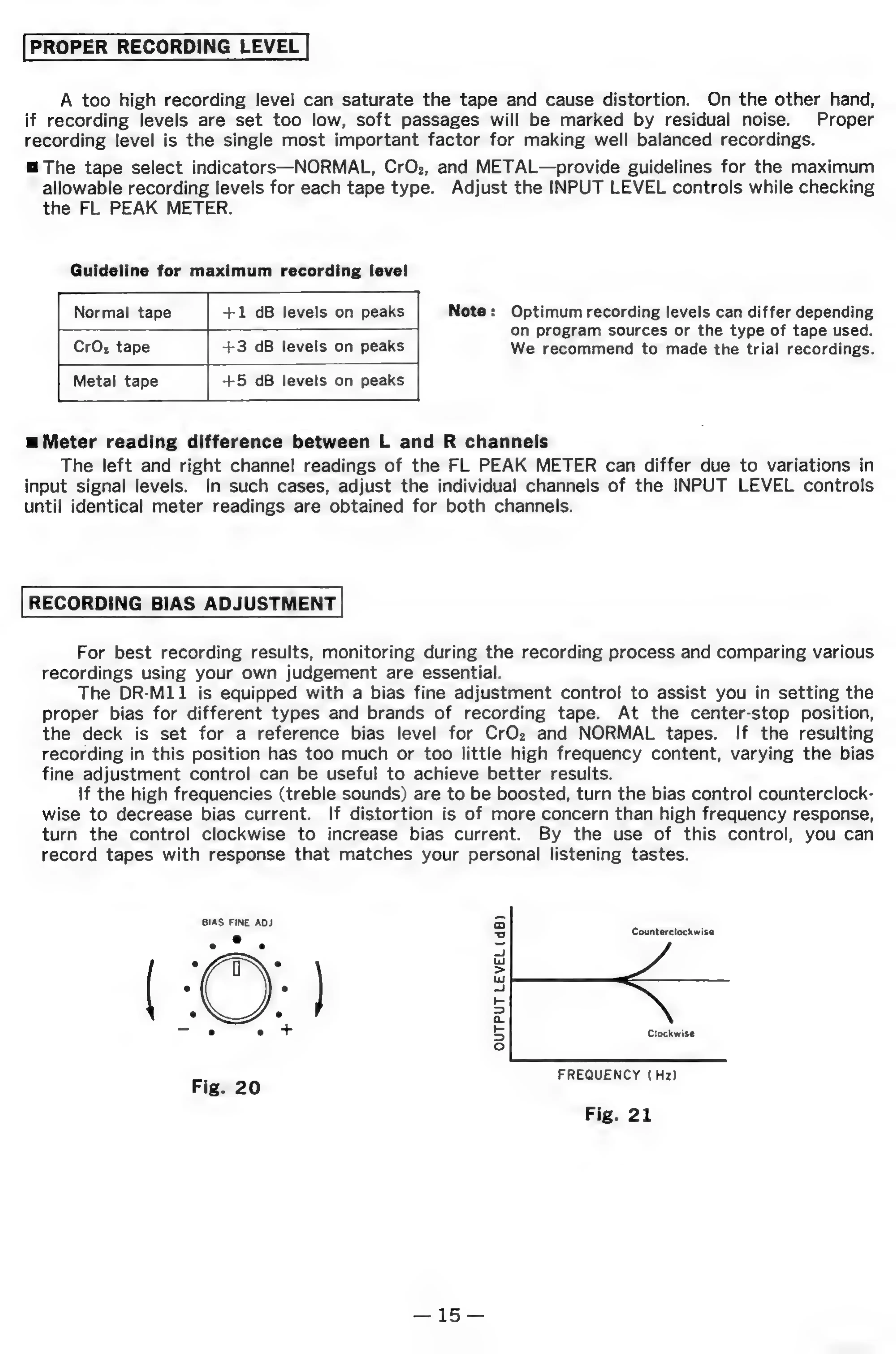
Guideline
for
maximum
recording
level
Normal
tape
+1
dB
levels
on
peaks
CrOz
tape
+3
dB
levels
on
peaks
Note:
Optimum
recording
levels
can
differ
depending
On
program
sources
or
the
type
of
tape
used.
We
recommend
to
made
the
trial
recordings.
Metal
tape
+5
dB
levels
on
peaks
m
Meter
reading
difference
between
L
and
R
channels
The
left
and
right
channel
readings
of
the
FL
PEAK
METER
can
differ
due
to
variations
in
input
signal
levels.
In
such
cases,
adjust
the
individual
channels
of
the
INPUT
LEVEL
controls
until
identical
meter
readings
are
obtained
for
both
channels.
RECORDING
BIAS
ADJUSTMENT
For
best
recording
results,
monitoring
during
the
recording
process
and
comparing
various
recordings
using
your
own
judgement
are
essential.
The
DR-M11
is
equipped
with
a
bias
fine
adjustment
control
to
assist
you
in
setting
the
proper
bias
for
different
types
and
brands
of
recording
tape.
At
the
center-stop
position,
the
deck
is
set
for
a
reference
bias
level
for
CrOz
and
NORMAL
tapes.
If
the
resulting
recording
in
this
position
has too
much
or
too
little
high
frequency
content,
varying
the
bias
fine
adjustment
control
can
be
useful
to
achieve
better
results.
If
the
high
frequencies
(treble
sounds)
are
to
be
boosted,
turn
the
bias
control
counterclock-
wise
to
decrease
bias
current.
If
distortion
is
of
more
concern
than
high
frequency
response,
turn
the
control
clockwise
to
increase
bias
current.
By
the
use
of
this
control,
you
can
record
tapes
with
response
that
matches
your
personal
listening
tastes.
BIAS
FINE
ADJ
Counterclockwise
Clockwise
7___
I,
° .
e e e
~~
OUTPUT
LEVEL
(dB)
FREQUENCY
(Hz)
Fig.
21
25
a