EasyManua.ls Logo

Denon DR-M11 - Timer Recording and Playback; Timer Recording Procedure; Timer Playback Procedure

Denon DR-M11
20 pages
Print Icon
To Next Page IconTo Next Page
To Previous Page IconTo Previous Page
Loading...
[TIMER
RECORDING/PLAYBACK|
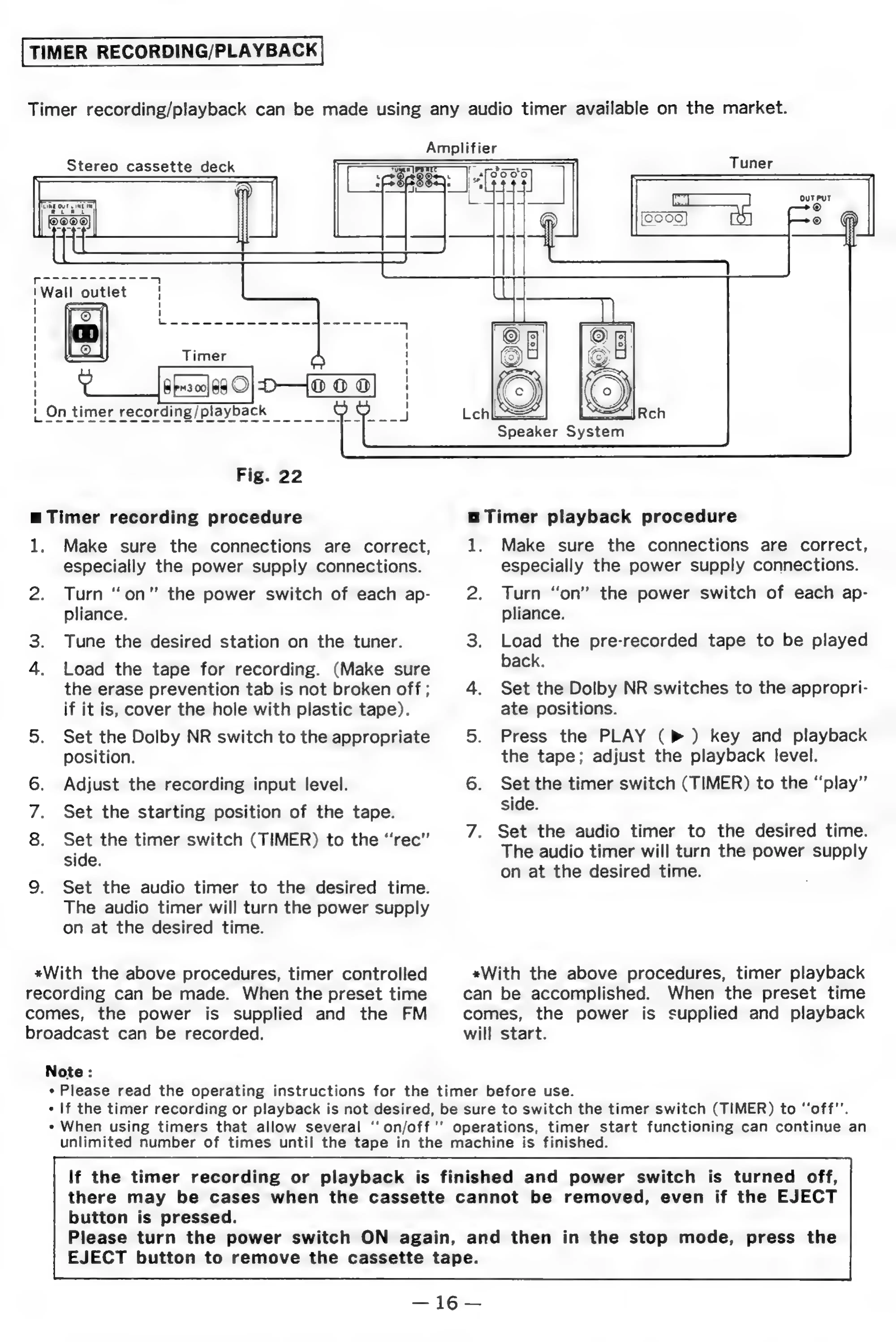
Timer
recording/playback
can
be
made
using
any
audio
timer
available
on
the
market.
Amplifier
>
Tuner
Stereo
cassette
deck
fe
Wall
outlet
——
Timer
!
On
timer
oe
Speaker
System
Fig.
22
a
Timer
recording
procedure
a
Timer
playback
procedure
1,
Make
sure
the
connections
are
correct,
1.
Make
sure
the
connections
are
correct,
especially
the
power
supply
connections.
especially
the
power
supply
connections.
2.
Turn
“on”
the
power
switch
of
each
ap-
2.
Turn
“on”
the
power
switch
of
each
ap-
pliance.
pliance.
3.
Tune
the
desired
station
on
the
tuner.
3.
Load
the
pre-recorded
tape
to
be
played
4.
Load
the
tape
for
recording.
(Make
sure
back.
the
erase
prevention
tab
is
not
broken
off
;
4.
Set
the
Dolby
NR
switches
to
the
appropri-
if
it
is,
cover
the
hole
with
plastic
tape).
ate
positions.
5.
Set
the
Dolby
NR
switch
to
the
appropriate
5.
Press
the
PLAY
(b>)
key
and
playback
position.
the
tape;
adjust
the
playback
level.
6.
Adjust
the
recording
input
level.
6.
Set
the
timer
switch
(TIMER)
to
the
“play”
side.
7.
Set
the
starting
position
of
the
tape.
8.
Set
the
timer
switch
(TIMER)
to
the
“rec”
side.
9.
Set
the
audio
timer
to
the
desired
time.
The
audio
timer
will
turn
the
power
supply
on
at
the
desired
time.
7.
Set
the
audio
timer
to
the
desired
time.
The
audio
timer
will
turn
the
power
supply
on
at
the
desired
time.
*With
the
above
procedures,
timer
controlled
«With
the
above
procedures,
timer
playback
recording
can
be
made.
When
the
preset
time
can
be
accomplished.
When
the
preset
time
comes,
the
power
is
supplied
and
the
FM
comes,
the
power
is
supplied
and
playback
broadcast
can
be
recorded.
will
start.
Note
:
*
Please
read
the
operating
instructions
for
the
timer
before
use.
-
If
the
timer
recording
or
playback
is
not
desired,
be
sure
to
switch
the
timer
switch
(TIMER)
to
‘‘off"’.
*
When
using
timers
that
allow
several
‘‘
on/off
'’
operations,
timer
start
functioning
can
continue
an
unlimited
number
of
times
until
the
tape
in
the
machine
is
finished.
If
the
timer
recording
or
playback
is
finished
and
power
switch
is
turned
off,
there
may
be
cases
when
the
cassette
cannot
be
removed,
even
if
the
EJECT
button
is
pressed.
Please
turn
the
power
switch
ON
again,
and
then
in
the
stop
mode,
press
the
EJECT
button
to
remove
the
cassette
tape.

Related product manuals