EasyManua.ls Logo

Denon DR-M11 - Page 6

Denon DR-M11
20 pages
Print Icon
To Next Page IconTo Next Page
To Previous Page IconTo Previous Page
Loading...
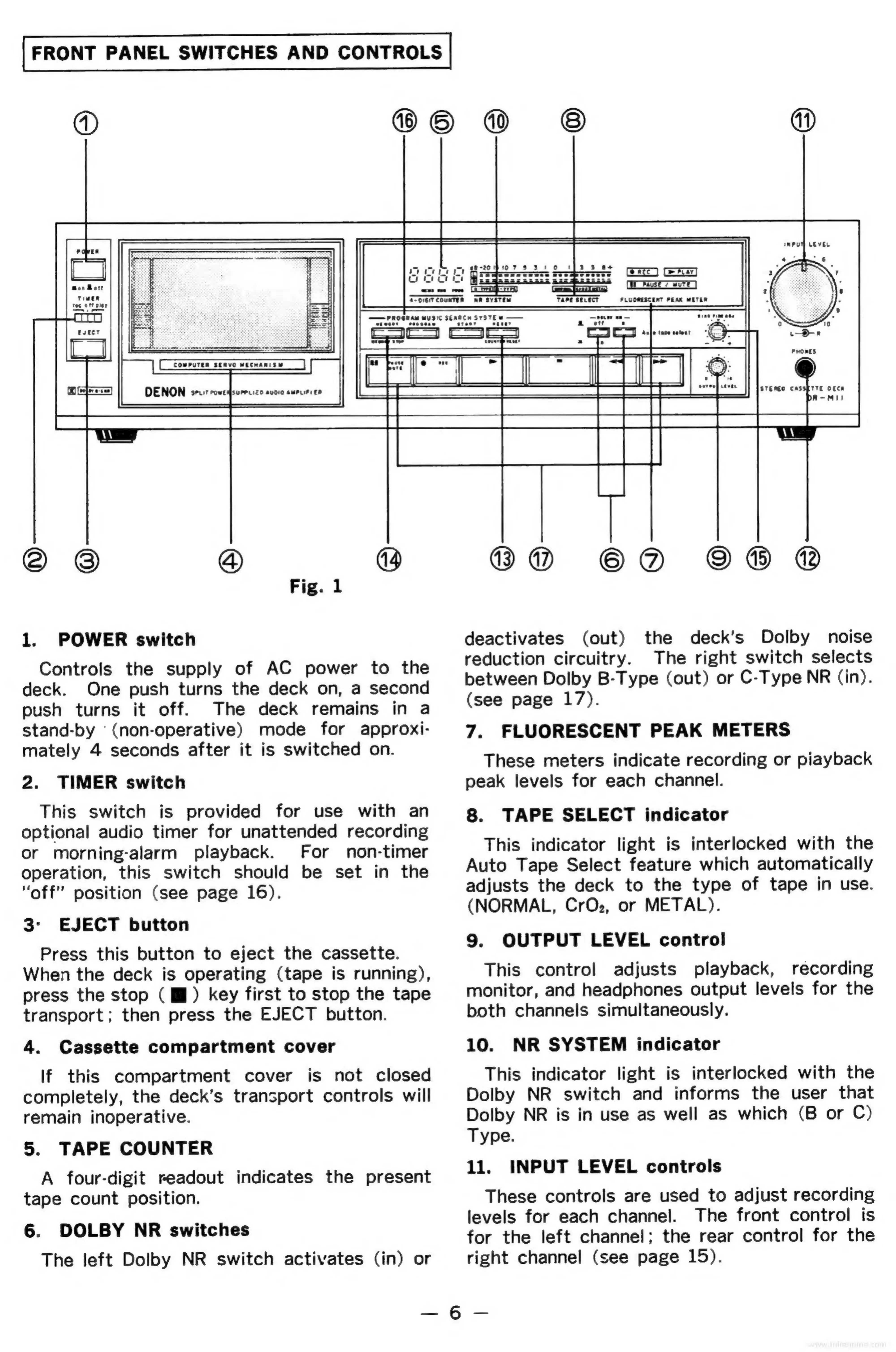
FRONT
PANEL
SWITCHES
AND
CONTROLS
aE
@
©
@
@)
Fig.
1
1.
POWER
switch
Controls
the
supply
of
AC
power
to
the
deck.
One
push
turns
the
deck
on,
a
second
push
turns
it
off.
The
deck
remains
in
a
stand-by
'(non-operative)
mode
for
approxi-
mately
4
seconds
after
it
is
switched
on.
2.
TIMER
switch
This
switch
is
provided
for
use
with
an
optional
audio
timer
for
unattended
recording
or
morning-alarm
playback.
For
non-timer
operation,
this
switch
should
be
set
in
the
“off”
position
(see
page
16).
3-
EJECT
button
Press
this
button
to
eject
the
cassette.
When
the
deck
is
operating
(tape
is
running),
press
the
stop
(ff)
key
first
to
stop
the
tape
transport;
then
press
the
EJECT
button.
4.
Cassette
compartment
cover
If
this
compartment
cover
is
not
closed
completely,
the
deck’s
transport
controls
will
remain
inoperative.
5.
TAPE
COUNTER
A
four-digit
readout
indicates
the
present
tape
count
position.
6.
DOLBY
NR
switches
The
left
Dolby
NR
switch
activates
(in)
or
BO
©D
deactivates
(out)
the
deck’s
Dolby
noise
reduction
circuitry.
The
right
switch
selects
between
Dolby
B-Type
(out)
or
C-Type
NR
(in).
(see
page
17).
7.
FLUORESCENT
PEAK
METERS
These
meters
indicate
recording
or
piayback
peak
levels
for
each
channel.
8.
TAPE
SELECT
indicator
This
indicator
light
is
interlocked
with
the
Auto
Tape
Select
feature
which
automatically
adjusts
the
deck
to
the
type
of
tape
in
use.
(NORMAL,
CrOz,
or
METAL).
9.
OUTPUT
LEVEL
control
This
control
adjusts
playback,
recording
monitor,
and
headphones
output
levels
for
the
both
channels
simultaneously.
10.
NR
SYSTEM
indicator
This
indicator
light
is
interlocked
with
the
Dolby
NR
switch
and
informs
the
user
that
Dolby
NR
is
in
use
as
well
as
which
(B
or
C)
Type.
11.
INPUT
LEVEL
controls
These
controls
are
used
to
adjust
recording
levels
for
each
channel.
The
front
control
is
for
the
left
channel;
the
rear
control
for
the
right
channel
(see
page
15).
—6-—

Related product manuals