EasyManua.ls Logo

Denon DR-M11 - Page 7

Denon DR-M11
20 pages
Print Icon
To Next Page IconTo Next Page
To Previous Page IconTo Previous Page
Loading...
12.
PHONES
jack
For
private
music
enjoyment
without
dis-
turbing
others,
or
for
monitoring
a
recording,
a
set
of
headphones
may
be
plugged
in.
Impedance
is
from
8
to
29000
ohms.
13.
RESET
button
Operation
of
the
button
resets
the
counter
to
all
zero.
14.
MEMORY
STOP
button
During
rewinding
operations,
the
tape
will
stop
at
the
ā€œ0000ā€
counter
point
automati-
cally
when
this
button
is
pressed
in.
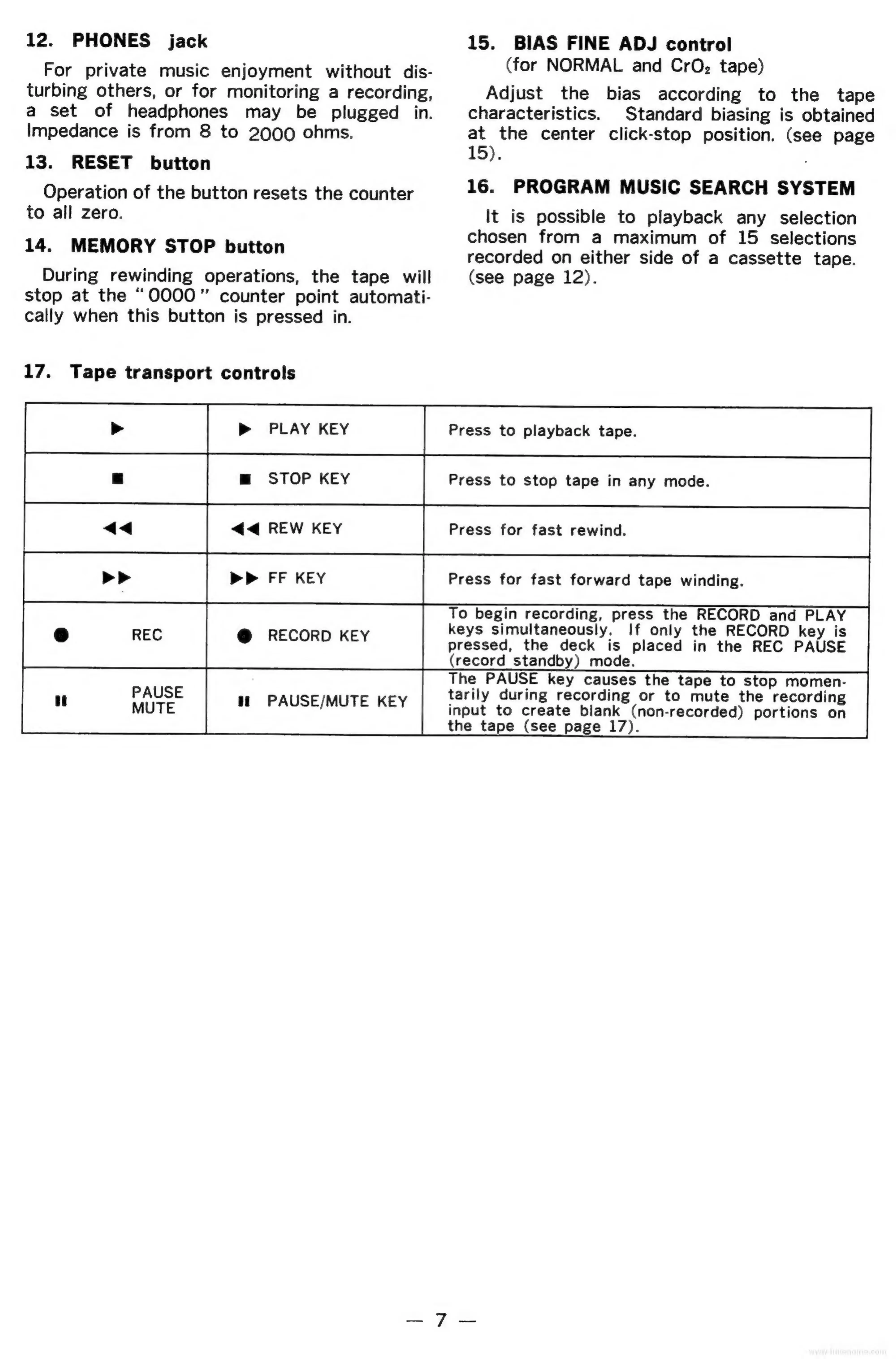
17.
Tape
transport
controls
pop
puarney
ae
=
ee
ss
m
STOP
KEY
Press
to
stop
tape
in
any
mode.
Press
for
fast
forward
tape
winding.
15.
BIAS
FINE
ADJ
control
(for
NORMAL
and
CrO,
tape)
Adjust
the
bias
according
to
the
tape
characteristics.
Standard
biasing
is
obtained
at
the
center
click-stop
position.
(see
page
15).
16.
PROGRAM
MUSIC
SEARCH
SYSTEM
It
is
possible
to
playback
any
selection
chosen
from
a
maximum
of
15
selections
recorded
on
either
side
of
a
cassette
tape.
(see
page
12).
To
begin
recording,
press
the
RECORD
and
PLAY
keys
simultaneously.
If
only
the
RECORD
key
is
pressed,
the
deck
is
placed
in
the
REC
PAUSE
(record
standby)
mode.
The
PAUSE
key
causes
the
tape
to
stop
momen-
tarily
during
recording
or
to
mute
the
recording
input
to
create
blank
(non-recorded)
portions
on
the
tape
(see
page
17).
L}
@
RECORD
KEY
PAUSE
i]
MUTE
ti
PAUSE/MUTE
KEY

Related product manuals