EasyManua.ls Logo

Denon DR-M11 - Connection; Connecting the deck to an amplifier; Connecting Headphones; Connection to Other Tape Deck

Denon DR-M11
20 pages
Print Icon
To Next Page IconTo Next Page
To Previous Page IconTo Previous Page
Loading...
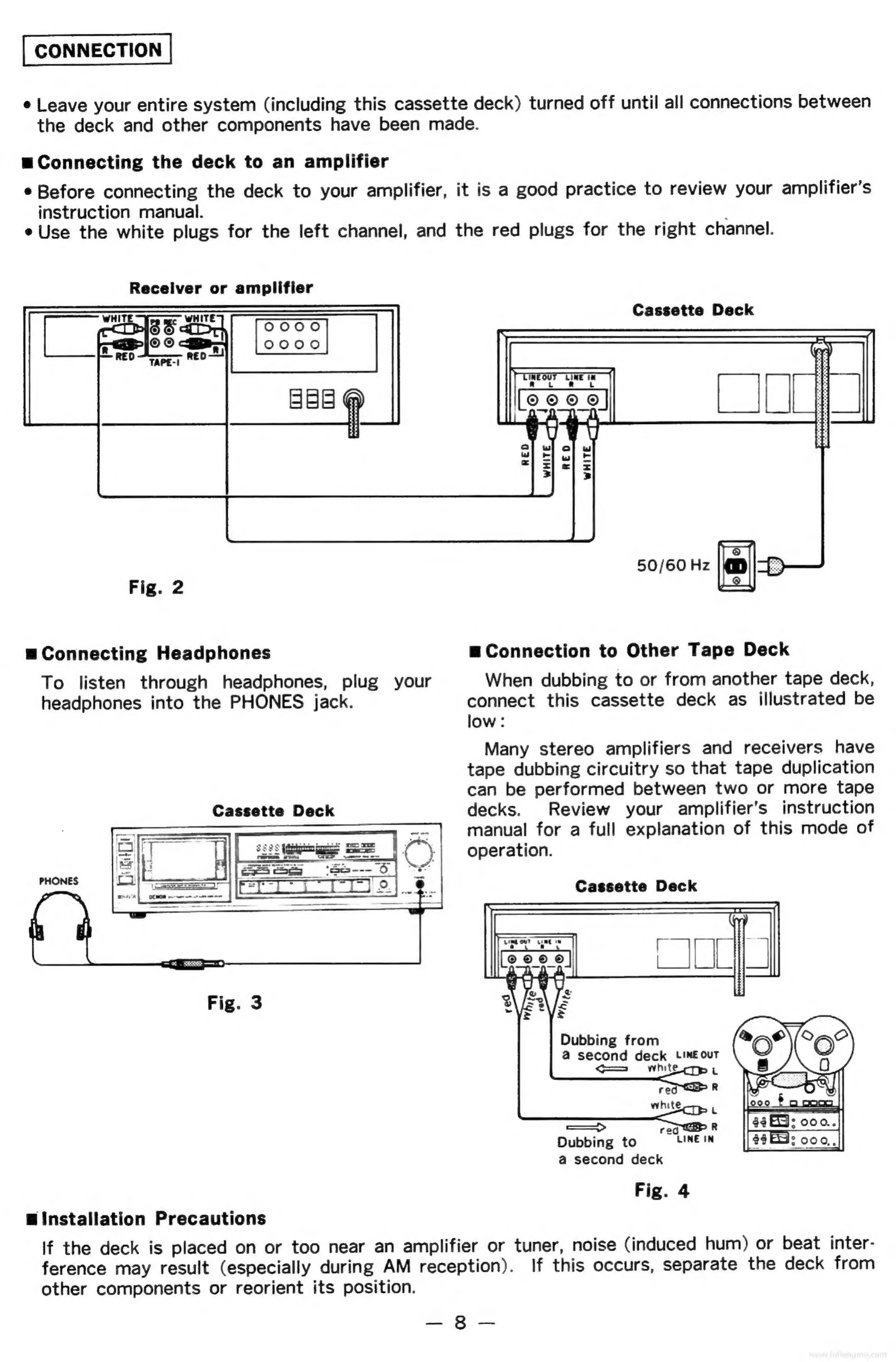
CONNECTION
e
Leave
your
entire
system
(including
this
cassette
deck)
turned
off
until
all
connections
between
the
deck
and
other
components
have
been
made.
wu
Connecting
the
deck
to
an
amplifier
¢
Before
connecting
the
deck
to
your
amplifier,
it
is
a
good
practice
to
review
your
amplifier’s
instruction
manual.
;
e
Use
the
white
plugs
for
the
left
channel,
and
the
red
plugs
for
the
right
channel.
Receiver
or
amplifier
o000
o000
zai
Cassette
Deck
50/60
Hz
eo)
Fig.
2
yo
uw
Connecting
Headphones
=
Connection
to
Other
Tape
Deck
To
listen
through
headphones,
plug
your
When
dubbing
to
or
from
another
tape
deck,
headphones
into
the
PHONES
jack.
connect
this
cassette
deck
as
illustrated
be
low:
Many
stereo
amplifiers
and
receivers
have
tape
dubbing
circuitry
so
that
tape
duplication
can
be
performed
between
two
or
more
tape
Cassette
Deck
decks.
Review
your
amplifier’s
instruction
=
manual
for
a
full
explanation
of
this
mode
of
operation.
Cassette
Deck
PHONES
Dubbing
from
@
second
deck
LINE
our
hit
9
poo
—>
Dubbing
to
a
second
deck
Fig.
4
Installation
Precautions
If
the
deck
is
placed
on
or
too
near
an
amplifier
or
tuner,
noise
(induced
hum)
or
beat
inter-
ference
may
result
(especially
during
AM
reception).
If
this
occurs,
separate
the
deck
from
other
components
or
reorient
its
position.
2
oes

Related product manuals