EasyManua.ls Logo

Denon DR-M11 - Cassette Tape and Auto Selection; Cassette Tape Handling and Storage; Auto Tape Select Feature

Denon DR-M11
20 pages
Print Icon
To Next Page IconTo Next Page
To Previous Page IconTo Previous Page
Loading...
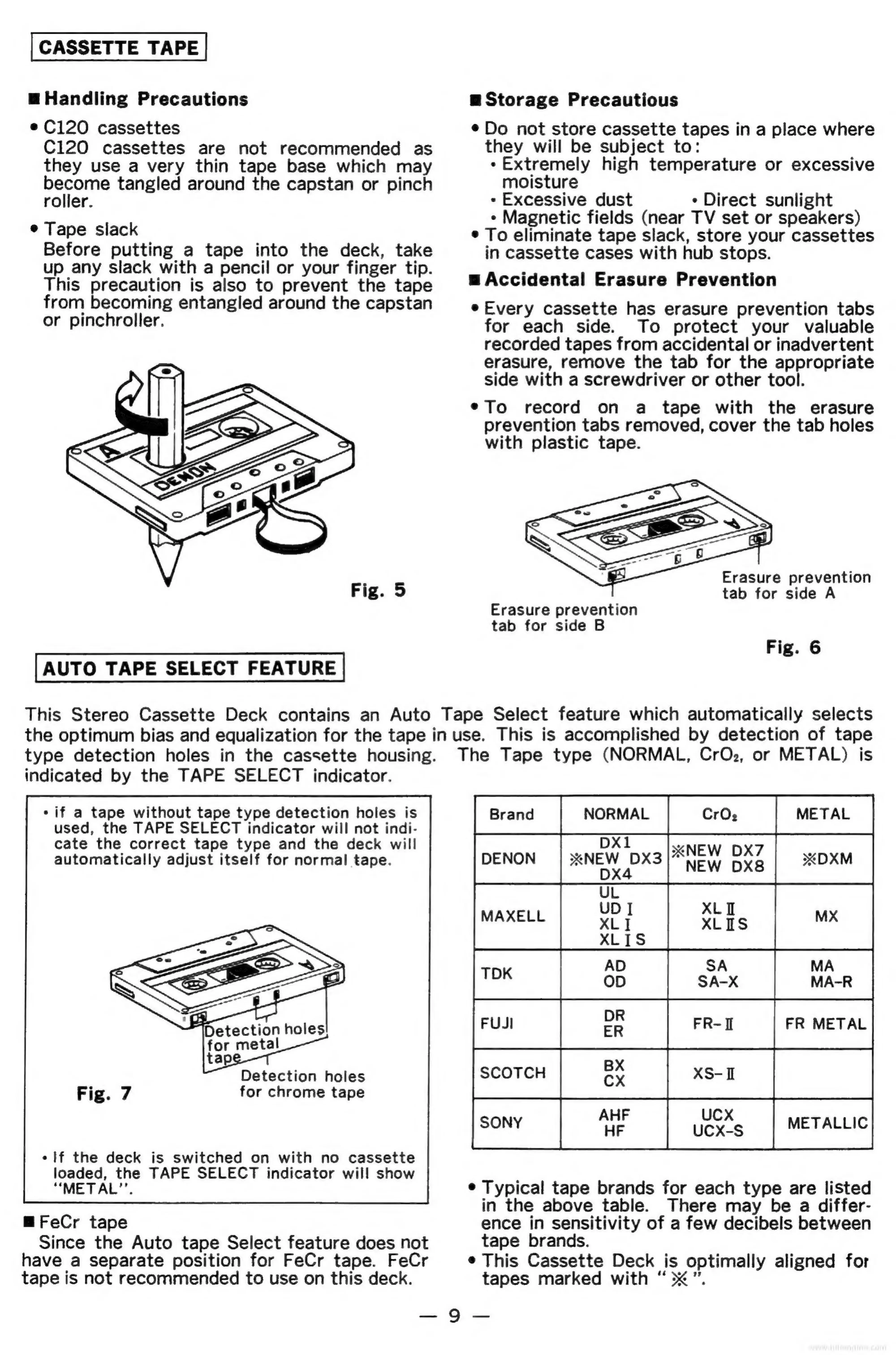
CASSETTE
TAPE
@
Handling
Precautions
e
C120
cassettes
C120
cassettes
are
not
recommended
as
they
use
a
very
thin
tape
base
which
may
ome
tangled
around
the
capstan
or
pinch
roller.
°
Tape
slack
Before
putting
a
tape
into
the
deck,
take
up
any
slack
with
a
pencil
or
your
finger
tip.
This
precaution
is
also
to
prevent
the
tape
from
becoming
entangled
around
the
capstan
or
pinchroller.
AUTO
TAPE
SELECT
FEATURE
m=
Storage
Precautious
¢
Do
not
store
cassette
tapes
in
a
place
where
they
will
be
subject
to:
+
Extremely
high
temperature
or
excessive
moisture
-
Excessive
dust
*
Direct
sunlight
*
Magnetic
fields
(near
TV
set
or
speakers)
¢
To
eliminate
tape
slack,
store
your
cassettes
in
cassette
cases
with
hub
stops.
w
Accidental
Erasure
Prevention
e
Every
cassette
has
erasure
prevention
tabs
for
each
side.
To
protect
your
valuable
recorded
tapes
from
accidental
or
inadvertent
erasure,
remove
the
tab
for
the
appropriate
side
with
a
screwdriver
or
other
tool.
¢To
record
on
a
tape
with
the
erasure
prevention
tabs
removed,
cover
the
tab
holes
with
plastic
tape.
Erasure
prevention
tab
for
side
A
Erasure
prevention
tab
for
side
B
Fig.
6
This
Stereo
Cassette
Deck
contains
an
Auto
Tape
Select
feature
which
automatically
selects
the
optimum
bias
and
equalization
for
the
tape
in
use.
This
is
accomplished
by
detection
of
tape
type
detection
holes
in
the
cassette
housing.
The
Tape
type
(NORMAL,
CrO2,
or
METAL)
is
indicated
by
the
TAPE
SELECT
indicator.
-
if
a
tape
without
tape
type
detection
holes
is
used,
the
TAPE
SELECT
indicator
will
not
indi-
cate
the
correct
tape type
and
the
deck
will
automatically
adjust
itself
for
normal
tape.
Detection
holes
for
chrome
tape
If
the
deck
is
switched
on
with
no
cassette
loaded,
the
TAPE
SELECT
indicator
will
show
“METAL’’.
mFeCr
tape
Since
the
Auto
tape
Select
feature
does
not
have
a
separate
position
for
FeCr
tape.
FeCr
tape
is
not
recommended
to
use
on
this
deck.
Ferana
|
noma
|
ar
ee
DX7
Joenon
|
nw
woxa
NEW
XZ
|
xox
UDI
MAXELL
XLI
XL
YS
ALis
SA
MA
MA-R
FUsI
a
FR-n
|
FR
METAL
BX
AHF UCX
¢
Typical
tape
brands
for
each
type
are
listed
in
the
above
table.
There
may
be
a
differ-
ence
in
sensitivity
of
a
few
decibels
between
tape
brands.
¢
This
Cassette
Deck
is
optimally
aligned
for
tapes
marked
with
“>”.
das
Ge
es

Related product manuals