EasyManua.ls Logo

Denon DR-M22 - Page 11

Denon DR-M22
31 pages
Print Icon
To Next Page IconTo Next Page
To Previous Page IconTo Previous Page
Loading...
When
Separating
the
Audio
Circuit
Board
by
Itself
(9)
Unscrew
the
nut
holding
the
input
volume
253
(10)
(11)
(12)
(13)
(1)
(2)
(3)
(4)
(5)
and
remove
the
input
volume
and
the
shield
bracket
209
toward
the
rear.
Unscrew
the
2
screws
(3
x
10
CBS)
315
holding
the
Bias
Volume
plate
274
and
remove
the
Bias
Volume
plate
toward
the
rear.
Unscrew
the
nut
holding
the
output
volume
254.
Remove
the
spring
plate
holding
the
headphone
jack
255.
By
removing
front
chassis
206,
the
audio
circuit
board
can
be
removed
by
itself.
Note:
Most
repairs
to
the
audio
circuit
board
can
be
performed
by
removing
the
bottom
cover
on
the
chassis.
Refer
to
the
above
procedure
only
when
necessary.
When
reassembling,
follow
the
procedures
in
reverse
order;
however,
if
each
of
the
various
parts
are
not
assembled
properly
in
their
respective
position,
the
set
cannot
be
assembled.
When
assembling,
check
the
work
of
each
step
carefully.
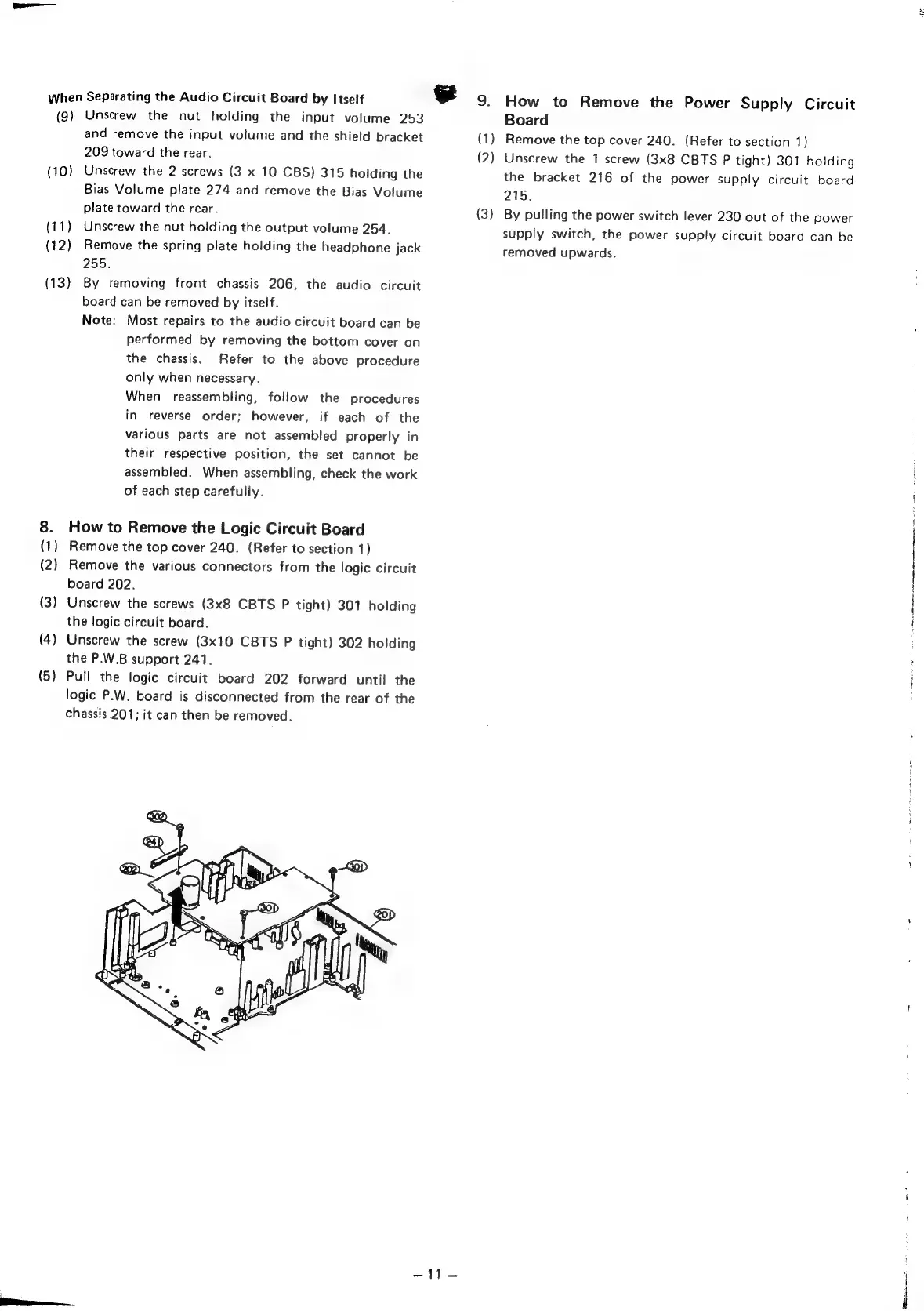
How
to
Remove
the
Logic
Circuit
Board
Remove
the
top
cover
240.
(Refer
to
section
1)
Remove
the
various
connectors
from
the
logic
circuit
board
202.
Unscrew
the
screws
(3x8
CBTS
P
tight)
301
holding
the
logic
circuit
board.
Unscrew
the
screw
(3x10
CBTS
P
tight)
302
holding
the
P.W.B
support
241.
Pull
the
logic
circuit
board
202
forward
until
the
logic
P.W.
board
is
disconnected
from
the
rear
of
the
chassis
201;
it
can
then
be
removed.
=
9.
(1)
(2)
{3)
How
to
Remove
the
Power
Supply
Circuit
Board
Remove
the
top
cover
240.
(Refer
to
section
1)
Unscrew
the
1
screw
(3x8
CBTS
P
tight)
301
holding
the
bracket
216
of
the
power
supply
circuit
board
215.
By
pulling
the
power
switch
lever
230
out
of
the
power
supply
switch,
the
power
supply
circuit
board
can
be
removed
upwards.
ae
PB
ee

Other manuals for Denon DR-M22

Related product manuals