EasyManua.ls Logo

Denon DR-M22 - Maintenance and Adjustments; Mechanism Section Adjustments and Checks

Denon DR-M22
31 pages
Print Icon
To Next Page IconTo Next Page
To Previous Page IconTo Previous Page
Loading...
ADJUSTING
AND
CHECKING
THE
MECHANISM
SECTION
1.
Replacing
the
Pinch
Roller
23
and
104
Before
replacing
the
pinch
roller,
clean
the
tape
contact
surface
of
the
pinch
roller
and
the
capstan
shaft.
Most
causes
of
poor
tape
transport
can
be
traced
to
dirty
pinch
rollers
and
capstan
shafts.
The
right
side
pinch
roller
23
can
be
taken
out
by
remov-
ing
spring
24
and
slit
washer
317.
In
the
same
manner,
the
left
side
pinch
roller
104
can
be
taken
out
by
remov-
ing
spring
106
and
slit
washer
317.
After
replacing,
play
a
padless
C-90
tape
and
check
for
tape
curls
at
the
head
tape
guide
section.
In
addition,
in
the
playback
mode,
check
to
make
sure
that
the
right
side
pinch
roller
contacts
the
capstan
shaft
before
the
left
side
pinch
roller
contacting.
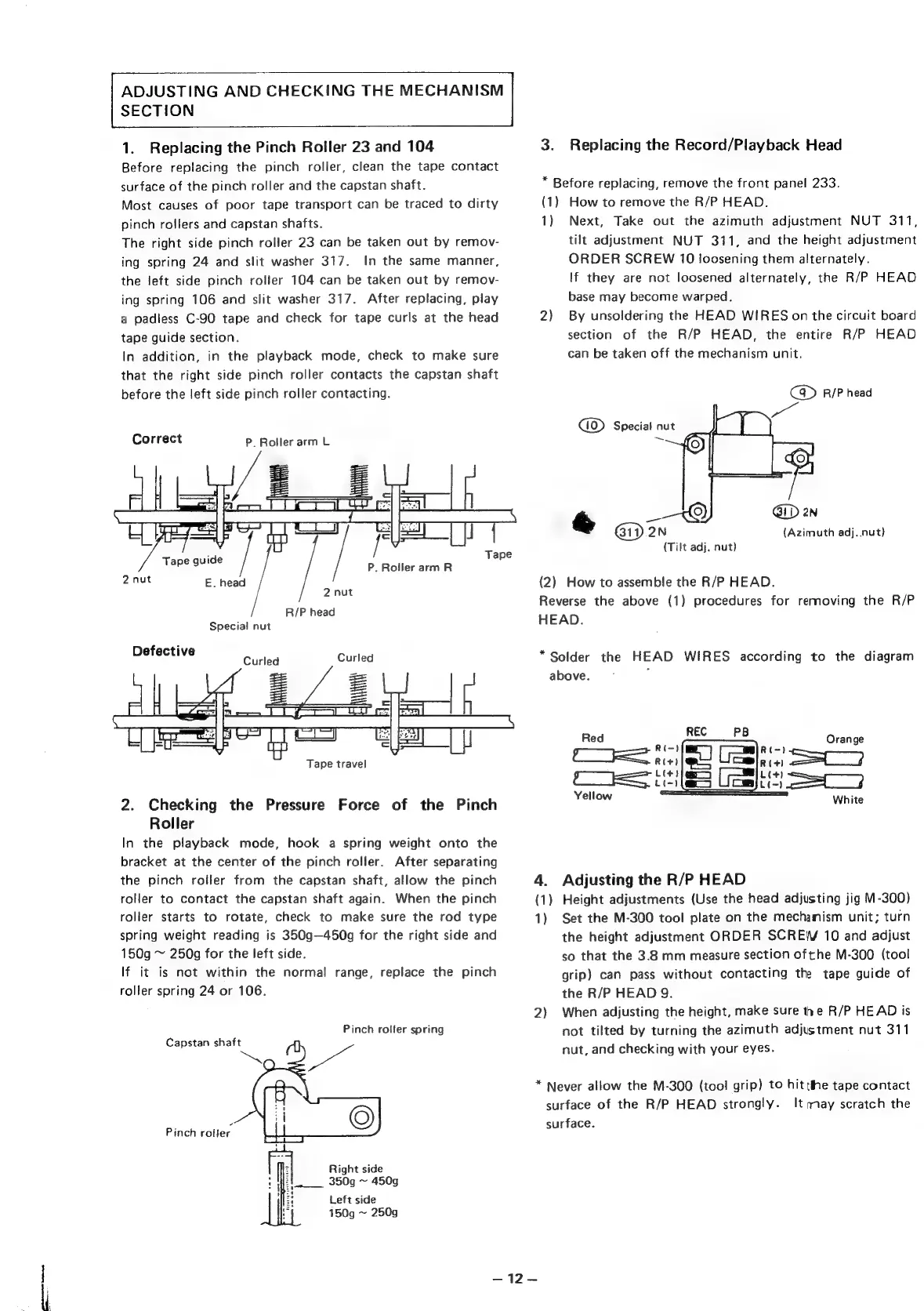
Correct
P.
Roller
arm
L
ra
=
=|
(E22)
|
a
U
id
Tape
guide
P.
RollerarmR
2nut
E.
head
2
nut
R/P
head
Special
nut
Defective
Sales
Gaied
Tape
travel
2.
Checking
the
Pressure
Force
of
the
Pinch
Roller
In
the
playback
mode,
hook
a
spring
weight
onto
the
bracket
at
the
center
of
the
pinch
roller.
After
separating
the
pinch
roller
from
the
capstan
shaft,
allow
the
pinch
roller
to
contact
the
capstan
shaft
again.
When
the
pinch
roller
starts
to
rotate,
check
to
make
sure
the
rod
type
spring
weight
reading
is
350g—450g
for
the
right
side
and
150g
~
250g
for
the
left
side.
If
it
is
not
within
the
normal
range,
replace
the
pinch
roller
spring
24
or
106.
Pinch
roller
spring
Capstan
shaft
Pinch
roller
Right
side
350g
~
450g
Left
side
150g
~
250g
3.
Replacing
the
Record/Playback
Head
*
Before
replacing,
remove
the
front
panel
233.
(1)
How
to
remove
the
R/P
HEAD.
1)
Next,
Take
out
the
azimuth
adjustment
NUT
311,
tilt
adjustment
NUT
311,
and
the
height
adjustment
ORDER
SCREW
10
loosening
them
alternately.
If
they
are
not
loosened
alternately,
the
R/P
HEAD
base
may
become
warped.
2)
By
unsoldering
the
HEAD
WIRES
on
the
circuit
board
section
of
the
R/P
HEAD,
the
entire
R/P
HEAD
can
be
taken
off
the
mechanism
unit.
C@
R/P
head
ue
(Azimuth
adj..nut)
(Tilt
adj.
nut)
(2)
How
to
assemble
the
R/P
HEAD.
Reverse
the
above
(1)
procedures
for
removing
the
R/P
HEAD.
*Solder
the
HEAD
WIRES
according
to
the
diagram
above.
2
Red
Yellow
4.
Adjusting
the
R/P
HEAD
(1)
Height
adjustments
(Use
the
head
adjusting
jig
M-300)
1)
Set
the
M-300
tool
plate
on
the
mechanism
unit;
turn
the
height
adjustment
ORDER
SCREW
10
and
adjust
so
that
the
3.8
mm
measure
section
ofthe
M-300
(tool
grip)
can
pass
without
contacting
the
tape
guide
of
the
R/P
HEAD
9.
2)
When
adjusting
the
height,
make
sure
the
R/P
HEAD
is
not
tilted
by
turning
the
azimuth
adjustment
nut
311
nut,
and
checking
with
your
eyes.
*
Never
allow
the
M-300
(tool
grip)
to
hit
tthe
tape
contact
surface
of
the
R/P
HEAD
strongly.
It
may
scratch
the
surface.
ae
by
Dee

Other manuals for Denon DR-M22

Related product manuals