EasyManua.ls Logo

Denon DR-M22 - Page 13

Denon DR-M22
31 pages
Print Icon
To Next Page IconTo Next Page
To Previous Page IconTo Previous Page
Loading...
eer
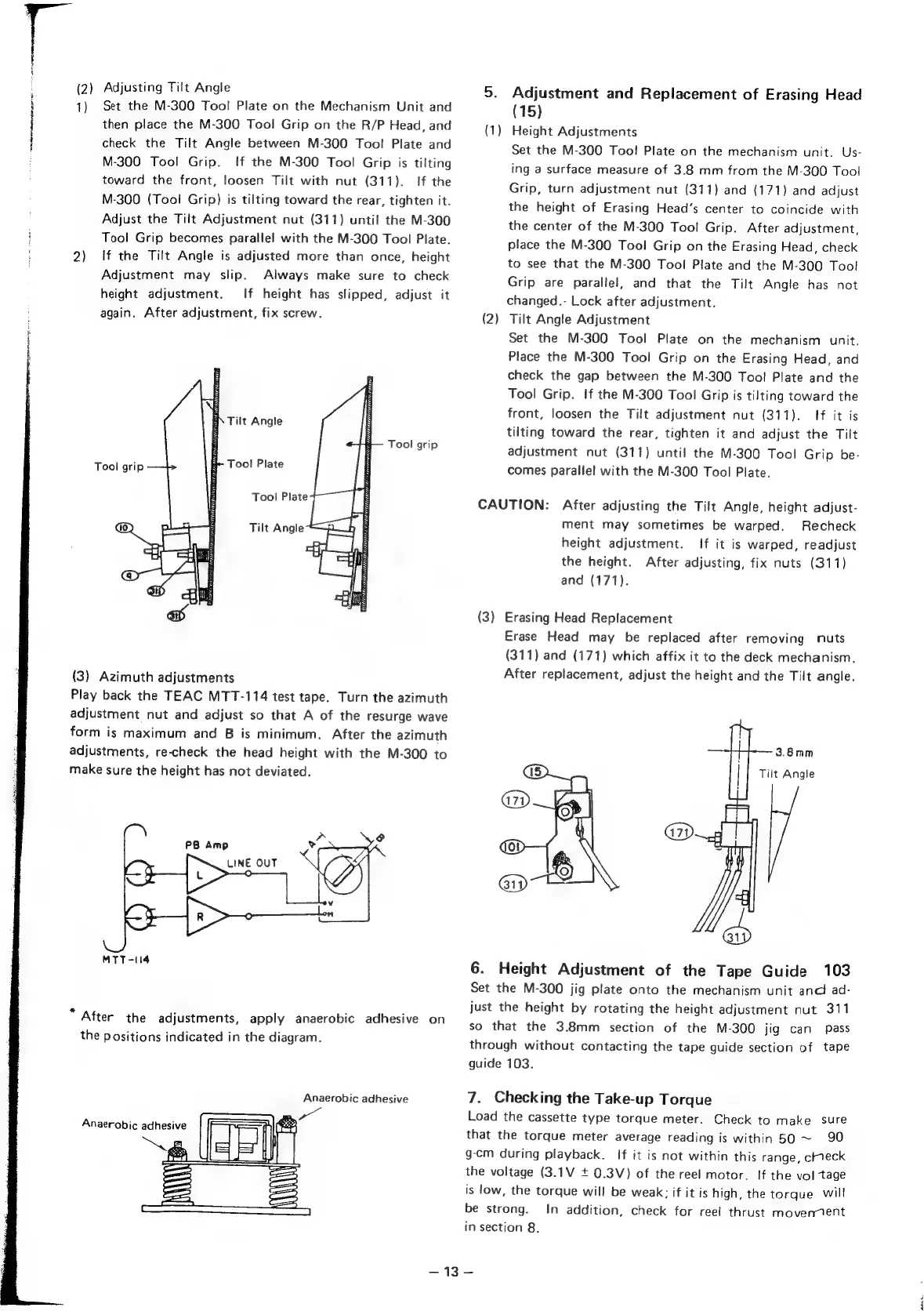
(2)
Adjusting
Tilt
Angle
1)
Set
the
M-300
Too!
Plate
on
the
Mechanism
Unit
and
then
place
the
M-300
Tool
Grip
on
the
R/P
Head,
and
check
the
Tilt
Angle
between
M-300
Tool
Plate
and
M-300
Tool
Grip.
If
the
M-300
Tool
Grip
is
tilting
toward
the
front,
loosen
Tilt
with
nut
(311).
If
the
M-300
(Tool
Grip)
is
tilting
toward
the
rear,
tighten
it.
Adjust
the
Tilt
Adjustment
nut
(311)
until
the
M-300
Tool
Grip
becomes
parallel
with
the
M-300
Tool
Plate.
2)
‘If
the
Tilt
Angle
is
adjusted
more
than
once,
height
Adjustment
may
slip.
Always
make
sure
to
check
height
adjustment.
If
height
has
slipped,
adjust
it
again.
After
adjustment,
fix
screw.
BN
Tilt
Angle
Tool
grip
Tool
grip
E~
Tool
Plate
Tool
Plate
Tilt
Angle
(3)
Azimuth
adjustments
Play
back
the
TEAC
MTT-114
test
tape.
Turn
the
azimuth
adjustment
nut
and
adjust
so
that
A
of
the
resurge
wave
form
is
maximum
and
B
is
minimum.
After
the
azimuth
adjustments,
re-check
the
head
height
with
the
M-300
to
make
sure
the
height
has
not
deviated.
MTT-114
“After
the
adjustments,
apply
anaerobic
adhesive
on
the
positions
indicated
in
the
diagram.
Anaerobic
adhesive
5.
Adjustment
and
Replacement
of
Erasing
Head
(15)
(1)
Height
Adjustments
Set
the
M-300
Too!
Plate
on
the
mechanism
unit.
Us-
ing
a
surface
measure
of
3.8
mm
from
the
M-300
Tool
Grip,
turn
adjustment
nut
(311)
and
(171)
and
adjust
the
height
of
Erasing
Head’s
center
to
coincide
with
the
center
of
the
M-300
Tool
Grip.
After
adjustment,
place
the
M-300
Tool
Grip
on
the
Erasing
Head,
check
to
see
that
the
M-300
Tool
Plate
and
the
M-300
Tool
Grip
are
parallel,
and
that
the
Tilt
Angle
has
not
changed.-
Lock
after
adjustment.
Tilt
Angle
Adjustment
Set
the
M-300
Tool
Plate
on
the
mechanism
unit.
Place
the
M-300
Tool
Grip
on
the
Erasing
Head,
and
check
the
gap
between
the
M-300
Too!
Plate
and
the
Tool
Grip.
If
the
M-300
Tool
Grip
is
tilting
toward
the
front,
loosen
the
Tilt
adjustment
nut
(311).
If
it
is
tilting
toward
the
rear,
tighten
it
and
adjust
the
Tilt
adjustment
nut
(311)
until
the
M-300
Tool
Grip
be-
comes
parallel
with
the
M-300
Tool
Plate.
(2
CAUTION:
After
adjusting
the
Tilt
Angle,
height
adjust-
ment
may
sometimes
be
warped.
Recheck
height
adjustment.
If
it
is
warped,
readjust
the
height.
After
adjusting,
fix
nuts
(311)
and
(171).
(3)
Erasing
Head
Replacement
Erase
Head
may
be
replaced
after
removing
nuts
(311)
and
(171)
which
affix
it
to
the
deck
mechanism.
After
replacement,
adjust
the
height
and
the
Tilt
angle.
3.8mm
Tilt
Angle
6.
Height
Adjustment
of
the
Tape
Guide
103
Set
the
M-300
jig
plate
onto
the
mechanism
unit
and
ad-
just
the
height
by
rotating
the
height
adjustment
nut
311
so
that
the
3.8mm
section
of
the
M-300
jig
can
pass
through
without
contacting
the
tape
guide
section
of
tape
guide
103.
7.
Checking
the
Take-up
Torque
Load
the
cassette
type
torque
meter.
Check
to
make
sure
that
the
torque
meter
average
reading
is
within
50
~
90
g-cm
during
playback.
If
it
is
not
within
this
range,
creck
the
voltage
(3.1V
+
0.3V)
of
the
reel
motor.
If
the
voltage
is
low,
the
torque
will
be
weak:
if
it
is
high,
the
torque
will
be
strong.
In
addition,
check
for
ree!
thrust
movennent
in
section
8.
S43.

Other manuals for Denon DR-M22

Related product manuals