EasyManua.ls Logo

Denon DR-M22 - Page 17

Denon DR-M22
31 pages
Print Icon
To Next Page IconTo Next Page
To Previous Page IconTo Previous Page
Loading...
1)
2)
4)
BN
tenets
oe
5)
6)
{3
|
(2)
Adjusting
the
record/playback
levels
Load
the
test
tape
DX7/50N
and
record
a
signal
of
1kHz
(—41
dB).
Adjust
RT104
(L
ch),
RT204
(R
ch)
so
that
the
output
level
is
the
same
when
the
MONITOR
switch
is
switched
from
SOURCE
to
TAPE
Position.
Load
the
test
tape
and
record
a
signal
of
1kHz
(-41dB).
Adjust
RT
103
(L
ch),
RT
203
(R
ch)
so
that
the
Output
level
is
the
same
when
the
MONITOR
switch
is
switched
from
SOURCE
to
TAPE
position.
Load
the
test
tape
DX3
and
record
a
signal
of
1kHz
(—41
dB).
Adjust
RT105
(L
ch),
RT
205
(R
ch)
so
that
the
output
level
is
the
same
when
the
MONITOR
switch
is
switched
from
SOURCE
to
TAPE
Position.
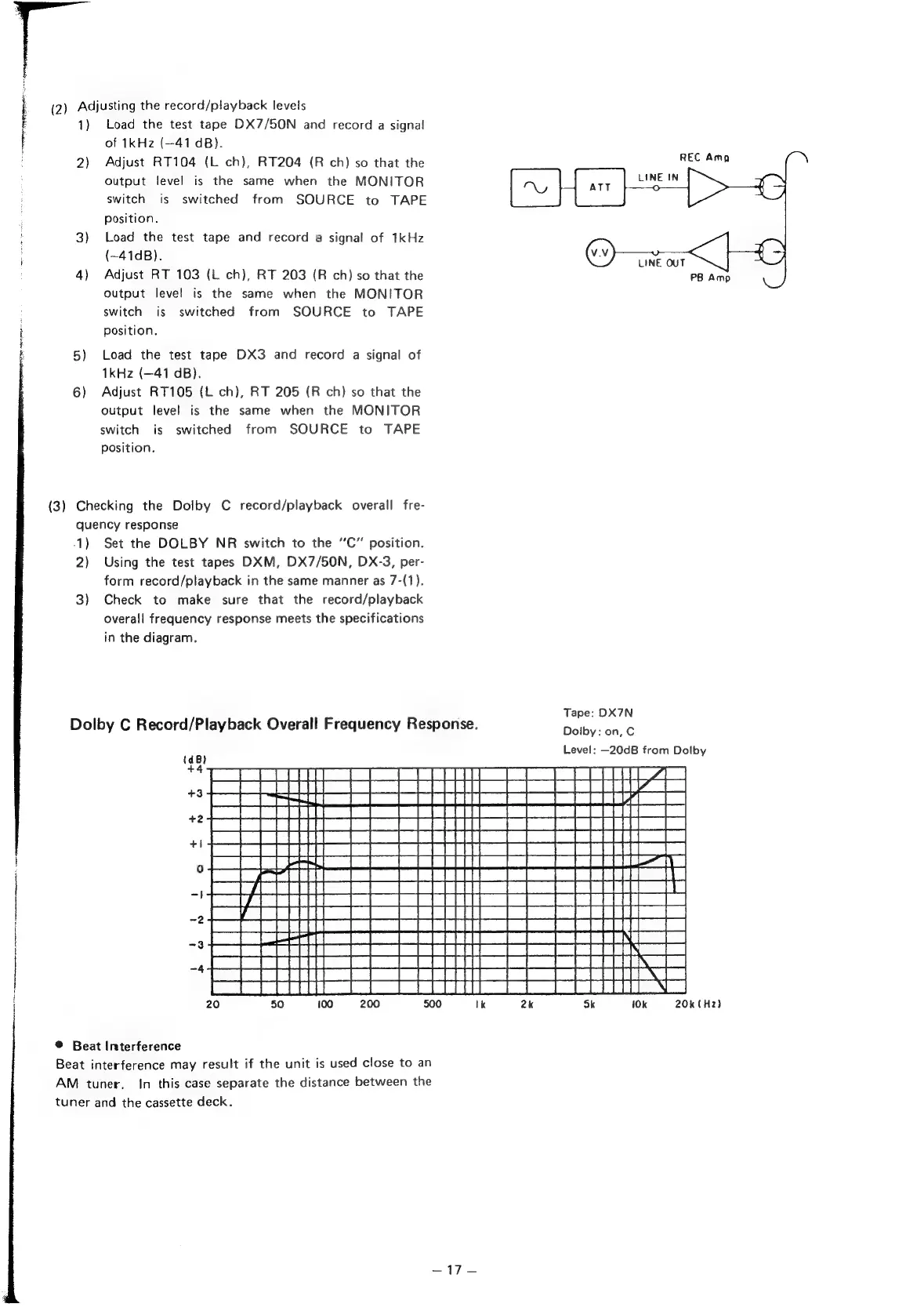
Checking
the
Dolby
C
record/playback
overall
fre-
quency
response
REC
Ama
LINE
IN
Ny
ATT
o
Ora
LINE
OUT
PB
Amp
1)
Set
the
DOLBY
NR
switch
to
the
‘‘C”
position.
2)
Using
the
test
tapes
DXM,
DX7/50N,
DX-3,
per-
form
record/playback
in
the
same
manner
as
7-(1).
3)
Check
to
make
sure
that
the
record/playback
overall
frequency
response
meets
the
specifications
in
the
diagram.
Tape:
DX7N
Dolby
C
Record/Playback
Overall
Frequency
Response.
raiwence
Level:
—20dB
from
Dolby
(dB)
+4
+3
+2
+1
0
|
re
|
A
-3
-4
®
Beat
Interference
Beat
interference
may
result
if
the
unit
is
used
close
to
an
AM
tuner.
In
this
case
separate
the
distance
between
the
tuner
and
the
cassette
deck.
10k
20k
(Hz)

Other manuals for Denon DR-M22

Related product manuals