EasyManua.ls Logo

Denon DR-M22 - Page 16

Denon DR-M22
31 pages
Print Icon
To Next Page IconTo Next Page
To Previous Page IconTo Previous Page
Loading...
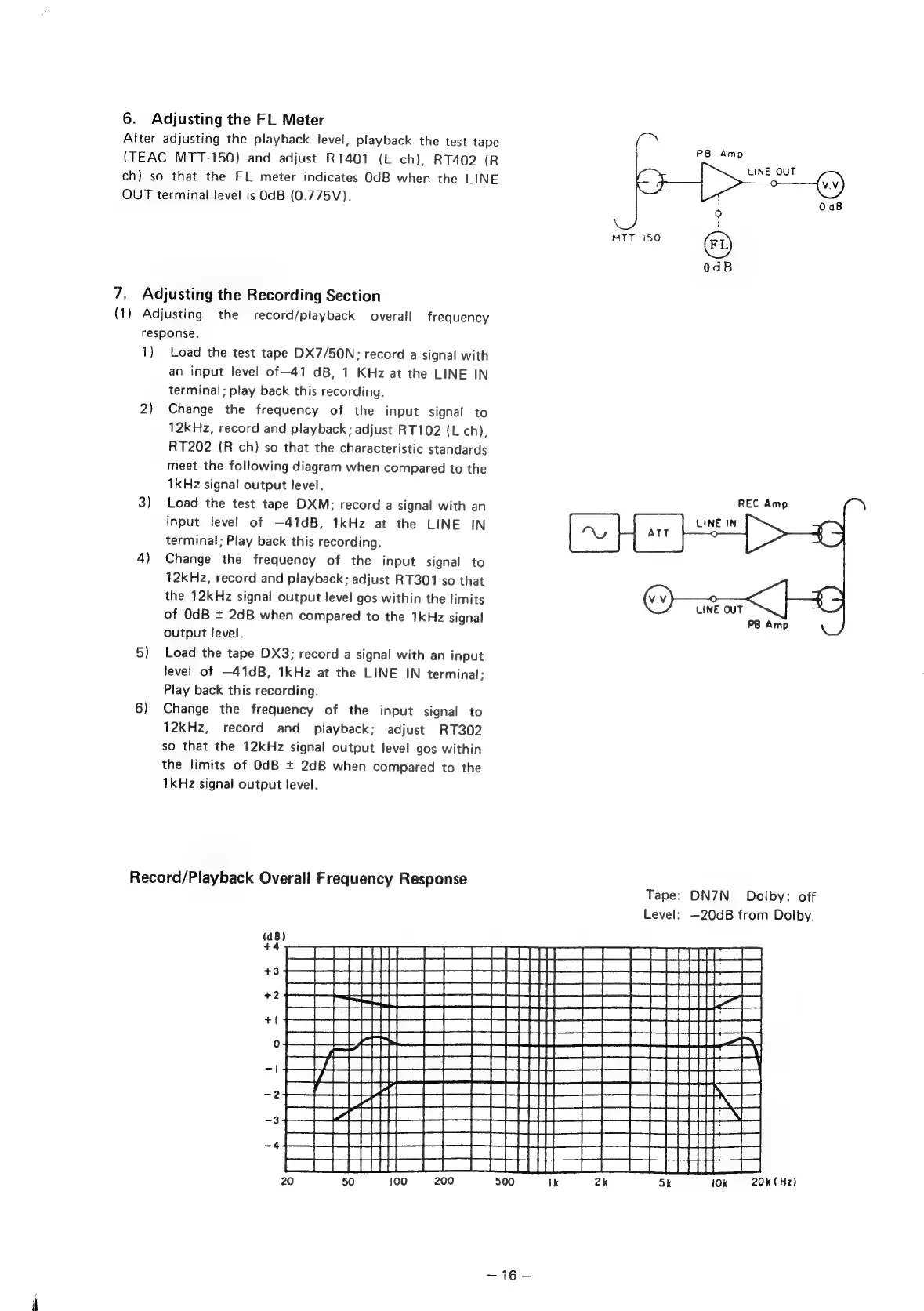
6.
Adjusting
the
FL
Meter
After
adjusting
the
playback
level,
playback
the
test
tape
ce
be
ag
(TEAC
MTT-150)
and
adjust
RT401
(L
ch),
RT402
(R
oe
out
ch)
so
that
the
FL
meter
indicates
OdB
when
the
LINE
>
‘o
(vv)
OUT
terminal
level
is
OdB
(0.775V).
0aB
°
MTT-i50
©)
0dB
7.
Adjusting
the
Recording
Section
(1)
Adjusting
the
record/playback
overall
frequency
response.
1)
Load
the
test
tape
DX7/50N:
record
a
signal
with
an
input
level
of—41
dB,
1
KHz
at
the
LINE
IN
terminal;
play
back
this
recording.
2)
Change
the
frequency
of
the
input
signal
to
12kHz,
record
and
playback;
adjust
RT102
(L
ch),
RT202
(R
ch)
so
that
the
characteristic
standards
meet
the
following
diagram
when
compared
to
the
1kHz
signal
output
level.
3)
Load
the
test
tape
DXM:
record
a
signal
with
an
input
level
of
—41dB,
1kHz
at
the
LINE
IN
terminal;
Play
back
this
recording.
4)
Change
the
frequency
of
the
input
signal
to
12kHz,
record
and
playback;
adjust
RT301
so
that
the
12kHz
signal
output
level
gos
within
the
limits
of
OdB
+
2dB
when
compared
to
the
1kHz
signal
output
level.
5)
Load
the
tape
DX3;
record
a
signal
with
an
input
level
of
—41dB,
1kHz
at
the
LINE
IN
terminal;
Play
back
this
recording.
6)
Change
the
frequency
of
the
input
signal
to
12kHz,
record
and
playback;
adjust
RT302
so
that
the
12kHz
signal
output
level
gos
within
the
limits
of
OdB
+
2dB
when
compared
to
the
1kHz
signal
output
level.
Record/Playback
Overall
Frequency
Response
Tape:
DN7N_
Dolby:
off
Level:
—20dB
from
Dolby,
BEREREEEE?URRRaEE
BANOBE
ELSREREE
PATENT
tN
Ok
(Hz)

Other manuals for Denon DR-M22

Related product manuals