EasyManua.ls Logo

Denon DRM-600 - Page 18

Denon DRM-600
36 pages
Print Icon
To Next Page IconTo Next Page
To Previous Page IconTo Previous Page
Loading...
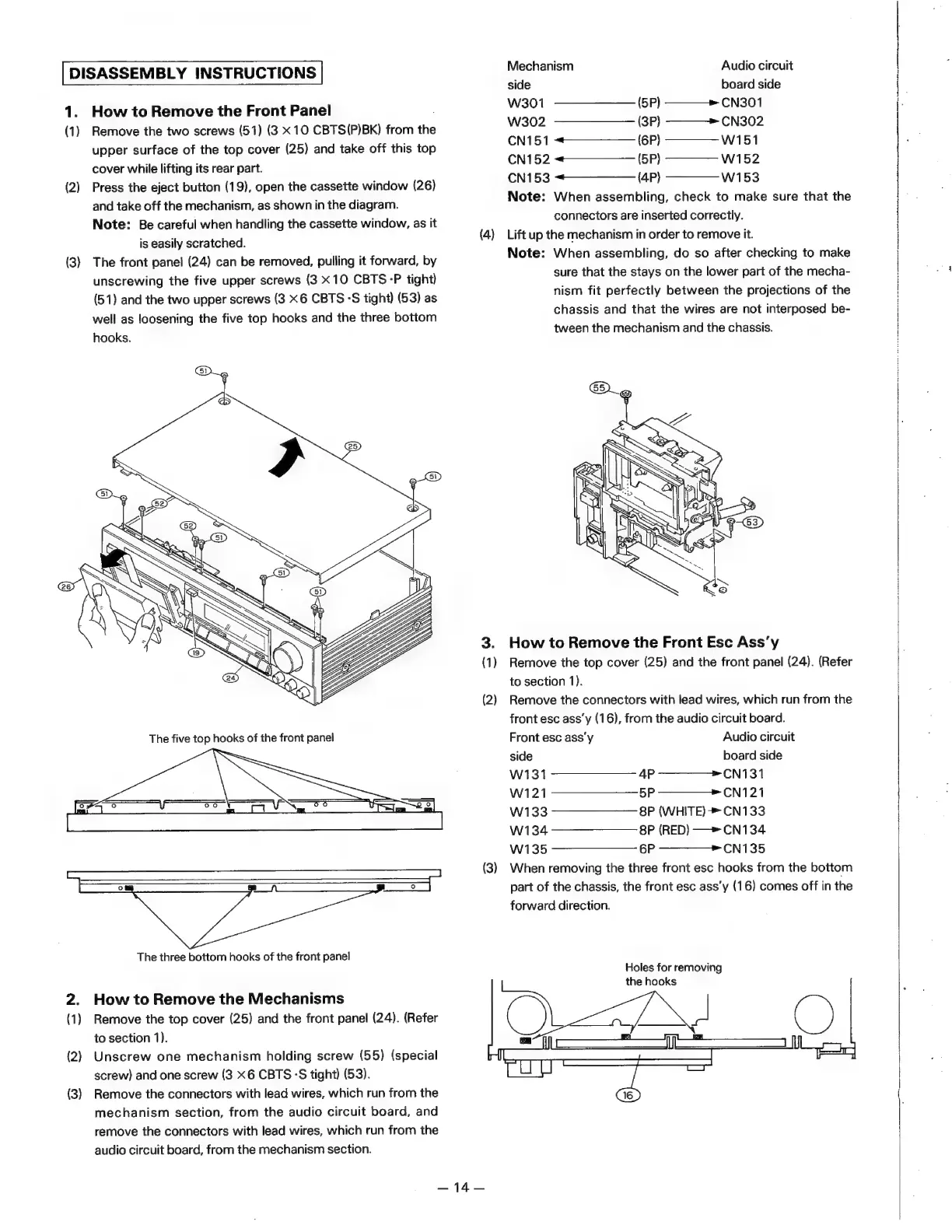
DISASSEMBLY
INSTRUCTIONS
1.
(1)
(2)
(3)
(1)
(2)
(3)
How
to
Remove
the
Front
Panel
Remove
the
two
screws
(51)
(3
x10
CBTS(P)BK)
from
the
upper
surface
of
the
top
cover
(25)
and
take
off
this
top
cover
while
lifting
its
rear
part.
Press
the
eject
button
(19),
open
the
cassette
window
(26)
and
take
off
the
mechanism,
as
shown
in
the
diagram.
Note:
Be
careful
when
handling
the
cassette
window,
as
it
is
easily
scratched.
The
front
panel
(24)
can
be
removed,
pulling
it
forward,
by
unscrewing
the
five
upper
screws
(3
X10
CBTS
-P
tight)
(51)
and
the
two
upper
screws
(3
6
CBTS
°S
tight)
(53)
as
well
as
loosening
the
five
top
hooks
and
the
three
bottom
hooks.
The
three
bottom
hooks
of
the
front
panel
How
to
Remove
the
Mechanisms
Remove
the
top
cover
(25)
and
the
front
panel
(24).
(Refer
to
section
1).
Unscrew
one
mechanism
holding
screw
(55)
(special
screw)
and
one
screw
(3
<6
CBTS°S
tight)
(53).
Remove
the
connectors
with
lead
wires,
which
run
from
the
mechanism
section,
from
the
audio
circuit
board,
and
remove
the
connectors
with
lead
wires,
which
run
from
the
audio
circuit
board,
from
the
mechanism
section.
(4)
(3)
—14—
Mechanism
Audio
circuit
side
board
side
W301
(5P)
———»
CN301
W302
(3P)
———->
CN302
CN151
<——————_
(6P)
————-W1151
CN152
«——————
(5P)
————_
W152
CN153
«———__
(4P)
————-W1153
Note:
When
assembling,
check
to
make
sure
that
the
connectors
are
inserted
correctly.
Lift
up
the
mechanism
in
order
to
remove
it.
Note:
When
assembling,
do
so
after
checking
to
make
sure
that
the
stays
on
the
lower
part
of
the
mecha-
nism
fit
perfectly
between
the
projections
of
the
chassis
and
that
the
wires
are
not
interposed
be-
tween
the
mechanism
and
the
chassis.
How
to
Remove
the
Front
Esc
Ass’y
Remove
the
top
cover
(25)
and
the
front
panel
(24).
(Refer
to
section
1).
Remove
the
connectors
with
lead
wires,
which
run
from
the
front
esc
ass’y
(16),
from
the
audio
circuit
board.
Front
esc
ass'y
Audio
circuit
side
board
side
W131
4P
———>-CN131
W121
5P
————+
CN121
W133
8P
(WHITE)
>
CN133
W134
8P
(RED)
—>
CN134
W135
6P
————_-CN135
When
removing
the
three
front
esc
hooks
from
the
bottom
part
of
the
chassis,
the
front
esc
ass’y
(16)
comes
off
in
the
forward
direction.
Holes
for
removing
the
hooks

Related product manuals