EasyManua.ls Logo

Denon DRM-600 - Page 19

Denon DRM-600
36 pages
Print Icon
To Next Page IconTo Next Page
To Previous Page IconTo Previous Page
Loading...
(1)
(2)
(3)
(1)
(2)
(3)
(4)
(5)
How
to
Remove
the
Meter
Circuit
Board
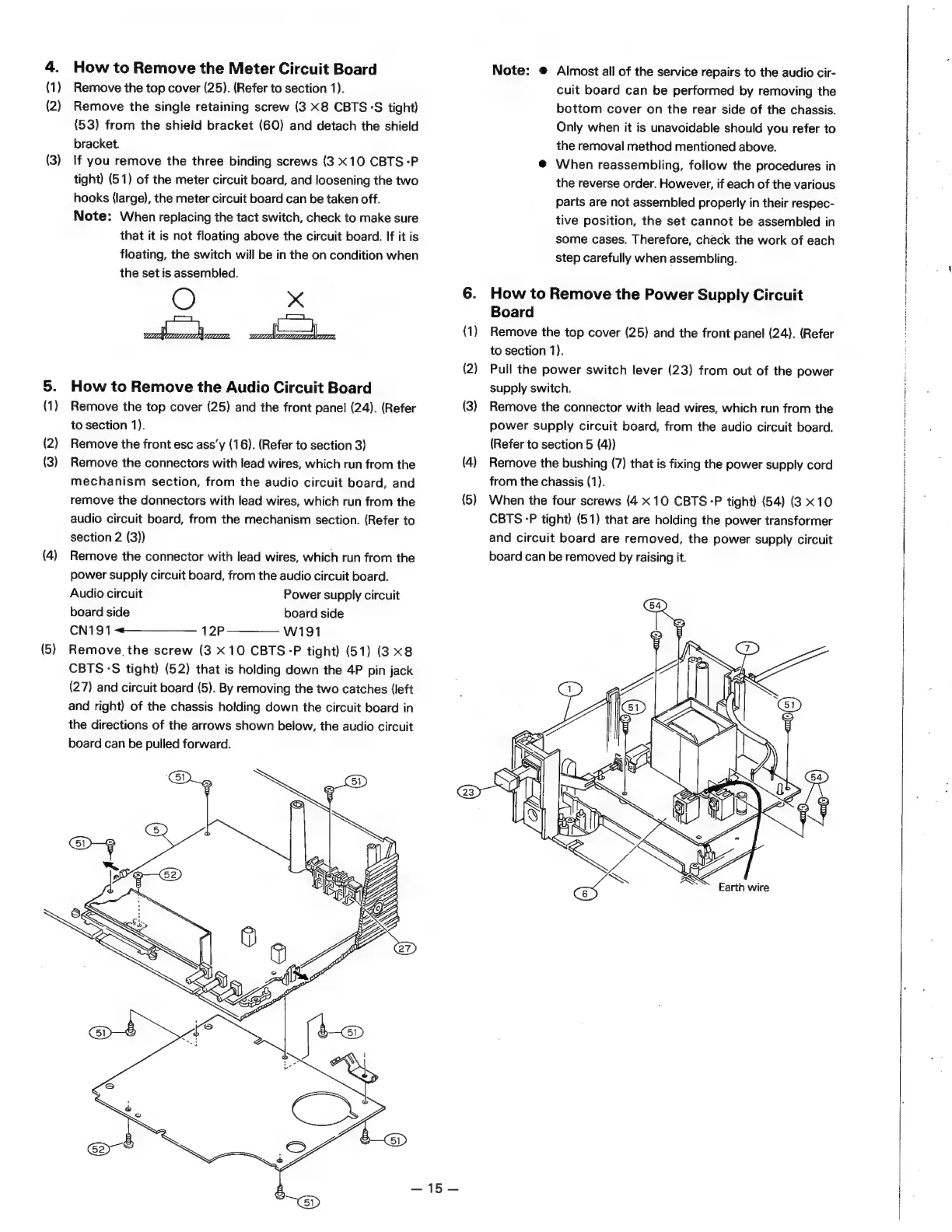
Remove
the
top
cover
(25).
(Refer
to
section
1).
Remove
the
single
retaining
screw
(3
x8
CBTS°S
tight)
(53)
from
the
shield
bracket
(60)
and
detach
the
shield
bracket.
if
you
remove
the
three
binding
screws
(3
X10
CBTS-P
tight)
(51)
of
the
meter
circuit
board,
and
loosening
the
two
hooks
(large),
the
meter
circuit
board
can
be
taken
off.
Note:
When
replacing
the
tact
switch,
check
to
make
sure
that
it
is
not
floating
above
the
circuit
board.
If
it
is
floating,
the
switch
will
be
in
the
on
condition
when
the
set
is
assembled.
xX
©
anes
ames
RE
Ta
How
to
Remove
the
Audio
Circuit
Board
Remove
the
top
cover
(25)
and
the
front
panel
(24).
(Refer
to
section
1).
Remove
the
front
esc
ass’y
(16).
(Refer
to
section
3)
Remove
the
connectors
with
lead
wires,
which
run
from
the
mechanism
section,
from
the
audio
circuit
board,
and
remove
the
donnectors
with
lead
wires,
which
run
from
the
audio
circuit
board,
from
the
mechanism
section.
(Refer
to
section
2
(3))
Remove
the
connector
with
lead
wires,
which
run
from
the
power
supply
circuit
board,
from
the
audio
circuit
board.
Audio
circuit
Power
supply
circuit
board
side
board
side
CN191<«——————_
12P
W191
Remove.
the
screw
(3
X10
CBTS-P
tight)
(51)
(3
x8
CBTS-S
tight)
(52)
that
is
holding
down
the
4P
pin
jack
(27)
and
circuit
board
(5).
By
removing
the
two
catches
(left
and
right)
of
the
chassis
holding
down
the
circuit
board
in
the
directions
of
the
arrows
shown
below,
the
audio
circuit
board
can
be
pulled
forward.
icy
BD
anf)
QB
(1)
(2)
(3)
(4)
(5)
=
|
Note:
©
Almost
all
of
the
service
repairs
to
the
audio
cir-
cuit
board
can
be
performed
by
removing
the
bottom
cover
on
the
rear
side
of
the
chassis.
Only
when
it
is
unavoidable
should
you
refer
to
the
removal
method
mentioned
above.
@
When
reassembling,
follow
the
procedures
in
the
reverse
order.
However,
if
each
of
the
various
parts
are
not
assembled
properly
in
their
respec-
tive
position,
the
set
cannot
be
assembled
in
some
cases.
Therefore,
check
the
work
of
each
step
carefully
when
assembling.
How
to
Remove
the
Power
Supply
Circuit
Board
Remove
the
top
cover
(25)
and
the
front
panel
(24).
(Refer
to
section
1).
Pull
the
power
switch
lever
(23)
from
out
of
the
power
supply
switch.
Remove
the
connector
with
lead
wires,
which
run
from
the
power
supply
circuit
board,
from
the
audio
circuit
board.
(Refer
to
section
5
(4))
Remove
the
bushing
(7)
that
is
fixing
the
power
supply
cord
from
the
chassis
(1).
When
the
four
screws
(4
x10
CBTS-P
tight)
(54)
(3
x10
CBTS
-P
tight)
(51)
that
are
holding
the
power
transformer
and
circuit
board
are
removed,
the
power
supply
circuit
board
can
be
removed
by
raising
it.
a
AS
Earth
wire

Related product manuals