EasyManua.ls Logo

Denon DRM-600 - OPERATING THE CASSETTE DECK; CONTROL PANEL AND TAPE FUNCTIONS

Denon DRM-600
36 pages
Print Icon
To Next Page IconTo Next Page
To Previous Page IconTo Previous Page
Loading...
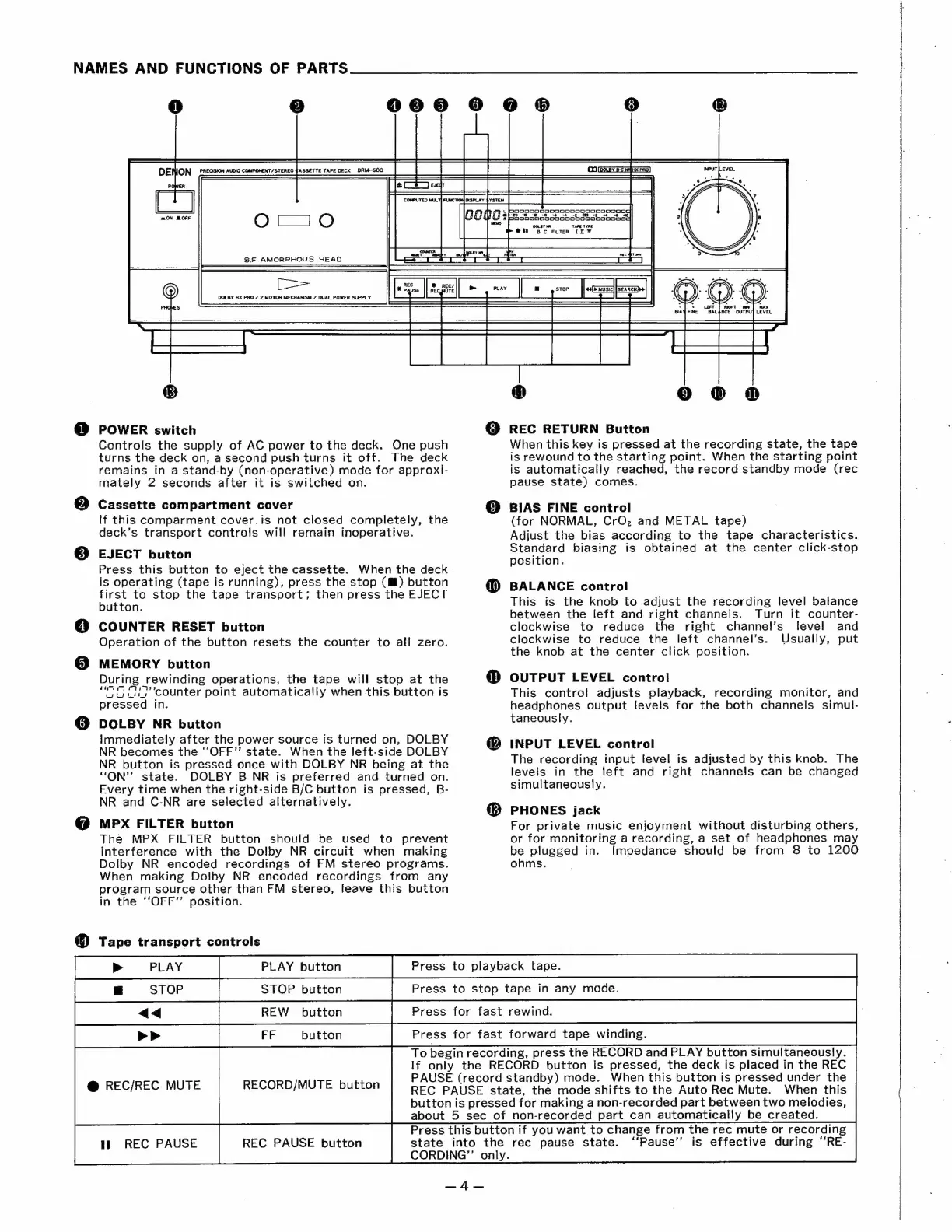
NAMES
AND
FUNCTIONS
OF
PARTS
3
4)
e
0
oonnoooooooRooooMNood
Se
ee,
es
es
OoOoOnoONnoSooooDooCoGgoH0000n0nG
OOLBY
TAPE
TYPE
@t)
Bc
FuTER
ID
W
POWER
switch
Controls
the
supply
of
AC
power
to
the
deck.
One
push
turns
the
deck
on,
a
second
push
turns
it
off.
The
deck
remains
in
a
stand-by
(non-operative)
mode
for
approxi-
mately
2
seconds
after
it
is
switched
on.
Cassette
compartment
cover
If
this
comparment
cover
is
not
closed
completely,
the
deck’s
transport
controls
will
remain
inoperative.
EJECT
button
Press
this
button
to
eject
the
cassette.
When
the
deck
.
is
operating
(tape
is
running),
press
the
stop
(™)
button
first
to
stop
the
tape
transport;
then
press
the
EJECT
button.
COUNTER
RESET
button
Operation
of
the
button
resets
the
counter
to
all
zero.
MEMORY
button
During
rewinding
operations,
the
tape
will
stop
at
the
“eG
Orcounter
point
automatically
when
this
button
is
pressed
in.
DOLBY
NR
button
Immediately
after
the
power
source
is
turned
on,
DOLBY
NR
becomes
the
‘“‘OFF’’
state.
When
the
left-side
DOLBY
NR
button
is
pressed
once
with
DOLBY
NR
being
at
the
“ON’’
state.
DOLBY
B
NR
is
preferred
and
turned
on.
Every
time
when
the
right-side
B/C
button
is
pressed,
B-
NR
and
C-NR
are
selected
alternatively.
MPX
FILTER
button
The
MPX
FILTER
button
should
be
used
to
prevent
interference
with
the
Dolby
NR
circuit
when
making
Dolby
NR
encoded
recordings
of
FM
stereo
programs.
When
making
Dolby
NR
encoded
recordings
from
any
program
source
other
than
FM
stereo,
leave
this
button
in
the
“‘OFF”’
position.
@
Tape
transport
controls
@
REC/REC
MUTE
1h
REC
PAUSE
REC
PAUSE
button
To
begin
recording,
press
the
RECORD
and
PLAY
button
simultaneously.
If
only
the
RECORD
button
is
pressed,
the
deck
is
placed
in
the
REC
PAUSE
(record
standby)
mode.
When
this
button
is
pressed
under
the
REC
PAUSE
state,
the
mode
shifts
to
the
Auto
Rec
Mute.
When
this
button
is
pressed
for
making
a
non-recorded
part
between
two
melodies,
about
5
sec
of
non-recorded
part
can
automatically
be
created.
Press
this
button
if
you
want
to
change
from
the
rec
mute
or
recording
state
into
the
rec
pause
state.
CORDING”’
only.
RECORD/MUTE
button
Al
ces
@
REC
RETURN
Button
When
this
key
is
pressed
at
the
recording
state,
the
tape
is
rewound
to
the
starting
point.
When
the
starting
point
is
automatically
reached,
the
record
standby
mode
(rec
pause
state)
comes.
©
BIAS
FINE
control
(for
NORMAL,
CrO,
and
METAL
tape)
Adjust
the
bias
according
to
the
tape
characteristics.
Standard
biasing
is
obtained
at
the
center
click-stop
position.
BALANCE
control
This
is
the
knob
to
adjust
the
recording
level
balance
between
the
left
and
right
channels.
Turn
it
counter-
clockwise
to
reduce
the
right
channel’s
level
and
clockwise
to
reduce
the
left
channel’s.
Usually,
put
the
knob
at
the
center
click
position.
OUTPUT
LEVEL
control
This
control
adjusts
playback,
recording
monitor,
and
headphones
output
levels
for
the
both
channels
simul-
taneously.
INPUT
LEVEL
control
The
recording
input
level
is
adjusted
by
this
knob.
The
levels
in
the
left
and
right
channels
can
be
changed
simultaneously.
PHONES
jack
For
private
music
enjoyment
without
disturbing
others,
or
for
monitoring
a
recording,
a
set
of
headphones
may
be
plugged
in.
Impedance
should
be
from
8
to
1200
ohms.
“Pause”’
is
effective
during
‘‘RE-

Related product manuals