EasyManua.ls Logo

Denon DRM-600 - ADVANCED FUNCTIONS AND MAINTENANCE

Denon DRM-600
36 pages
Print Icon
To Next Page IconTo Next Page
To Previous Page IconTo Previous Page
Loading...
REC/REC
MUTE
-
REC
PAUSE
BUTTON
1.
TAPE
COUNTER
AND
MEMORY
STOP
1)
When
you
want
to
make
about
5
sec
of
non-recorded
3.
part
after
the
recording
state:
Press
the
REC/REC
MUTE
button.
The
recorder
wil!
auto-
matically
create
about
5
sec
of
non-recorded
part
and
4
will
stay
in
the
recording
standby
state.
:
To
create
about
5
sec
of
non-recorded
part
after
the
standby
state:
Press
the
REC/REC
MUTE
button,
and
the
recorder
will
enter
the
non-recording
state,
automatically
create
about
5
sec
of
non-recorded
part
and
stay
in
the
standby
state.
To
cancel
the
non-recording
state
(the
REC
MUTE
state):
Press
the
REC
PAUSE
button,
and
the
recorder
will
cancel
the
non-recording
state
and
will
stay
in
the
standby
state.
To
extend
the
non-recording
state
(the
REC
MUTE
state)
for
further
5
sec
or
more:
Press
the
REC/REC
MUTE
button,
and
the
non-recorded
part
will
automatically
be
extended
for
another
5
sec.
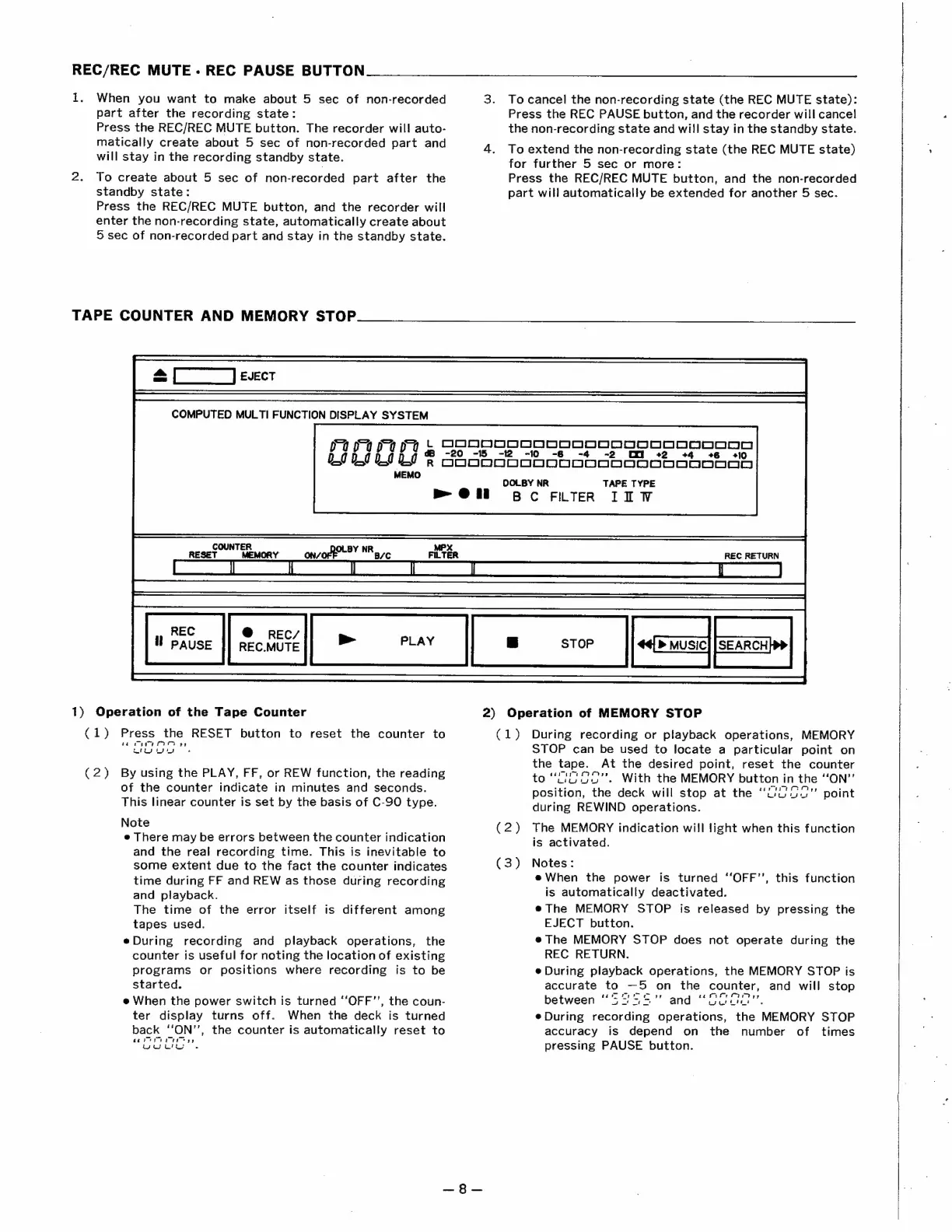
>
@
il
COUNTER
MPX
RESET
MEMORY
ON?
of
LBY
bats
B/C
FILTER
70
§
GeoosSsoooosoossoonooonn
LIL!
®
GoooooooboDDoDoODoDoODOoODoOSo
-t2
-10
cy
+4
+6
=
«+10
OLBY
NR
TAPE
TYPE
Bc
FILTER
II
W
REC
RETURN
REC
@
REC/
HW
pause
|]
RECMUTE
>
PLAY
-
STOP
>
MUSIC]
[SEARCH
Operation
of
the
Tape
Counter
2)
(1)
Press
the
RESET
button
to
reset
the
counter
to
ee
hee
eee
ww
wus
(2)
By
using
the
PLAY,
FF,
or
REW
function,
the
reading
of
the
counter
indicate
in
minutes
and
seconds.
This
linear
counter
is
set
by
the
basis
of
C-90
type.
Note
e
There
may
be
errors
between
the
counter
indication
and
the
real
recording
time.
This
is
inevitable
to
some
extent
due
to
the
fact
the
counter
indicates
time
during
FF
and
REW
as
those
during
recording
and
playback.
The
time
of
the
error
itself
is
different
among
tapes
used.
eDuring
recording
and
playback
operations,
the
counter
is
useful
for
noting
the
location
of
existing
programs
or
positions
where
recording
is
to
be
started.
e
When
the
power
switch
is
turned
‘“‘OFF’’,
the
coun-
ter
display
turns
off.
When
the
deck
is
turned
back
‘‘ON’’,
the
counter
is
automatically
reset
to
cee
yy
veuli
Operation
of
MEMORY
STOP
(1)
During
recording
or
playback
operations,
MEMORY
STOP
can
be
used
to
locate
a
particular
point
on
the
tape.
At
the
desired
point,
reset
the
counter
to
“UiG.
G0".
With
the
MEMORY
button
in
the
“ON”
position,
the
deck
will
stop
at
the
“uuu.”
point
during
REWIND
operations.
(2)
The
MEMORY
indication
will
light
when
this
function
is
activated.
(3)
Notes:
e
When
the
power
is
turned
‘‘OFF’’,
this
function
is
automatically
deactivated.
®
The
MEMORY
STOP
is
released
by
pressing
the
EJECT
button.
e
The
MEMORY
STOP
does
not
operate
during
the
REC
RETURN.
e
During
playback
operations,
the
MEMORY
STOP
is
accurate
to
—5
on
the
counter,
and
will
stop
between
“S755
and
“COGa"
e
During
recording
operations,
the
MEMORY
STOP
accuracy
is
depend
on
the
number
of
times
pressing
PAUSE
button.

Related product manuals