EasyManua.ls Logo

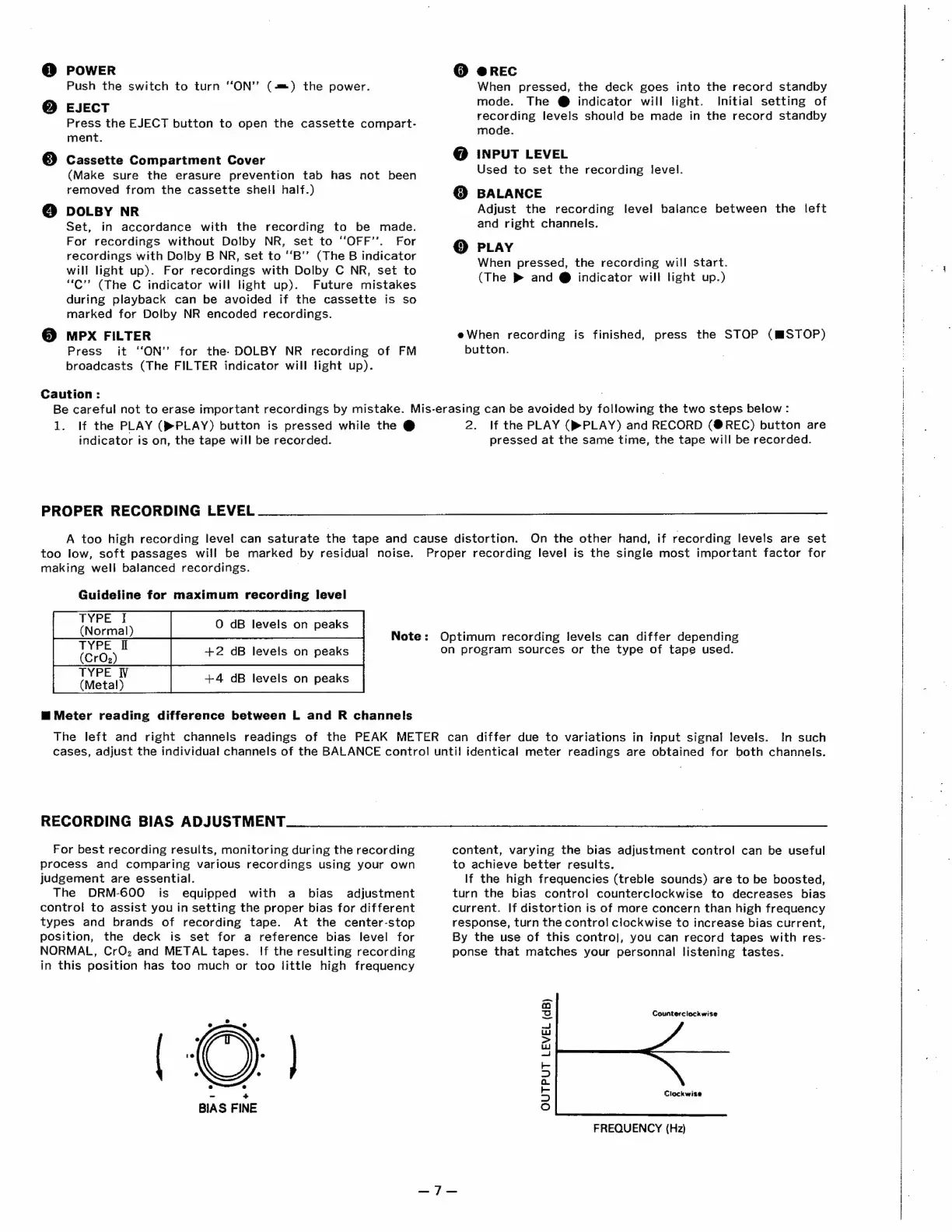
Denon DRM-600 - RECORDING OPTIMIZATION

Denon DRM-600
36 pages
Print Icon
To Next Page IconTo Next Page
To Previous Page IconTo Previous Page
Loading...
@
POWER
Push
the
switch
to
turn
“ON”
(-m=)
the
power.
@
EJECT
Press
the
EJECT
button
to
open
the
cassette
compart-
ment.
assette
Compartment
Cover
©
Cassette
C
tment
C
(Make
sure
the
erasure
prevention
tab
has
not
been
removed
from
the
cassette
shell
half.)
@
DOLBY
NR
Set,
in
accordance
with
the
recording
to
be
made.
For
recordings
without
Dolby
NR,
set
to
“‘OFF’’.
For
recordings
with
Dolby
B
NR,
set
to
‘‘B’’
(The
B
indicator
will
light
up).
For
recordings
with
Dolby
C
NR,
set
to
“C”’
(The
C
indicator
will
light
up).
Future
mistakes
during
playback
can
be
avoided
if
the
cassette
is
so
marked
for
Dolby
NR
encoded
recordings.
MPX
FILTER
Press
it
“‘ON’”’
for
the:
DOLBY
NR
recording
of
FM
broadcasts
(The
FILTER
indicator
will
light
up).
Caution:
@
@REC
When
pressed,
the
deck
goes
into
the
record
standby
mode.
The
@
indicator
will
light.
Initial
setting
of
recording
levels
should
be
made
in
the
record
standby
mode.
@
INPUT LEVEL
Used
to
set
the
recording
level.
@
BALANCE
Adjust
the
recording
level
balance
between
the
left
and
right
channels.
@
PLAY
When
pressed,
the
recording
will
start.
(The
®
and
@
indicator
will
light
up.)
eWhen
recording
is
finished,
press
the
STOP
(MSTOP)
button.
Be
careful
not
to
erase
important
recordings
by
mistake.
Mis-erasing
can
be
avoided
by
following
the
two
steps
below
:
1.
If
the
PLAY
(®PLAY)
button
is
pressed
while
the
@
indicator
is
on,
the
tape
will
be
recorded.
PROPER
RECORDING
LEVEL
2.
If
the
PLAY
(®PLAY)
and
RECORD
(@REC)
button
are
pressed
at
the
same
time,
the
tape
will
be
recorded.
A
too
high
recording
level
can
saturate
the
tape
and
cause
distortion.
On
the
other
hand,
if
recording
levels
are
set
too
low,
soft
passages
will
be
marked
by
residual
noise.
making
well
balanced
recordings.
Guideline
for
maximum
recording
level
Ate
O
dB
levels
on
peaks
(Gr0;)
t
+2
dB
levels
on
peaks
iMCEaD):
+4
dB
levels
on
peaks
m™@
Meter
reading
difference
between
L
and
R
channels
Note:
Proper
recording
level
is
the
single
most
important
factor
for
Optimum
recording
levels
can
differ
depending
on
program
sources
or
the
type
of
tape
used.
The
left
and
right
channels
readings
of
the
PEAK
METER
can
differ
due
to
variations
in
input
signal
levels.
In
such
cases,
adjust
the
individual
channels
of
the
BALANCE
control
unti!
identical
meter
readings
are
obtained
for
both
channels.
RECORDING
BIAS
ADJUSTMENT
For
best
recording
results,
monitoring
during
the
recording
process
and
comparing
various
recordings
using
your
own
judgement
are
essential.
The
DRM-600
is
equipped
with
a
bias
adjustment
control
to
assist
you
in
setting
the
proper
bias
for
different
types
and
brands
of
recording
tape.
At
the
center-stop
position,
the
deck
is
set
for
a
reference
bias
level
for
NORMAL,
CrOz
and
METAL
tapes.
If
the
resulting
recording
in
this
position
has
too
much
or
too
little
high
frequency
-
+
BIAS
FINE
content,
varying
the
bias
adjustment
control
can
be
useful
to
achieve
better
results.
If
the
high
frequencies
(treble
sounds)
are
to
be
boosted,
turn
the
bias
control
counterclockwise
to
decreases
bias
current.
If
distortion
is
of
more
concern
than
high
frequency
response,
turn
the
control
clockwise
to
increase
bias
current,
By
the
use
of
this
contro],
you
can
record
tapes
with
res-
ponse
that
matches
your
personnal
listening
tastes.
Counterclockwise
Clockwise
OUTPUT
LEVEL
(dB)
FREQUENCY
(Hz)

Related product manuals