EasyManua.ls Logo

Denon DRM-600 - PLAYBACK AND RECORDING OPERATIONS; PLAYBACK AND RECORDING PROCEDURES

Denon DRM-600
36 pages
Print Icon
To Next Page IconTo Next Page
To Previous Page IconTo Previous Page
Loading...
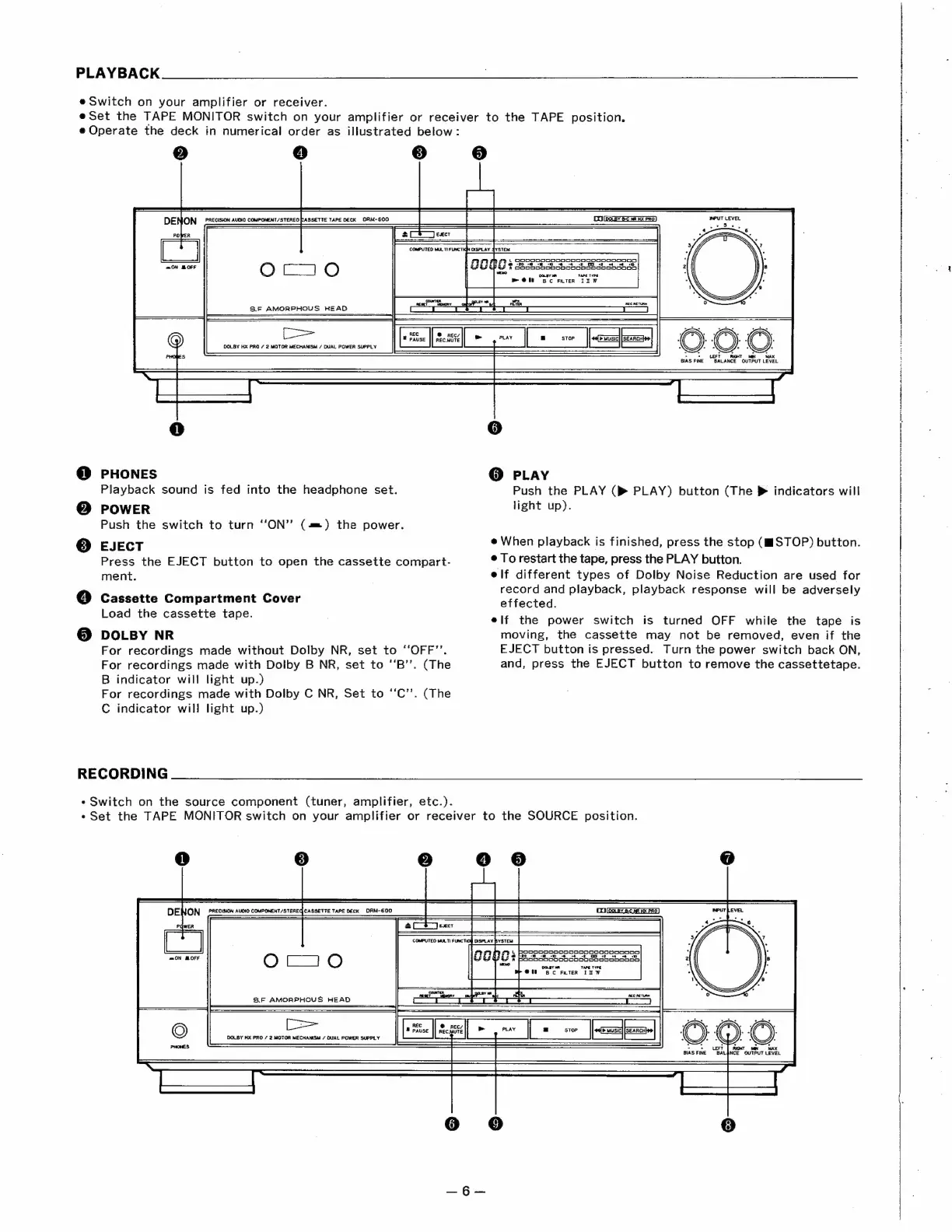
PLAYBACK
@
Switch
on
your
amplifier
or
receiver.
eSet
the
TAPE
MONITOR
switch
on
your
amplifier
or
receiver
to
the
TAPE
position.
e
Operate
the
deck
in
numerical
order
as
illustrated
below:
3)
e
4)
3]
L
OoOpoDooOoDoOoODoOoOoScReooNANno
@
“90-3
-e
©
6
5
2
OE
oe
&
OOCODoODoDAoOCoooOcAAANooo!
OOLEY
aN
TAPE TYPE
=
@
Bc
FLIER
IZDW
PHONES
Playback
sound
is
fed
into
the
headphone
set.
POWER
Push
the
switch
to
turn
‘‘ON’’
(4m)
the
power.
EJECT
Press
the
EJECT
button
to
open
the
cassette
compart-
ment.
Cassette
Compartment
Cover
Load
the
cassette
tape.
DOLBY
NR
For
recordings
made
without
Dolby
NR,
set
to
“OFF’’.
For
recordings
made
with
Dolby
B
NR,
set
to
‘‘B’’.
(The
B
indicator
will
light
up.)
For
recordings
made
with
Dolby
C
NR,
Set
to
‘‘C’’.
(The
C
indicator
will
light
up.)
RECORDING
*
Switch
on
the
source
component
(tuner,
amplifier,
etc.).
@
PLAY
Push
the
PLAY
(pm
PLAY)
button
(The
>
indicators
will
light
up).
e
When
playback
is
finished,
press
the
stop
(gi
STOP)
button.
e
To
restart
the
tape,
press
the
PLAY
button.
elf
different
types
of
Dolby
Noise
Reduction
are
used
for
record
and
playback,
playback
response
will
be
adversely
effected.
elf
the
power
switch
is
turned
OFF
while
the
tape
is
moving,
the
cassette
may
not
be
removed,
even
if
the
EJECT
button
is
pressed..
Turn
the
power
switch
back
ON,
and,
press
the
EJECT
button
to
remove
the
cassettetape.
«Set
the
TAPE
MONITOR
switch
on
your
amplifier
or
receiver
to
the
SOURCE
position.
L
PORPoOoKoOooOBoNAGooCoo00oDennDD
cto
-0
-@
=
6
4
-t
CO
ef
+4
+
10
8
PoOooDonoCoOoCoCoDORoOoODCADo
Onsy
TAPE
TYPE
@t
Bc
FKTER
In
W
©:
©
r(
>
-eOLEFT
|
mcr
ow
MAX
BIAS
FINE
BALANCE
OUTPUT
LEVEL

Related product manuals