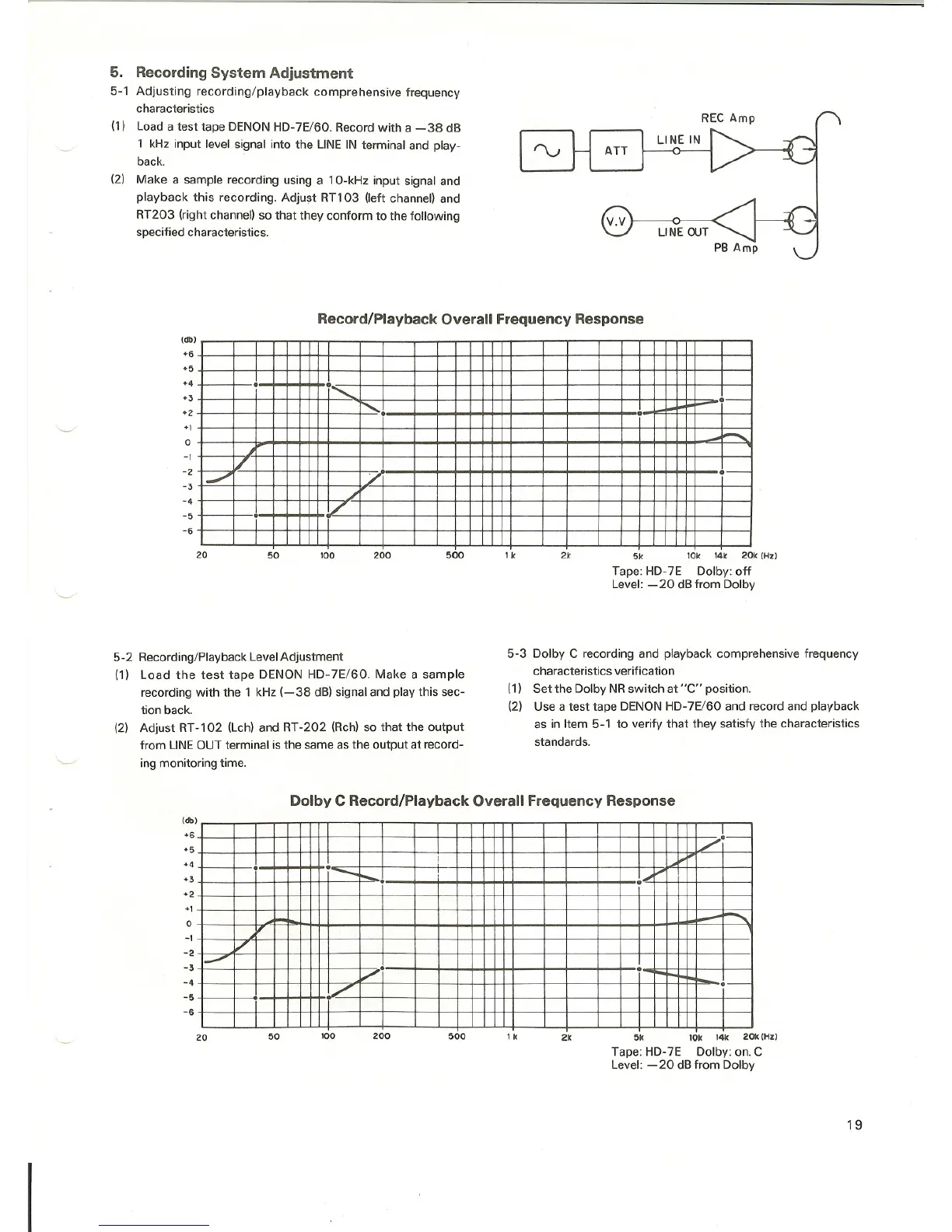
5. Recording System Adjustment
5-1 Adjusting recording/playback comprehensive frequency
characteristics
(1) Load a test tape DENON HD-7E/60. Record with a -38 dB
1 kHz input level signal into the LINE IN terminal and play-
back.
(2) Make a sample recording using a 10-kHz input signal and
playback this recording. Adjust RT103 (left channel) and
RT203 (right channel) so that they conform to the following
specified characteristics.
V.V
LI NE OUT
PB Amp
Record/Playback Overall Frequency Response
(db)
+6
+5
+4
+3
+2
+1
o
-1
-2
-3
-4
-5
-6
I
I
1· ...•...•...
'.
_.-
•
..........•.
/
-'
/
.-
~
./
·
20
50
100 200 500
1k
2k
5k 10k 14k 20k (Hz)
Tape: HD-7E Dolby: off
Level: -20 dB from Dolby
5-2 Recording/Playback Level Adjustment
(1) Load the test tape DENON HD-7E/60. Make a sample
recording with the 1 kHz (-38 dB) signal and play this sec-
tion back.
(2) Adjust RT-102 (Lch) and RT-202 (Rch) so that the output
from LINEOUT terminal is the same as the output at record-
ing monitoring time.
5-3 Dolby C recording and playback comprehensive frequency
characteristics verification
(1) Set the Dolby NR switch at "C" position.
(2) Use a test tape DENON HD-7E/60 and record and playback
as in Item 5-1 to verify that they satisfy the characteristics
standards.
Dolby C Record/Playback Overall Frequency Response
(db)
+6
+5
+4
+3
+2
+1
o
-1
-2
-3
-4
-5
-6
I
I
./0-
I
I
1
,
•
--.....•... ,,~
•
•
•....
~
"
/
.-'
•
/.
1""-_
•...
1/
•
OJ
20
50
100
200 500
2k
5k 10k 14k 20k (Hz)
Tape: HD-7E Dolby: on. C
Level: - 20 dB from Dolby
19



 To Next Page