ii_P i _il. L.--JLj LJ it- mmmm
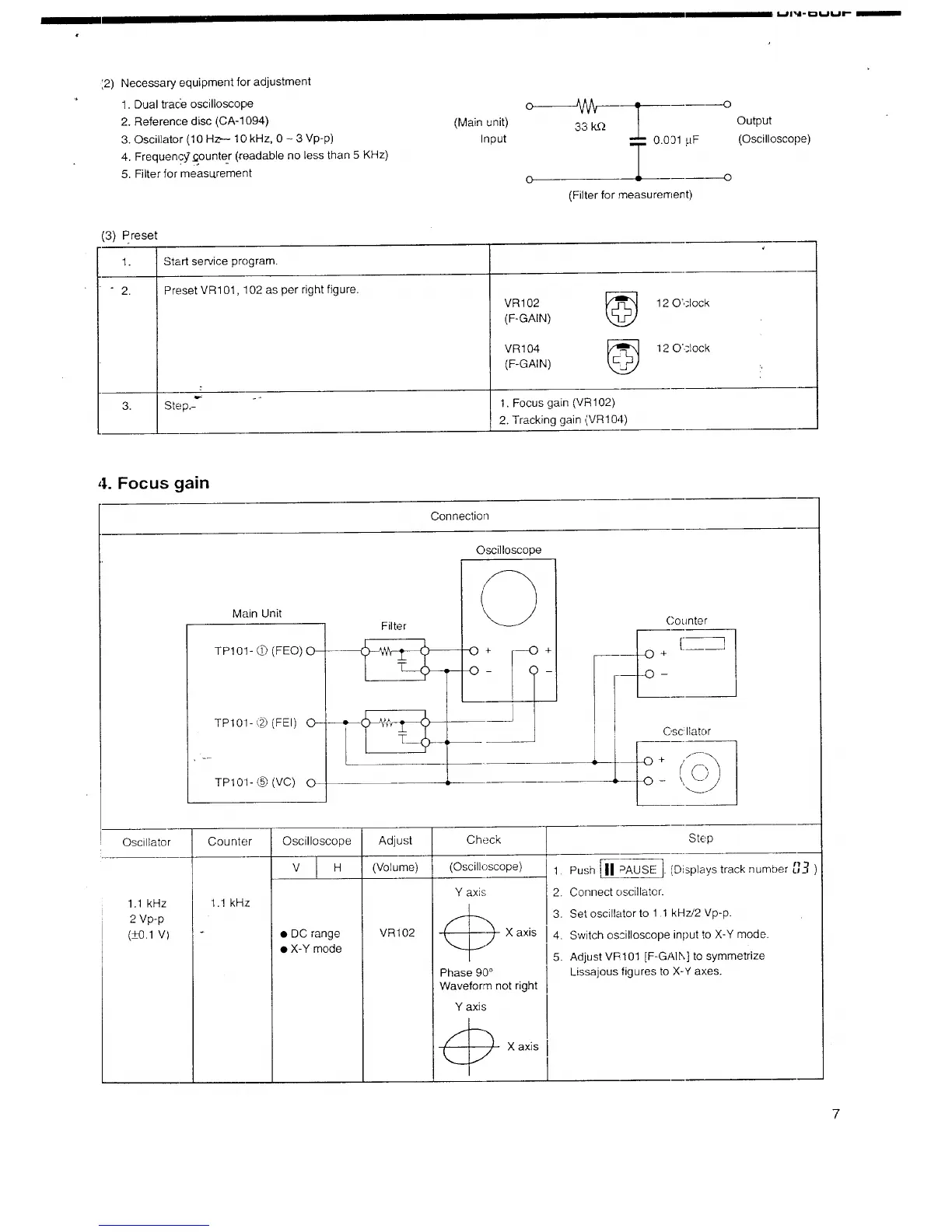
:2) Necessary equipment for adjustment
1. Dual tracie oscilloscope
2. Reference disc (CA-1094)
3. Oscillator (10 Hz,-- 10 kHz, 0 - 3 Vp-p)
4. Frequen,?_._ounte_r (_r_adable no less than 5 KHz)
5. Filter for measu.rement
(Main unit)
Input
33 k_Q Output
0.091 pF (Oscilloscope)
T o
o
(Filter for measuren'lent)
(3) Preset
1.
" " 2,
Start service program.
Preset VR101, 102 as per right figure.
VR102
(F-GAIN)
3. Step.- 1. Focus gain (VR 102)
2. Tracking gain (VR104)
VR 104
kL2J
(F-GAIN)
12 O'clock
12 O'ciock
4. Focus gain
Connection
Main Unit
TP101- L[-')(FEO) O--
TP101- (_ (FEI) 0--
TPI01- @ (VC) 0
Filter
Oscilloscope
C'ounter
! C'sc Ilator
Oscillator
1.1 kHz
2 Vp-p
(_+0.1V)
Counter
Oscilloscope
V H
Adjust
(Volume)
Check
(Oscilloscope)
1.1 kHz
• DC range
• X-Y mode
VR102
Y axis
C)
Phase 90 °
X axis
Step
1. Push [11#AUSE '1(Displays track number
2. Connect oscillator.
3. Set oscillator to 1.1 kHz/2 Vp-p.
4. Switch oscilloscope input to
X-Y mode.
5. Adjust VR101 [F-G to symmetrize
: Lissajous figures tc X-Y axes.
Waveform not right
Y axis
7



 To Next Page
 Loading...