EasyManua.ls Logo

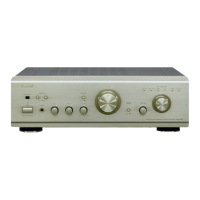
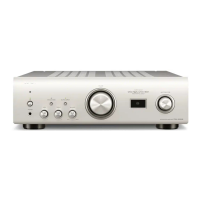
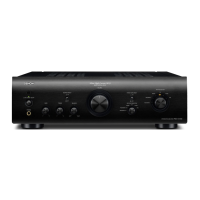
Denon PMA-1510AE - User Manual

Denon PMA-1510AE
17 pages
Print Icon
To Next Page IconTo Next Page
Loading...
INTEGRATED AMPLIFIER
PMA-1510AE
Owner’s Manual
Bedienungsanleitung
Manuel de l’Utilisateur
Manuale delle istruzioni
Manual del usuario
Gebruiksaanwijzing
Bruksanvisning
1.PMA1510AEE2_ENG_002_5th_0222.indd 1 2010/02/23 15:55:12

Questions and Answers

  • M
    Megan MccarthyAug 15, 2025
    What to do if my Denon PMA-1510AE Amplifier power switches off suddenly and the power indicator flashes red?
    • A
      Adam BurgessAug 15, 2025
      This issue can occur if you are using a speaker with impedance not supported by your unit, or if the protection circuit has been activated because the core wires of different speaker cables have touched or a core wire slipped out of the terminal and is touching the unit’s rear panel. Please use speakers with the specified impedance. Unplug the power cord, twist the core wires together tightly, effect termination treatments, and reconnect.
  • A
    Amy KramerAug 18, 2025
    What to do if my Denon PMA-1510AE Amplifier power switches off suddenly and the power indicator flashes in red?
    • B
      bmoralesAug 18, 2025
      The protection circuit may be activated due to a temperature rise in the internal parts of the unit. Switch off the power immediately and re-apply it after the body temperature has sufficiently cooled down. Also, ensure the unit is re-installed in a location with good ventilation.
  • J
    Jacob FisherAug 21, 2025
    Why does my Denon Amplifier power indicator light but no sound is produced?
    • M
      Michael PatelAug 21, 2025
      This can occur due to several reasons: the speaker cables or the input cable are not fully connected, the wrong device input is selected, or the volume control is set to minimum. Ensure all cables are securely connected, the correct input is selected, and the volume is set to an appropriate level.
  • S
    Sandra HansonAug 25, 2025
    How to fix reversed stereo sound on my Denon PMA-1510AE Amplifier?
    • E
      ejohnsonAug 26, 2025
      If the left and right stereo sound is reversed, the connections of the speakers or input cables are likely reversed. Check the connections to ensure that the left channel is connected to the left speaker and the right channel to the right speaker.
  • A
    Amanda VelasquezAug 27, 2025
    What to do if my Denon PMA-1510AE is only producing sound from one speaker?
    • W
      Wesley DiazAug 27, 2025
      If sound is only coming from one speaker, it could be due to a few reasons: the speaker cables or the input cable are not fully connected, or the left/right balance is off. Ensure all cables are securely connected and adjust the balance with the balance control knob.
  • A
    Amanda SanchezAug 30, 2025
    What to do if the Denon PMA-1510AE Amplifier power indicator flashes red even after applying power?
    • S
      Stephanie BurkeAug 30, 2025
      If the power display flashes red even after applying power, it indicates that the amplifier circuit has failed. Switch off the power and contact the DENON service advisor.
  • K
    Kathryn MartinSep 2, 2025
    How to stop howling when playing records on my Denon Amplifier?
    • R
      Renee AvilaSep 2, 2025
      Howling during record playback at high volumes can occur if the player and speakers are too close together, or if vibrations from the speakers are being transmitted to the player through the floor. Install the player and speakers as far apart as possible and use cushions to absorb the speakers’ vibrations.
  • K
    Kerry RobinsonSep 6, 2025
    Why is there a humming sound when playing records on my Denon Amplifier?
    • A
      Anthony GonzalezSep 6, 2025
      A humming sound during record playback can be caused by several factors: the player’s ground wire is not connected, the cables are not fully connected to the PHONO terminals, or interference from a nearby TV or VCR. Ensure the ground wire is securely connected, all cables are fully connected, and try repositioning the devices.
  • P
    Paige FryeSep 8, 2025
    What causes distorted sound when playing a record on my Denon PMA-1510AE?
    • J
      jacob77Sep 8, 2025
      Distorted sound during record playback can be due to incorrect needle pressure, dirt on the tip of the needle, or a defective cartridge. Adjust to the correct needle pressure, check the tip of the needle for dirt, and consider replacing the cartridge if necessary.
  • M
    Melissa LunaSep 12, 2025
    Why is my Denon PMA-1510AE not turning on?
    • H
      Heather KingSep 12, 2025
      If the power indicator does not light up and no sound is produced when you turn on the power, the power cord’s plug may not be fully plugged in. Check if the cord is securely inserted into the unit’s AC inlet and the wall power outlet.

Summary

Safety Precautions

Risk of Electric Shock Warning

Warning about not removing the cover and referring servicing to qualified personnel.

Important Safety Instructions

List of essential safety guidelines for operating the apparatus.

Hot Surface Caution

Caution regarding hot surfaces and the need to avoid touching them.

Power Disconnection Instructions

Instructions on how to completely disconnect the product from the mains power supply.

General Warnings and Precautions

Handling and Environmental Safety

Warnings about high temperatures, moisture, dust, foreign objects, and chemicals.

Power Cord, Ventilation, and Flame Safety

Precautions regarding power cord handling, ventilation, and flame sources.

Placement and Liquid Exposure Warnings

Warnings about unit placement, liquids, and cord handling.

Power Status When Unit is Off

Information about the equipment's power status when switched off.

Regulatory Compliance and Installation Cautions

Declaration of Conformity and Recycling

Statement of conformity to standards and information on recycling packaging and batteries.

Installation Cautions for Heat Dispersal

Advice on proper heat dispersal and placement to avoid overheating and ensure ventilation.

Getting Started

Key Features and Technologies

Highlights key technologies like UHC (Ultra High Current)-MOS and large potentiometer.

Handling and Usage Cautions

General advice on handling the unit, including power, condensation, and mobile phone interference.

Remote Control Overview

Details on using the remote control, inserting batteries, and operating range.

Component Identification

Overview of front and rear panel part names and their functions.

Handling Cautions

Pre-Operation Checks and Moving Procedures

Pre-operation checks for connections and steps for safely moving the unit.

Condensation and Mobile Phone Interference

Advice on handling condensation and potential mobile phone interference.

Remote Control Usage Details

Battery Insertion and Operating Range

Step-by-step guide to insert batteries and information on operating range.

Remote Sensor Operating Conditions

Information on optimal operating conditions for the remote sensor.

Part Names and Functions

Front Panel Controls and Indicators

Identifies and describes the buttons and indicators on the front panel of the unit.

Rear Panel Terminals and Connectors

Identifies and describes the input/output terminals and connectors on the rear panel.

Remote Control Functions Explained

Amplifier, CD, and Tuner Controls

Explains the functions of various buttons on the remote control for amplifier and CD/Tuner operation.

CD and Tuner Operation Buttons

Details the remote control buttons used for CD and Tuner playback functions.

Basic Connections: Setup and Guidelines

Cable Preparation and Connection Notes

Guidance on selecting cables, preparing speaker wires, and general connection precautions.

Speaker and Player Connection Methods

Details on connecting speakers, players, and recorders, including impedance and notes.

Power Cord Connection Procedure

Step-by-step guide for connecting the power cord to the unit.

Basic Connections: Visual Guides

Speaker Wiring Diagrams

Visual guide for speaker connections, including A/B terminals and bi-wiring setup.

Player and Recorder Connection Diagrams

Diagrams showing connections for turntables, CD players, tuners, and recorders.

Basic Operation: Initial Setup and Power

Initial Setup Before Use

Steps to perform before operating the unit for the first time, including volume and tone adjustments.

Powering On, Off, and Standby

Instructions for turning the unit on, off, and entering standby mode.

Playback and Recording Operations

Starting Playback and Volume Adjustment

Guide to selecting audio sources and adjusting volume for playback.

Recording and Copying Procedures

Instructions for setting up and starting recording, and copying audio between recorders.

Headphone Usage and Volume Precautions

How to connect and use headphones with the unit, including volume precautions.

Advanced Connections

P.DIRECT Jacks for Power Amplifier Use

How to use the unit as a power amplifier by connecting to P.DIRECT jacks.

Pre Out Jacks for Preamplifier Use

How to use the unit as a preamplifier by connecting to PRE OUT jacks.

Advanced Operations

Setting Eco Mode for Power Saving

Instructions on activating and deactivating Eco mode for power saving.

Explanation of Terms

Connection and Circuitry Terminology

Explains terms like Bi-wiring, MM/MC cartridge select, Protection Circuit, Source Direct, and Speaker Impedance.

Troubleshooting Guide

Common Problems, Causes, and Solutions

Lists common issues, their causes, and countermeasures for the unit.

Technical Specifications

Amplifier and Performance Specifications

Details output power, dynamic power, input sensitivity, and impedance for amplifier sections.

Remote Control and General Specifications

Covers remote control dimensions, general power supply, consumption, and weight.

Denon PMA-1510AE Specifications

General IconGeneral
BrandDenon
ModelPMA-1510AE
CategoryAmplifier
LanguageEnglish

Related product manuals