8
S-102
各部のはずしかた
(組み立てるときは、逆の順序でおこなってください。)
● ADV-S102
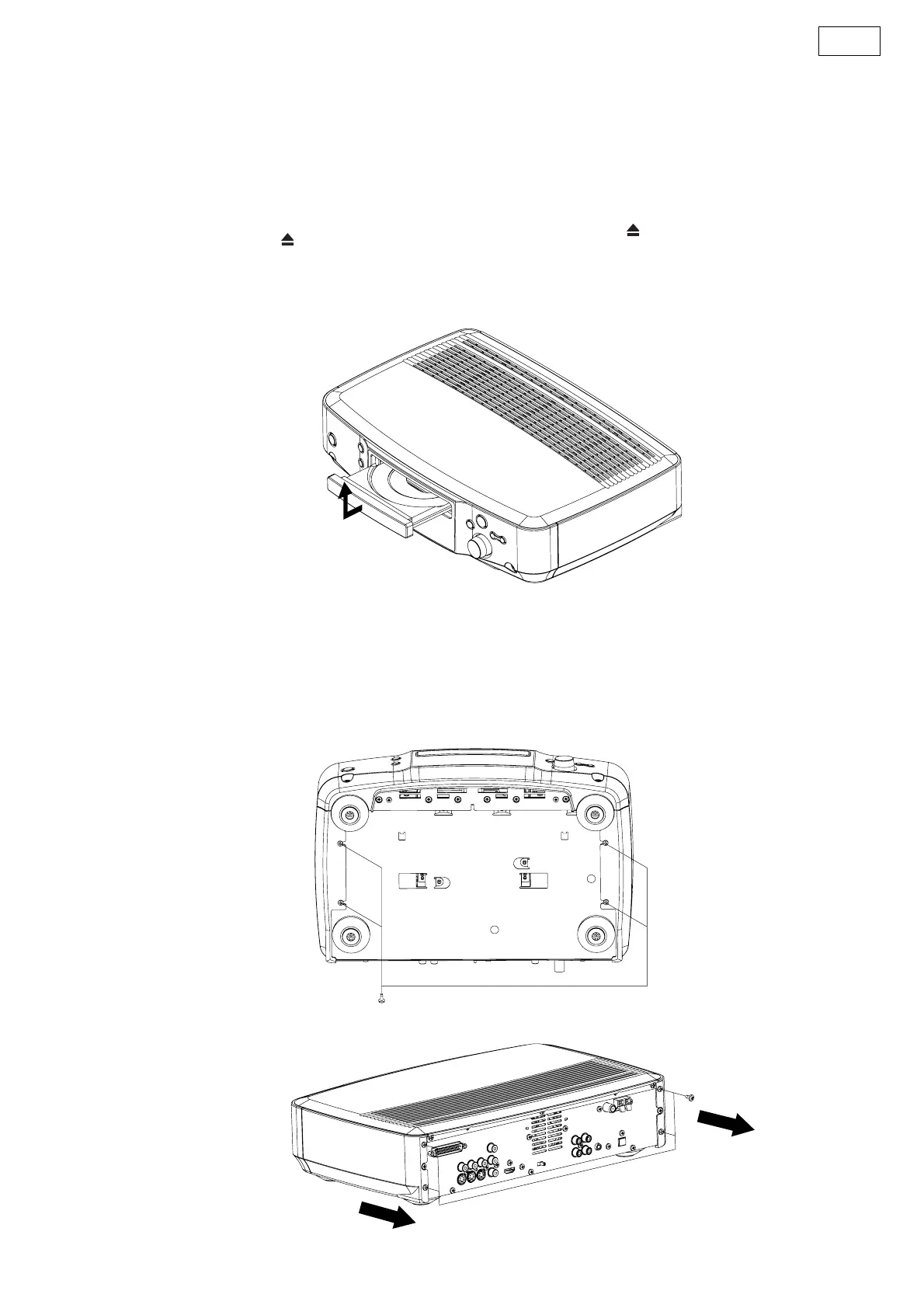
1. ローダーパネルのはずしかた
(1) 電源を入れ「 (OPEN/CLOSE)」ボタンを押して、
ディスクトレイを開きます。
(2) ローダーパネルを持ち上げてはずします。
2. サイドパネルのはずしかた
(1) 底面よりネジを 4 本はずします。
(2) 裏面よりネジを 4 本はずし、サイドパネルを矢印
の方向へはずします。
DISASSEMBLY
(Follow the procedure below in reverse order when
reassembling.)
● ADV-S102
1. Loader Panel
(1) Switch on, and press [ (OPEN/CLOSE)] button
to open the Disc tray.
(2) Detach the Loader Panel by lifting.
2. Side Panel
(1) Remove 4 bottom screws.
(2) Remove 4 rear screws, then detach Side Panel.



 To Next Page