1 Before Use
- 7 -
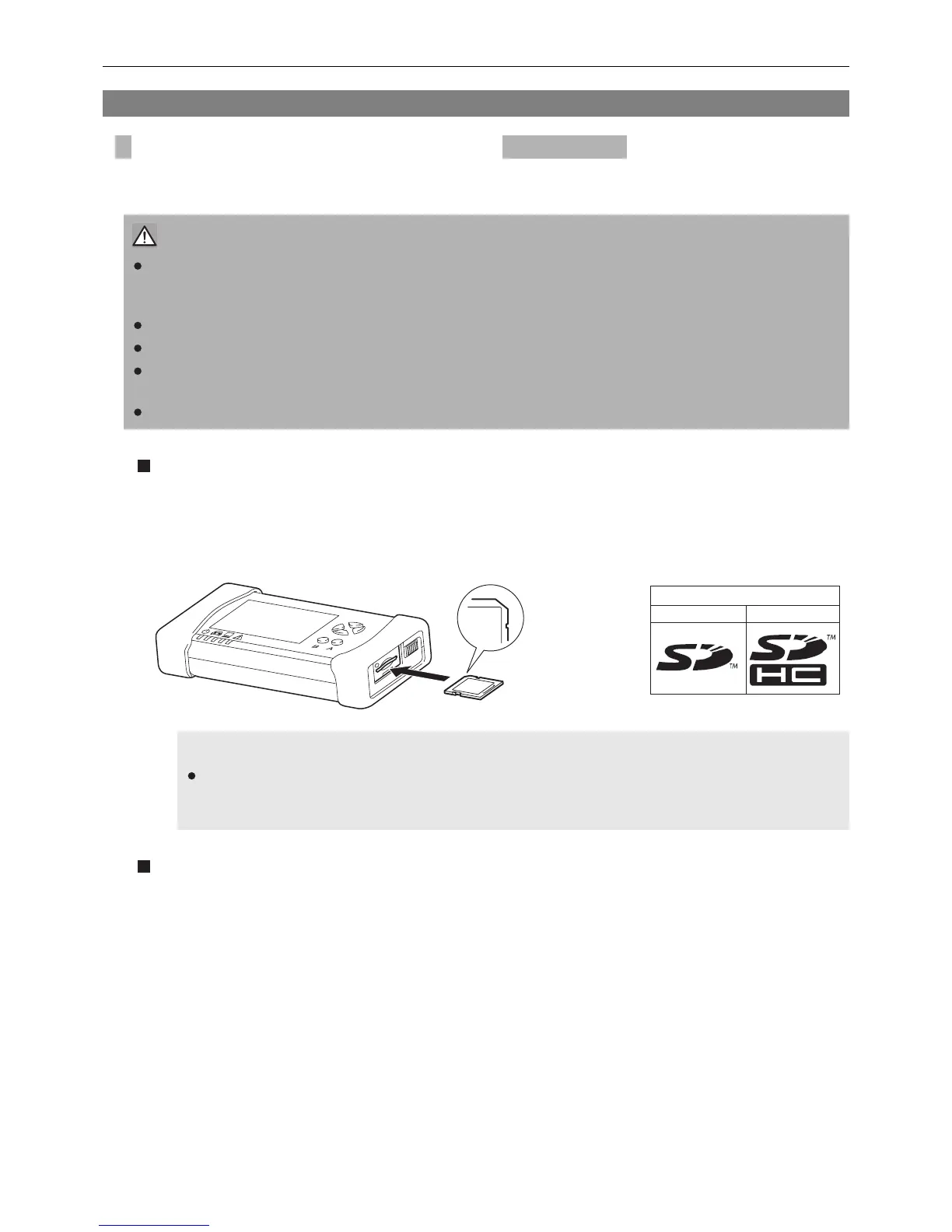
This product can use an SD memory card inserting it into the SD memory card slot.
The SD memory card may be used to install software or store vehicle data.
Inserting an SD memory card
1. Turn the mode switch of this product OFF.
2. Turn the notch of SD memory card to the right and insert gently to the slot end until a clicking noise
is heard.
Removing an SD memory card
1. Turn the mode switch of this product OFF.
2. Push the SD memory card lightly.
3. The SD memory card is ejected a little. Pull out it gently.
1-5 SD Memory Card
Inserting/removing an SD memory card
CAUTION
Depending on software, some functions with SD memory cards are not available.
Refer to the instruction manual of the software to know whether your software supports the functions
or not and the handling method.
Use an SD memory card or an SDHC memory card.
This product does not support an SDXC memory card.
Use an SD memory card labeled with the SD logo mark and conforming to the SD standard.
The following brand SD memory cards are recommended: Panasonic, SanDisk and Toshiba
Not all the SD memory cards are supported on this product.
NOTE
If the notch on the SD memory card side face is set to the "Lock" position, data storage and
deletion are disabled by the write protect function (write inhibit). Make sure to unlock the write
protect function before use.
T02085E
Notch to be on
the right side
Confirm the logo mark of
the card.
SDHC
SD
Available card


 To Next Page