3 Indicator
- 10 -
3 Indicator
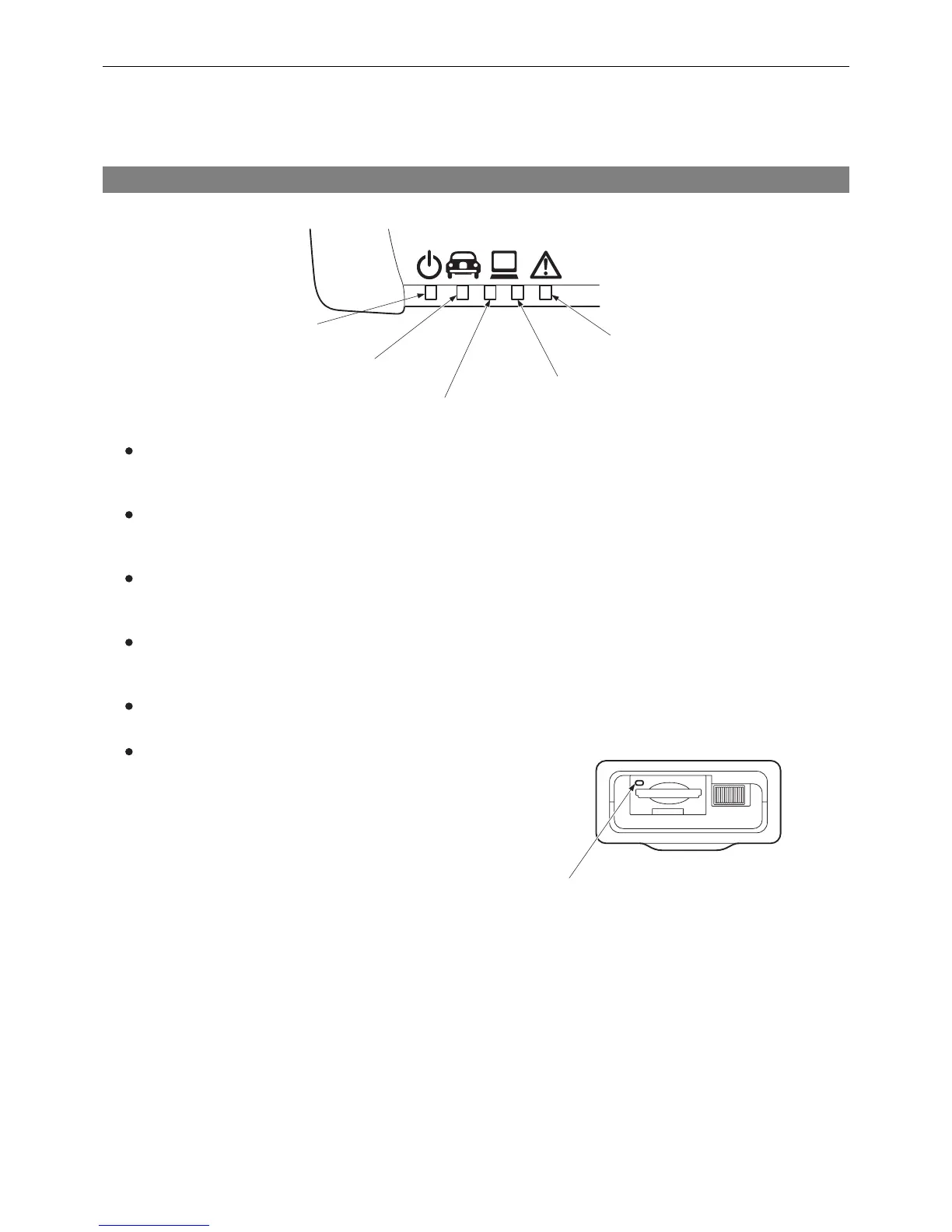
The indicators of this product provide the following information by their illumination.
[Power] indicator
Shows the status of power.
Lights in green during power ON.
[Vehicle] indicator
Shows the status of communications with the vehicle.
Flashes in green during active communications.
[PC (Bluetooth)] indicator
Shows the status of Bluetooth communications with the PC.
Flashes in blue during active communications.
[PC (USB)] indicator
Shows the status of USB communications with the PC.
Flashes in green during active communications.
[Error] indicator
Lights or flashes in red when an error occurs.
[SD Memory Card] indicator
Shows the access status of the SD memory card.
Flashes in green during active access.
3-1 Indicator
T01900E
[Power] indicator
[Vehicle] indicator
[PC (USB)] indicator
[PC (Bluetooth)]
indicator
[Error] indicator
T01917E
[SD memory card] indicator


 To Next Page