EasyManua.ls Logo

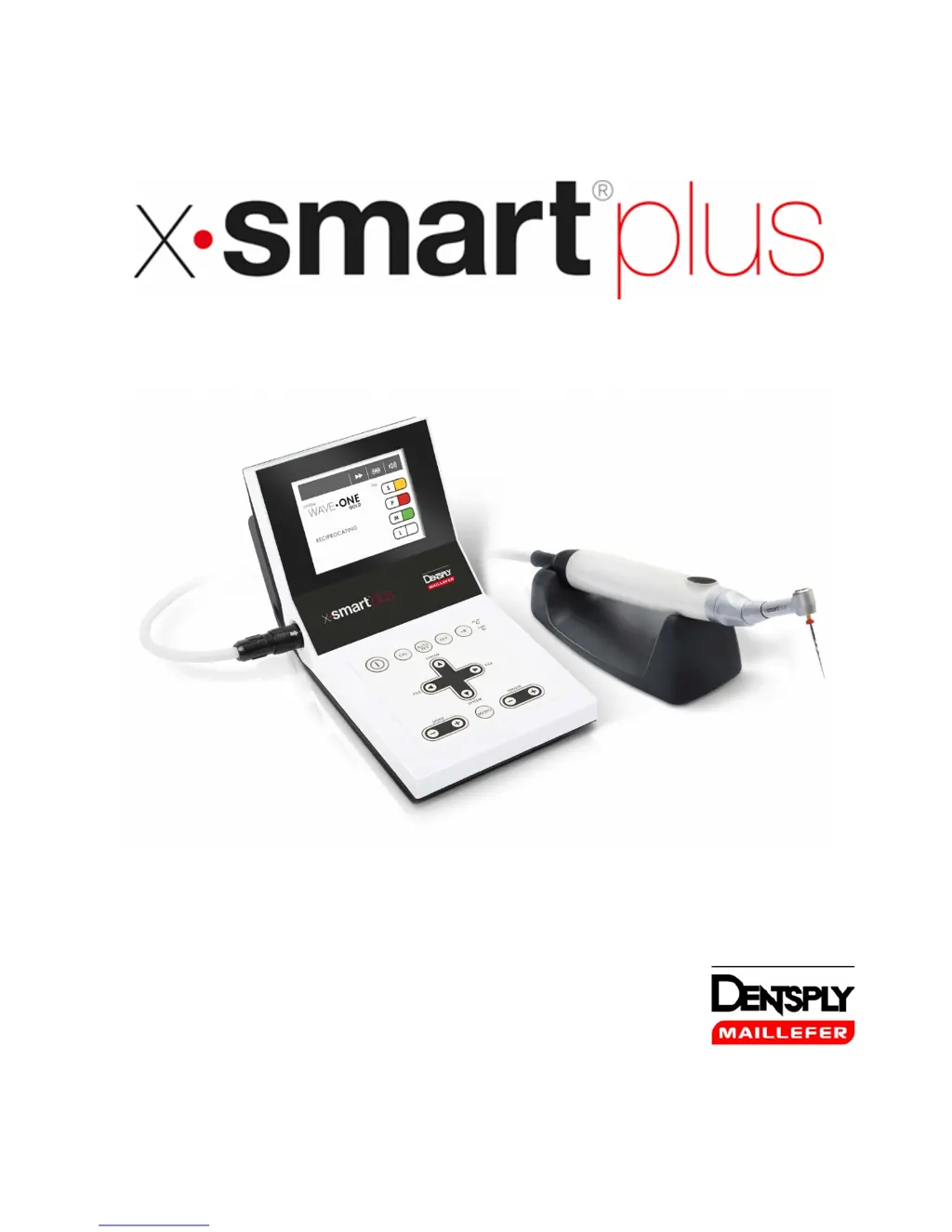
DENTSPLY X-Smart Plus - User Manual

DENTSPLY X-Smart Plus
47 pages
Print Icon
To Next Page IconTo Next Page
Loading...
USER MANUAL

Questions and Answers

  • E
    Elizabeth TerryAug 16, 2025
    Why does the motor handpiece not rotate and show error code E-01 on DENTSPLY X-Smart Plus Medical Equipment?
    • S
      Samuel SimpsonAug 16, 2025
      If the motor handpiece on your DENTSPLY Medical Equipment isn't rotating and error code “E-01” is displayed, the contra-angle may be clogged. Try cleaning or replacing it. If the problem persists, there might be a short circuit inside the motor handpiece or cord, and you should contact your distributor.
  • E
    Erik McclureAug 19, 2025
    How to fix DENTSPLY Medical Equipment when the power is not turned on?
    • C
      Christy GeorgeAug 19, 2025
      If the DENTSPLY Medical Equipment does not turn on, check the AC adapter connection to ensure it's properly connected to both the device and a working outlet. Also, verify that the battery is not flat; if it is, charge the battery or use the AC adapter. If no battery is inserted, insert one or use the AC adapter. If none of these steps work, the internal fuse may have burnt, in which case you should contact your distributor.
  • M
    Michael FisherAug 22, 2025
    What to do if the AC-IN lamp does not light on DENTSPLY X-Smart Plus?
    • A
      angelacruzAug 22, 2025
      If the AC-IN lamp on your DENTSPLY Medical Equipment doesn't light, ensure the AC adapter is properly connected to both the device and a working outlet. If the connection is correct and the lamp still doesn't light, the internal or AC adapter fuse may have burnt. In this case, contact your distributor.
  • D
    Darrell LucasAug 25, 2025
    Why is my DENTSPLY X-Smart Plus AC adapter not working and the CHRG lamp is off?
    • J
      John RussellAug 25, 2025
      If the AC adapter isn't working and the CHRG lamp on your DENTSPLY Medical Equipment doesn't light, first ensure a battery is inserted. If the battery is fully charged or near full charge, this is normal. If the battery temperature is low (less than 0°C or 32°F), it won't charge; warm the battery in a room, being careful about moisture. A slightly elevated battery temperature right after charging is normal. However, if the battery is hot during normal use, contact your distributor. If an error code is displayed, consult chapter 8.
  • N
    Nicole JohnstonAug 27, 2025
    What to do if the motor handpiece does not rotate on DENTSPLY Medical Equipment?
    • L
      Lindsey JenkinsAug 27, 2025
      If the motor handpiece on your DENTSPLY Medical Equipment isn't rotating, first check the motor handpiece cord connection. If the connection is secure and it still doesn't rotate, the motor handpiece or cord may be damaged. In this case, contact your distributor.
  • K
    Kimberly McclureAug 31, 2025
    What causes the motor handpiece to not rotate with alternating display on DENTSPLY X-Smart Plus?
    • S
      Stephen DuncanAug 31, 2025
      If the motor handpiece on your DENTSPLY Medical Equipment isn't rotating, and you see “ ” and the rotation speed displayed alternately, the contra-angle may be clogged. Try cleaning or replacing it. If that doesn't work, there could be a short circuit inside the motor handpiece or the cord, and you should contact your distributor.
  • A
    Andrea MooreSep 2, 2025
    Why does DENTSPLY X-Smart Plus make sound but motor handpiece won't rotate?
    • B
      Barry ThomasSep 3, 2025
      If you hear a sound when turning on your DENTSPLY Medical Equipment, but the motor handpiece doesn't rotate, check the ON/OFF key. The device might be turning on while the key is pressed. If this isn't the issue, there may be a short circuit inside the ON/OFF key, and you should contact your distributor.
  • M
    Matthew OneillSep 6, 2025
    How to stop motor handpiece from continuously rotating on DENTSPLY X-Smart Plus?
    • R
      Rhonda MillerSep 6, 2025
      If the motor handpiece on your DENTSPLY Medical Equipment keeps rotating, it may be activated by the ON/OFF key. Try stopping the rotation using the ON/OFF key.
  • A
    Aaron WoodsSep 9, 2025
    What to do if continuous rotary file blocks in root canal with DENTSPLY X-Smart Plus?
    • D
      Derrick AlvarezSep 9, 2025
      If a continuous rotary file blocks in the root canal while using your DENTSPLY Medical Equipment, it might be due to a wrong file setting or too much pressure. Change the rotational direction by pressing the REV key, then start the motor and carefully pull out the file.
  • Z
    zmooreSep 12, 2025
    Why does reciprocating file block in root canal when using DENTSPLY Medical Equipment?
    • A
      Anthony SpencerSep 12, 2025
      If a reciprocating file blocks in the root canal when using your DENTSPLY Medical Equipment, it may be due to excessive pressure or an insufficiently cleaned file. Try removing the file with pliers by gently pulling out and rotating it clockwise.

Summary

Warnings

Precautions

Step-by-Step Instructions

Operation Panel

LCD Panel

Preparation

Connecting the AC adapter

Steps to connect the AC adapter to the power supply and the device.

Installation

Charging the Battery

Detailed instructions on how to charge the X-SMART Plus rechargeable battery.

Calibration

Procedure to calibrate the contra-angle for accurate torque and speed settings.

Operation

Auto Reverse Function

Explanation of the three auto reverse modes: Reversing, Stop, and Off.

Selecting a File System

Changing Speed and Torque

Adjusting speed and torque settings for continuous rotary file systems.

Factory Default Parameters

Battery Refresh

Maintenance

Changing the Battery

Step-by-step guide for replacing the rechargeable battery in the device.

Cleaning, Disinfection and Sterilization

Error Code

Troubleshooting

DENTSPLY X-Smart Plus Specifications

General IconGeneral
TypeEndodontic Motor
DisplayLCD
Operating ModeCordless
Auto-ReverseYes
Apex Locator ConnectionNo
Power SourceRechargeable Battery
Battery LifeApproximately 2 hours of continuous operation

Related product manuals